前半はこちら↓

- グローバルオブジェクト
- address オブジェクト
- article オブジェクト
- article.author
- article.comments
- article.comments_count
- article.comments_enabled?
- article.comment_post_url
- article.content
- article.created_at
- article.excerpt
- article.excerpt_or_content
- article.handle
- article.id
- article.image
- article.image.alt / article.image.source
- article.moderated?
- article.published_at / article.updated_at
- article.tags
- article.url
- article.user
- article.user.account_owner
- article.user.bio 経歴 / article.user.email
- article.user.first_name / article.user.last_name
- article.user.homepage / article.user.image
- block オブジェクト
- blog オブジェクト
- cart オブジェクト
- checkout オブジェクト
- checkout.applied_gift_cards
- checkout.attributes
- checkout.billing_address
- checkout.buyer_accepts_marketing
- checkout.customer
- checkout.discount_applications
- checkout.discounts_amount
- checkout.discounts_savings
- checkout.email
- checkout.gift_cards_amount
- checkout.id
- checkout.line_items
- checkout.name
- checkout.note
- checkout.order
- checkout.order_id
- checkout.order_name
- checkout.requires_shipping
- checkout.shipping_address
- checkout.shipping_method
- checkout.shipping_methods
- checkout.shipping_price
- checkout.subtotal_price
- checkout.tax_lines
- checkout.tax_price
- checkout.total_price
- checkout.transaction
- collection オブジェクト
- collection.all_products_count
- collection.all_tags
- collection.all_types
- collection.all_vendors
- collection.current_type
- collection.current_vendor
- collection.default_sort_by
- collection.description
- collection.handle
- collection.id
- collection.image
- collection.next_product
- collection.previous_product
- ollection.products
- collection.products_count
- collection.published_at
- collection.sort_by
- collection.sort_options
- collection.template_suffix
- collection.title
- collection.tags
- collection.url
- comment オブジェクト
- Content Objects
- Other Objects
- customer.accepts_marketing
- customer.addresses
- customer.addresses_count
- customer.default_address
- customer.email
- customer.first_name / .last_name
- customer.has_account
- customer.id
- customer.last_order
- customer.name
- customer.orders
- customer.orders_count
- customer.phone
- customer.tags
- customer.tax_exempt
- customer.total_spent
- line_item.discount_allocations
- line_item.final_line_price
- line_item.final_price
- line_item.fulfillment
- line_item.fulfillment_service
- line_item.gift_card
- line_item.grams
- line_item.image
- line_item.key
- line_item.line_level_total_discount
- line_item.message
- line_item.options_with_values
- line_item.original_price
- line_item.price
- line_item.product
- line_item.product_id
- line_item.properties
- line_item.quantity
- line_item.requires_shipping
- line_item.selling_plan_allocation
- line_item.sku
- line_item.successfully_fulfilled_quantity
- line_item.taxable
- line_item.title
- line_item.unit_price
- line_item.unit_price_measurement
- line_item.url
- line_item.variant
- line_item.vendor
- line_item.id
- order.attributes
- order.billing_address
- order.cancelled
- order.cancelled_at
- order.cancel_reason
- order.cancel_reason_label
- order.cart_level_discount_applications
- order.created_at
- order.customer
- order.customer_url
- order.discount_applications
- order.email
- order.financial_status
- order.financial_status_label
- order.fulfillment_status
- order.fulfillment_status_label
- order.line_items
- order.line_items_subtotal_price
- order.line_items_subtotal_price
- order.location
- order.name
- order.note
- order.order_number
- order.order_status_url
- order.phone
- order.shipping_address
- order.shipping_methods
- order.shipping_price
- order.subtotal_line_items
- order.subtotal_price
- order.tags
- order.tax_lines
- order.tax_price
- order.total_discounts
- order.total_net_amount
- order.total_price
- order.total_refunded_amount
- order.transactions
- product.available
- product.collections
- product.compare_at_price
- product.compare_at_price_max
- product.compare_at_price_min
- product.compare_at_price_varies
- product.content
- product.created_at
- product.description
- product.featured_image
- product.featured_media
- product.first_available_variant
- product.handle
- product.has_only_default_variant
- product.id
- product.images
- product.media
- product.options
- product.options_by_name
- product.options_with_values
- product.price
- product.price_max
- product.price_min
- product.price_varies
- product.published_at
- product.requires_selling_plan
- product.selected_variant
- product.selected_or_first_available_variant
- product.selected_of_first_available_selling_plan_allocation
- product.selected_selling_plan
- product.selected_selling_plan_allocation
- product.selling_plan_groups
- product.tags
product.template_suffix- product.title
- product.url
- product.variants
- product.vendor
recommendations オブジェクト- routes.root_url
- routes.account_url
- routes.account_login_url
- routes.account_logout_url
- routes.account_register_url
- routes.account_addresses_url
- routes.collections_url
- routes.all_products_collection_url
- routes.search_url
- routes.cart_url
- routes.cart_add_url
- routes.cart_change_url
- routes.cart_clear_url
- routes.product_recommendations_url
- shop.address
- shop.address.city
- shop.address.country
- shop.address.country_upper
- shop.address.province
- shop.address.province_code
- shop.address.street
- shop.address.summary
- shop.address.zip
- shop.checkout.guest_login
- shop.collections_count
- shop.currency
- shop.customer_accounts_enabled
- shop.customer_accounts_optional
- shop.description
- shop.domain
- shop.email
- shop.enabled_currencies
- shop.enabled_payment_types
- shop.metafields
- shop.money_format
- shop.money_with_currency_format
- shop.name
- shop.password_message
- shop.permanent_domain
- shop.phone
- shop.policies
- shop.privacy_policy
- shop.published_locales
- shop.refund_policy
- shop.shipping_policy
- shop.subscription_policy
- shop.terms_of_service
- shop.products_count
- shop.secure_url
- shop.taxes_included
- shop.types
- shop.url
- shop.vendors
- variant.available
- variant.varcode
- variant.compare_at_price
- variant.featured_media
- varitant.id
- variant.image
- variant.incoming
- variant.inventory_management
- variant.inventory_policy
- variant.inventory_quantity
- variant.next_incoming_date
- variant.options
- variant.option1
- variant.option2
- variant.option3
- variant.requires_shipping
- variant.requires_selling_plan
- variant.selected
- variant.selected_selling_plan_allocation
- valiant.selling_plan_allocations
- valiant.sku
- variant.store_availabilities
- variant.taxable
- variant.title
- variant.unit_price
- variant.unit_price_measurement
- variant.url
- variant.weight
- variant.weight_unit
- variant.weight_in_unit
グローバルオブジェクト
これらオブジェクトは、テーマ内のどのファイルからでも使用およびアクセスでき、グローバルオブジェクトまたはグローバル変数として定義されます。


all_products
ストア内のすべての製品のリストを返します。
それぞれの製品が持つハンドルを使って製品にアクセスすることができます。
{{ all_products['fancy-shoes'].title }}Fancy Shoesarticles
ストア内のすべてのブログ記事のリストを返します。
ハンドルを指定することでブログ記事にアクセスできる。
% assign article = articles['news/new-products'] %}
{{ article.title | link_to: article.url }}
<a href="/news/new-products">New products</a>blogs
ストア内のすべてのブログ記事一覧のリストを返します。
配列構造になっていてfor文で使う?
{% for blog in blogs %}
  {{ blog.title }}
{% endfor %}
News
Product updates
Eventscanonical_url
現在のページの正規URLを返します。
ページの正規URLは、URLパラメータを含まないページのデフォルトURLです。製品およびバリアントの場合、正規URLは、コレクションまたはバリアントが選択されていないデフォルトの製品ページです。
{{ canonical_url }}collections
ストア内のすべてのコレクションのリストを返します。
{% for collection in collections %}
  {{ collection.title }}
{% endfor %}
Fall collection
Best sellers
New productscurrent_page
current_pageをつかうと、ページ付けされたコンテンツを閲覧するときに表示しているページの番号を返します。
paginateブロックの外で使用することができます。
{{ page_title }} - Page: {{ current_page }}Summer Collection - Page: 1hundle
表示されているページのハンドルを返します。
{% if handle contains 'hide-from-search' %}
  <meta name="robots" content="noindex">
{% endif %}
images
ファイル名を指定することで、ストア内にある任意の画像にアクセスできます。
{% assign image = images['store-logo.png'] %}
<img src="{{ image }}" alt="{{ image.alt }}">
linklists
ストア内のすべてのメニューのリスト(=リンクリスト)を返します。ハンドルを使用してリンクリストにアクセスできます。
例えば、メインメニューのリストを取得した結果が下↓
<ul>
  {% for link in linklists.main-menu.links %}
    <li>{{ link.title | link_to: link.url }}</li>
  {% endfor %}
</ul>
<ul>
<li><a href="/">Home</a></li>
<li><a href="/collections/all">Catalog</a></li>
<li><a href="/blogs/news">Blog</a></li>
<li><a href="/pages/about-us">About Us</a></li>
</ul>linklists. "ハンドル名".links のようにドットでハンドルを指定するらしい。
[]ブラケット記法でも書けるかもしれないので試してみる。→ OK
page_description
表示されている製品、コレクション、またはページの説明を買い¥得します。
Shopify管理者で説明を設定できます。
{{page_description}}All about my stroe{% if page_description %}
<meta name="description" content="{{ page_description }}" />
{% endif %}page_title
表示されている製品、コレクション、またはページのタイトルを返します。Shopify管理者でタイトルを設定できます。
pages
ストア内のすべてのページのリストを返します。
ハンドルを使用してページにアクセスできます。
<h1>{{ pages.about.title }}</h1>
<p>By {{ pages.about.author }}</p>
<div>{{ pages.about.content }}</div>
<h1>About us</h1>
<p>By Anne Teak</p>
<div><p>About page content!</p></div>request
ストアへのアクセスに使用されたドメイン情報を返します。
顧客がどのドメインからアクセスしているかを確認するために使用します。
{% if request.host == 'myshop.com' %}
  Welcome USA!
{% elsif request.host == 'myshop.ca' %}
  Welcome Canada!
{% else %}
  Welcome!
{% end %}他にも、request.design_modeを使用して、テーマエディタで望ましくない動作を無効にすることができます。
{% if request.design_mode %}
  <!-- This will only render in the theme editor -->
{% endif %}注意:これは、テーマエディタに表示されるストアフロントプレビューを変更するために使用しないでください。https://shopify.dev/docs/themes/liquid/reference/objects/request
{{ request.locale.name }}scripts
ストアのアクティブスクリプトに関する情報を返します。
Shopifyスクリプトの詳細については、スクリプトエディターアプリまたはスクリプトAPIのヘルプコンテンツにアクセスしてください。
{% if scripts.cart_calculate_line_items %}
  <p>We are running a {{ scripts.cart_calculate_line_items.name }} promotion!</p>
{% endif %}
Shopify スクリプトは小さなコードです。これを使用することで、カート内やチェックアウト時でのお客様の体験をパーソナライズできます。
スクリプトとScript Editorアプリは、Shopify Plusマーチャントのみが利用できます。
Shopify Scripts Editorは、商品を複数購入したら〇〇%OFF、過去に同一商品を注文した方のみ〇〇%OFFなどの複合条件付きのディスカウントを行うAPPです。https://transcosmos-ecx.jp/blog/shopify/11
settings
公開されたテーマの設定のリストを返します。
{% if settings.use_logo %}
  {{ 'logo.png' | asset_url | img_tag: shop.name }}
{% else %}
  <span class="no-logo">{{ shop.name }}</span>
{% endif %}
address オブジェクト
addressオブジェクトは、Shopifyのチェックアウトページに顧客が入力した情報が含まれています。
顧客は、請求先住所または配送先住所の2つの住所を入力できることに注意してください。
addressオブジェクトの属性にアクセスするときは、ターゲットにするアドレスを指定する必要があります。これは、属性の前に shipping_addressまたは billing_addressを使用して実行されます。
address.name
アドレスの[ファーストネーム]フィールドと[ラストネーム]フィールドの値を返します。
address.first_name / address.last_name
address.address1 / address.address2
address.street
address1と2を合体させたものを返す。
address.company
address.city
address.province 州 / address.province_code
address.zip 郵便番号
address.country / address.country_code
address.phone
article オブジェクト
article.author
記事の著者のフルネーム
article.comments
記事の公開されたコメントを返します。コメントが無効になっている場合は、空の配列を返します。
article.comments_count
article.comments_enabled?
article.comment_post_url
新しいコメントを作成するときにPOSTリクエストが送信される総体URLを返します。
article.content
記事の内容
article.created_at
記事が作成されたときのタイムスタンプを返します。dateフィルタを使用してタイムスタンプをフォーマットします。dateフィルターの指定方法はRuby参照。
article.excerpt
article.excerpt_or_content
抜粋があるなら抜粋を、ないなら記事本文を返す。
article.handle
article.id
article.image
記事の画像を返します。img_urlフィルタを使用して、ShopifyCDNの画像ファイルにリンクします。最初に画像の存在を確認してください。
{% if article.image %}
  {{ article | img_url: 'medium' }}
{% endif %}
article.image.alt / article.image.source
article.moderated?
???コメントが管理されていればtrueを、
コメントが管理されていなければfalse
article.published_at / article.updated_at
article.tags
記事のすべてのタグを返します。
article.url
article.user
記事の作成者に関する情報を含むオブジェクトを返します。
この情報はShopify管理者のアカウントページの「スタッフアカウント」オプションで編集できます。
article.user.account_owner
記事の作成者がショップのアカウントオーナーである場合true
article.user.bio 経歴 / article.user.email
article.user.first_name / article.user.last_name
article.user.homepage / article.user.image
{% if article.user.image %}
  {{ article.user.image | img_url: '200x200' }}
{% endif %}//cdn.shopify.com/s/files/1/0087/0462/users/user-image_200x200.png?v=1337103726block オブジェクト
ブロックは、セクションブロックの配列の中の1つのブロックの内容や設定を表します。ブロックオブジェクトは、セクションファイル内で section.block をループすることでアクセスすることができます。


blockはShopifyのschemaを弄る際に使います。
blockはShopify特有の概念なので、初めての人は理解するのが難しいかもしれません。簡単に解説すると、管理画面のカスタマイズ画面で弄れる、セクションの可変部分です。

管理画面でカスタマイズできるような仕組みを実現するには、themeファイルのconfig/settings_data.jsonとContent Schemaという機能を理解してカスタマイズする必要があります。
block.id
Shopifyによって動的に生成された一意のIDを返す。
block.settings
テーマエディタで設定したブロック設定のオブジェクトを返します。設定のユニークIDを参照して設定値を取得します。
block.shopify_attributes
ブロックの属性を表す文字列を返します。
block.type
ブロックのスキーマで定義されているタイプを返します。
blog オブジェクト
blog記事一覧に関するオブジェクト
blog.all_tags
ブログのすべての記事のすべてのタグを返します。これには、現在のページ付けビューにない記事のタグが含まれます。
{% for tag in blog.all_tags %}
  {{ tag }}
{% endfor %}
News, Music, Sale, Tips and Tricksblog.articles
ブログ内のすべての記事の配列を返します。
{% for article in blog.articles %}
  <h2>{{ article.title }}</h2>
{% endfor %}
blog.articles_count
ブログ内の記事の総数を返す。非表示の記事は含まれません。
blog.comments_enabled?
blog.handle
blog.id
blog.moderated?
blog.next-article
次の(古い)投稿のURLを返します。ない場合はfalse。
blog.previous-article
以前の(新しい)投稿のURLを返します。
blog.tags
ブログ内のすべてのタグを返します。all_tagsに似ていますが、フィルタリングされたビューにある記事のタグのみを返します。
blog.title / blog.url
cart オブジェクト
cartオブジェクトはテーマ内のどのファイルからでも使用、アクセスができます。


cart.attributes
cart.attributesはカートページでより多くの情報を取得できるようにします。
これは、次の構文attributes[attribute-name]で、name属性をインプットすることによって実行されます。
{{ cart.attributes.your-pet-name }}Rex以下に示すのは、「テキスト」タイプのHTML入力を使用してカートページの情報をキャプチャする方法の基本的な例です。cart.attributesはShopifyUI要素ジェネレーターを使用して入力を作成することもできます。
<label>What is your Pet's name?</label>
<input type="text" name="attributes[your-pet-name]" value="{{ cart.attributes.your-pet-name }}" />
cart.currency
カートの通貨を返します。
ストアで複数通貨を使用している場合は、顧客の現地(presentment)通貨と同じものを返します。
そうでない場合は、ストアで使用する通貨を返す。
{{ cart.currency.iso_code }}USDcart.item_count
カート内のアイテムの数を返します。
{{ cart.item_count }} {{ cart.item_count | pluralize: 'Item', 'Items' }} ({{ cart.total_price | money }})25 items ($53.00)※pluralize=複数形をつける。
cart.items
カート内のすべての一般品目(翻訳だとline item が広告申込情報と訳されるが、おそらく間違い)を返します。
line_itemは、ショッピングカート内の1行を表します。カート内の個別の商品バリエーションごとに1つのラインアイテムがあります。
cart.note
cart.noteはカートページでより多くの情報を取得できます。
→ カートページの注文メモを表示。{{ cart.note }}
textareaのname属性に'note'を追加し、{{ cart.note }}を入力するとメモ欄が出力される。
---- ---- ---- ---- ---- ---- ---- ---- ---- ---- ---- ---- ---- ---- ----
cart.noteを使用すると、カートページでより多くの情報を取得できます。 これは、HTMLテキストエリアを使用してカートフォームを送信し、cart.note出力をラップすることによって行われます。
<label>Gift note:</label>
<textarea name="note"></textarea>
カートページに存在できる{{cart.note}}のインスタンスは1つだけです。複数のインスタンスがある場合は、ドキュメントオブジェクトモデル(DOM)の最新のものがフォームとともに送信されます。
cart.noteは、注文メールのテンプレート、チェックアウトの注文ステータスページ、オーダープリンターなどのアプリでアクセスできます。カートノートの使用方法の例については、「お客様に質問して詳細を確認する」を参照してください。input.liquid
{{ note }}Hope you like the gift, Kylea!
cart.orignal_total_price
割引が適用される前のカートの小計を返します。金額は、お客様の現地(プレゼンテーション)通貨で表示されます。
cart.total_discount
カートのすべての割引の合計(節約された金額)を返します(割引後の合計金額ではない)。金額は、お客様の現地(プレゼンテーション)通貨で表示されます。
cart.total_price
カート内のすべてのアイテムの合計価格を返します。(割引が適用されたあとの合計金額)
cart.total_weight
カート内のすべてのアイテムの総重量をグラム単位で返します。weight_with_unitフィルタを使用して重みをフォーマットします。
checkout オブジェクト
チェックアウトに関する注文状況ページにアクセスすることができます。
Shopify Plusマーチャントはcheckout、checkout.liquidレイアウトファイル内のオブジェクトのプロパティにアクセスすることもできます。


→ chekoutオブジェクトは、チェックアウト時の割引金額や通貨などにアクセスしたい時に使用します。これは、チェックアウトの注文ページでアクセスすることが出来ます。
チェックアウトとは「支払う」「会計する」という意味があります。 つまりユーザーが購入を完全に確定し、支払いを完了させることが「チェックアウト」です。
checkout.applied_gift_cards
チェックアウトに適用されたギフトカードを返します。
checkout.attributes
カートに取り込まれたチェックアウトの属性を返します。
checkout.billing_address
チェックアウトの請求先住所を返します。
checkout.buyer_accepts_marketing
購入者がチェックアウト中にニュースレターを受け入れたかどうかを返します。
{% if checkout.buyer_accepts_marketing %}
  Thank you for subscribing to our newsletter. You will receive our exclusive newsletter deals!
{% endif %}
checkout.customer
チェックアウトする顧客を返します。
checkout.discount_applications
チェックアウトで使用される割引の情報の配列を返します。
{% for discount_application in checkout.discount_applications %}
  Discount name: {{ discount_application.title }}
  Savings: -{{ discount_application.total_allocated_amount | money }}
{% endfor %}
Discount name: SUMMER19
Savings: -$20.00checkout.discounts
チェックアウトに適用された割引を返します。
{% for discount in checkout.discounts %}
* {{ discount.code }}: {{ discount.amount | money }}
{% endfor %}
* secret-discount: $12.00checkout.discounts_amount
チェックアウト時に適用された割引額の合計を返します。
You save: {{ checkout.discounts_amount | money }} <br>You save: $12.00checkout.discounts_savings
チェックアウト時に適用された割引の合計を返します。
返される値は、checkout.discounts_amountの値を負にしたものです。
checkout.email
チェックアウト時に使用したメールを返します。
checkout.gift_cards_amount
チェックアウトのギフトカードで支払った金額を返します。
checkout.id
チェックアウトのIDを返します。
checkout.line_items
チェックアウトのすべてのラインアイテムを返します。
checkout.name
チェックアウトの名前を返します。
この値は、checkout.idと同じで、前にハッシュタグが付加されています。
checkout.note
チェックアウトのメモを返します。
checkout.order
チェックアウトで作成された注文を返します。
チェックアウトの注文状態ページでまだ注文が作成されていないとき、このプロパティーはnilになるときがあります。
checkout.order_id
チェックアウトで作成された注文のIDを返します。
checkout.order_name
チェックアウトで作成された注文の名前を返します。
checkout.order_number
チェックアウトによって作成された注文の番号を返します。
checkout.requires_shipping
チェックアウトが出荷(配送)を必要としているかどうかを返します。
{% if checkout.requires_shipping %}
  You will receive an email with your shipment tracking number as soon as your order is shipped.
{% endif %}
checkout.shipping_address
チェックアウトの配送先を返します。
checkout.shipping_method
チャックアウトの配送方法を返します。
checkout.shipping_methods
チェックアウトの配送方法の配列を返します。
Shipping methods:
{% for shipping_method in checkout.shipping_methods %}
  * {{ shipping_method.title }}: {{ shipping_method.price | money }}
{% endfor %}
Shipping methods:
* International Shipping: $12.00checkout.shipping_price
チェックアウトの送料を返します。
checkout.subtotal_price
価格に含まれていない限り、チェックアウトの小計(subtotal)価格、つまり送料と税金がかかる前の金額を返します。
checkout.tax_lines
チェックアウトのすべての税明細を返します。
checkout.tax_price
税金が価格に含まれているかどうかに関係なく、チェックアウトの税額を返します。
checkout.total_price
チェックアウトの合計金額を返します。
Total: {{ checkout.total_price | money }}
Total: $26.75checkout.transaction
チェックアウトからのトランザクション(処理の単位)の配列を返します。
決済方法等の情報を属性により出力することができます。
トランザクション...
関連するアクションや、ひとまとまりのデータなどのことで、分けることができない一つの情報処理単位。スーパーなとで買い物をした際に出力されるレシートには、購入された様々な商品の単価・数量などのデータが記載されるが、レシート1 枚が、一つのトランザクションデータとなる。
https://ecnomikata.com/dictionary/7576/
collection オブジェクト
コレクションに関するオブジェクトで、コクレクションページのURLやタイトル等を返します。
collectionオブジェクトは、Globalオブジェクトであるcollectionsの中に格納されています。
collections.collection.~とすることでチェックアウトページ以外のページからアクセスすることができます。
collection.all_products_count
コレクションに登録されている商品の総数を返します。
コレクションページが、商品タグによってフィルタリングされている状態でも登録されている商品の総数が返されます。
それに対して、collection.products_countは、現在のビューのコレクション内の商品の総数を返します。
collection.all_tags
コクレクションページがフィルタリングされている場合でも、全商品タグのリストを返します。
最大で、1000個のタグを返す事ができます。
collection.all_types
コレクション内の全商品タイプのリストを返します。
{% for product_type in collection.all_types %}
  {{ product_type | link_to_type }}
{% endfor %}
<a href="/collections/types?q=Accessories" title="Accessories">Accessories</a>
<a href="/collections/types?q=Chairs" title="Chairs">Chairs</a>
<a href="/collections/types?q=Shoes" title="Shoes">Shoes</a>collection.all_vendors
コクレクション内の全商品のベンダーのリストを返します。
{% for product_vendor in collection.all_vendors %}
  {{ product_vendor | link_to_vendor }}
{% endfor %}
<a href="/collections/vendors?q=Shopify" title="Shopify">Shopify</a>
<a href="/collections/vendors?q=Shirt+Company" title="Shirt Company">Shirt Company</a>
<a href="/collections/vendors?q=Montezuma" title="Montezuma">Montezuma</a>collection.current_type
コクレクションページの/collections/types?q=TYPEの商品タイプ(TYPE)を返します。
例えば、自動生成された「Shirts」コレクションは、ストア内の「Shirts」タイプの全商品をリスト化します。
コレクションページ:yourstore.myshopify.com/collections/types?q=Shirts
{% if collection.current_type %}
  We are on an automatic product type collection page. The product type is {{ collection.current_type }}.
{% endif %}
collection.current_vendor
コレクションページの/collections/vendors?q=VENDORにある商品のベンダー(VENDOR)を返します
例えば、自動生成されたApparelCoコレクションは、ストア内のベンダーApparelCoを持つ全商品をリスト化します。
コレクションページ:yourstore.myshopify.com/collections/vendors?q=ApparelCo
collection.default_sort_by
Shopify管理画面のコレクションのページで設定されているコレクションの並び順を返します。
可能な並び順は以下の8つです。
manual:手動best-selling:ベストセラーtitle-ascending:商品名をA-Ztitle-descending:商品名をZ-Aprice-ascending:価格が高い順price-descending:価格が低い順created-ascending:商品登録が新着順created-descending:商品登録が古い順
collection.description
コクレクションの説明を返します。
collection.handle
コレクションのハンドルを返します。
ちなみに、collections["ハンドル名"]でどのページからでも該当するcollectionを取得することができる。
collection.id
コレクションのID番号を返します。
collection.image
コレクションの画像を返します。
画像ファイルをShopifyコンテンツ配信ネットワーク(CDN)から読み込むためには、img_urlフィルターを使用します。
以下の例では、ifタグで、最初に画像が存在するかどうかをチェックして存在していれば表示するようにしています。
{% if collection.image %}
  {{ collection.image | img_url: 'medium' }}
{% endif %}
collection.next_product
コレクション内の次の商品URLを返します。
次の商品がないときは、nilを返します。
また、コレクション内の次の商品のURLを返すには、collection.next_product.urlを使用します。
(← collection.next_productも同じURLを返すので、どっち使ってもいいんじゃないかな...)
collection.next_product.titleなどproductで使えるオブジェクトも使える。
{% if collection.next_product %}
  {{ 'Next product' | link_to: collection.next_product.url, collection.next_product.title }}
{% endif %}
{% if collection %}がtrueになるのは、現在表示しているページのURLに、ショップURL/collections/(コレクション名)/products/(商品名)といったような/collections/が入っている場合。collectionsがなくても商品ページは表示できるが、if collection内の記述は表示されない。
例)https://localhost:3000/collections/allcurry/products/beef-curryのページならtrue
https://localhost:3000/products/beef-curryのページならfalse
collection.previous_product
現在表示しているコレクションページ内の商品URLを返します。
ollection.products
コレクション内の全商品を返します。
1ページあたり、最大で50個の商品を表示することができます。
表示する商品数を変更するときは、pagenateタグ使用します。
collection.products_count
現在表示しているコレクションページ内の商品数を返します。
collection.published_at
コレクションが公開された日時を返します。
この情報は、Shopify管理者のコレクションのページで[公開日カレンダーの設定]アイコンで設定できます。日付フィルターを使用して、日付をフォーマットできます。
collection.sort_by
URLパラメータであるsort_byによってコレクションに適用される並べ替え順を返します。
URLパラメータsort_byが存在しない場合はnilを返します。
例えば、/collections/widgets?sort_by=best-sellingのとき、
{% if collection.sort_by %}
  Sort by: {{ collection.sort_by }}
{% endif %}
Sort by: best-sellingcollection.sort_options
コレクションのソートオプション(並び替え機能)の配列を返します。
→ どんな並べ替えの種類があるか、すべてお出ししてくれます。
<select name="sort_by">
{% for option in collection.sort_options %}
  <option value="{{ option.value }}">{{ option.name }}</option>
{% endfor %}
</select>
<select name="sort_by">
<option value="manual">Featured</option>
<option value="best-selling">Best selling</option>
<option value="title-ascending">Alphabetically, A-Z</option>
<option value="title-descending">Alphabetically, Z-A</option>
<option value="price-ascending">Price, low to high</option>
<option value="price-descending">Price, high to low</option>
<option value="created-ascending">Date, old to new</option>
<option value="created-descending">Date, new to old</option>
</select>collection.template_suffix
コレクションに割り当てられたカスタムコレクションテンプレートの名前を、コレクションプレフィックスまたは.liquidサフィックスなしで返します。カスタムテンプレートがコレクションに割り当てられていない場合はnilが返されます。
{{ collection.template_suffix }}collection.title
コレクションのタイトルを返します。
collection.tags
現在、表示されているコレクションページ内の商品タグを返します。
collection.url
コレクションのURLを返します。
comment オブジェクト
コメントとは、ブログ記事に対する読者の反応のことです。


以下、一部のみ抜粋
comment.status
コメントの状態を返します。
状態の値は以下の5つです。
- pendeing:保留状態のメール
- published:公開されているコメント
- removed:削除されたコメント
- spam:Shopifyのスパム検出でスパムとしてマークされたコメント
- unapproved:承認待ちのコメント
comment.updated_at
コメントのステータスが最後に変更された時刻のタイムスタンプを返します。
例えば、コメントが記事の著者によって承認された時のタイムスタンプなどです。
comment.url
comment.idが付加された記事のURLを返します。
表示しているページをコメントまで自動スクロールするために使用します。
Content Objects
テンプレートやセクションファイル、Shopifyアプリを読み込むために必要なオブジェクトです。
content_for_header
Shopifyのアプリ(WordPressでいうプラグイン)を使うのに必要なスクリプトやGoogleアナリティクスや、Shopifyアナリティクスを読み込むためにあるオブジェクトです。「theme.liquid」<header>タグ内に必ず記載するものです。
https://taka-forward.com/what-is-object/#Content_Objects
以下コピペ
content_for_index
お客さんがテーマを編集してサイト構築をする際に使用するオブジェクトです。「templates/index.liquid」ファイルの<body>タグ内に記載します。
これは、トップページを全て、ノーコード(サイト上のカスタマイズのみ)で作る場合に使われます。
content_for_layout
それぞれのページで作成したテンプレートファイルを読み込みます。というオブジェクトです。「theme.liquid」ファイルの<body>タグ内に必ず記載するものです。
トップページであれば、theme.liquid→index.liquid(トップページに対応するテンプレートファイル)、商品の個別ページだったら、theme.liquid→product.liquid(商品の個別ページに対応するテンプレートファイル)の順で表示されるので{{ content_for_layout }}がそれぞれ、index.liquid/product.liquidに対応している。ということになります。
それぞれのテンプレートファイルの対応については、こちらの記事を参照してください。
Other Objects
特定の状況下で使用ができるものです。(2つしかないので紹介します。)
additional_checkout_buttons
外部サイトに飛んで決済をしてもらう場合(例:Apple payやGooglepayなど)が設定されているかどうかを判断する時に使います。設定があればtrueを、なければfalseを返します。
{{ content_for_additional_checkout_buttons }}
外部サイトでチェックアウトするボタンを出力します。
カートページ(決済情報を入力する前に注文商品の数量と金額を確認する画面)やチェックアウトページ(決済時に個人情報を入れる画面)で2つセットで使うことが多いです。
{% if additional_checkout_buttons %}
  <div class="additional_checkout_buttons">
{{ content_for_additional_checkout_buttons }}</div>
{% endif %}
これをかくとチェックアウトページでこのようになります。

チェックアウトページの編集は、Shopify PlusプランでないとLiquidコードの変更ができませんのでお気をつけください。
country_option_tags オブジェクト
管理画面の配送ページに配送ゾーンとして含まれる国ごとの<option>を生成します
各<option>には、data-provincesという属性が認定され、その国のサブリージョンのJSONエンコードされた配列が含まれます。
サブリージョンを持たない国の場合、data-provinces属性には空の配列が設定されます。
<!-- Store ships only to Canada and the United Kingdom -->
<select name="country">
  {{ country_option_tags }}
</select>
<!-- Store ships only to Canada and the United Kingdom -->
<select name="country">
<option value="---" data-provinces="[]">---</option>
<option value="Canada" data-provinces="[['Alberta','Alberta'],['British Columbia','British Columbia'],['Manitoba','Manitoba'],['New Brunswick','New Brunswick'],['Newfoundland','Newfoundland'],['Northwest Territories','Northwest Territories'],['Nova Scotia','Nova Scotia'],['Nunavut','Nunavut'],['Ontario','Ontario'],['Prince Edward Island','Prince Edward Island'],['Quebec','Quebec'],['Saskatchewan','Saskatchewan'],['Yukon','Yukon']]">Canada</option>
<option value="United Kingdom" data-provinces="[]">United Kingdom</option>
</select>currency オブジェクト
currency.name / currency.iso_code
currency.symbol
通貨の記号を返します(たとえば、$または€)
current_tags オブジェクト
.current_tagsとすると、現在フィルタリング中にでてくる商品・記事タグのみ表示
blog.liquid内なら、ブログのフィルタリングに使用されるすべての記事タグが含まれる。collection.liquid内なら、コレクションのフィルタリングに使用されるすべての製品タグ。
customer_address オブジェクト
お客様のアカウントに関連付けられたアドレスの情報が含まれています。
customer_address.first_nameなどあります(割愛)


customer オブジェクト
カスタマーオブジェクトは、顧客アカウントを持っている顧客に関する情報が含まれています。
テーマ内のどのファイルからでもアクセス可能です。


customer.accepts_marketing
顧客がマーケティングを受け入れる場合に true。そうでない場合false。
customer.addresses
顧客に関連付けられているすべての住所の配列を返します。
{% for address in customer.addresses %}
  {{ address.street }}
{% endfor %}
126 York St, Suite 200 (Shopify Office)
123 Fake St
53 Featherston Lanecustomer.addresses_count
顧客に関連付けられているアドレスの数を返します。
customer.default_address
デフォルトの住所を返します
{{ customer.default_address | format_address }}customer.email
customer.first_name / .last_name
customer.has_account
注文に関連付けられたメールが顧客アカウントにも関連付けられている場合 true。
customer.id
customer.last_order
テスト注文を含まない、顧客による最後の注文を返します。
Your last order was placed on: {{ customer.last_order.created_at | date: "%B %d, %Y %I:%M%p" }}
Your last order was placed on: April 25, 2014 01:49PMcustomer.name
customer.orders
顧客からのすべての注文の配列を返します。
customer.orders_count
customer.phone
customer.tags
顧客に関連付けられているタグのリストを返します。
{% for tag in customer.tags %}
{{ tag }}
{% endfor %}
wholesale regular-customer VIPcustomer.tax_exempt
顧客が税金を免除されているかどうかを返します。
customer.total_spent
すべての注文に費やされた合計金額を返します。
discount オブジェクト
割愛(なぜか、ドキュメントには記述なし)
discount_allocation 割引配分オブジェクト
discout_allocationには、どのように商品価格が割引されるのかに関するすべての情報が含まれています。
このオブジェクトは、顧客注文(customers/order.liquid)テンプレートや通知(notification)テンプレートからアクセスする事ができます。
※Shopify Plusのマーチャントは、checkout.liquidレイアウトファイル内のdescount_allocationオブジェクトのプロパティにアクセスすることができます
discount_allocation.amount
特定の割引による商品の割引額を返します。
discount_allocation.discount_application
ラインアイテム(カートに追加された商品)の割引情報を返します。
discount_applicationオブジェクト
discount_applicationは、注文に適用された割引の情報を返します。
このオブジェクトは、顧客注文(customers/order.liquid)テンプレートや通知(notification)テンプレートからアクセスする事ができます。
discount_application.target_selection
割引対象商品の選択方法を返します。
- all:全カート商品に割引を適用します。
- entitled:一部の商品に対して割引を適用します。
- explicit:特定の商品か配送方法に対して割引を適用します。
discount_application.target_type
割引を適用する商品の種類を指定します。
以下の値を指定することが出来ます。
- line_item:カート内の商品
- shipping_line:配送が必要な商品
discount_application.title
顧客に表示する割引名です。
例えば、Welcome10やCBBWQQAKYBYYなどです。
discount_application.total_allocated_amount
割引金額の合計を返します。
discount_application.type
割引の種類を返します。
typeには、以下の値があります。
- automatic
- discount_code
- manual
- script
discount_application.value
割引の値を返します。
discount_application.value_type
割引のタイプ(固定値、割合)を返します。
以下のタイプがあります。
- fixed_amount(固定値)
- percentage(割合)
font オブジェクト
fontオブジェクトは、font_pickerの設定にアクセスするために使用されます。これはグローバルsettingsオブジェクトを介してアクセスできます
font_pickerとは、Shopifyのセクションでフォントを選択することができる機能のことです。fontオブジェクトでは、そのfont_pickerの設定にアクセスすることができます。
font.baseline_raito
font.baseline_ratioは、emボックス内のベースラインの位置を返します。ベースラインとは、底面から測った値です。ベースラインの比率については、 Plumber SASS documentationを参照してください。
ベースラインの比率はフォントごとに決まっています。
{{ settings.heading_font.baseline_ratio }}0.091font.fallback_families
提案された代替フォントファミリを返します。
フォールバックフォントとは、指定されたフォントがデバイスにインストールされていない時に代替で適用されるフォントのことです。
{{ settings.heading_font.fallback_families }}sans-serif
フォントファミリー
フォントの名前を返します。
font.style
選択したフォントスタイルを返します。
{{ settings.heading_font.style }}italicfont.weight
font.variants
font.variantsは、フォントのファミリー内のすべてのバリアントを返します。それぞれのバリアントは、fontオブジェクトでもあります。
{% for variant in settings.heading_font.variants %}
    {{ variant.family }}
{% endfor %}
forloop オブジェクト
forloopオブジェクトには、その親for loopの属性が含まれます
そのためforloopオブジェクトはforタグの中でしか使うことができません。
forloop.first
forloop.firstは、forループの最初の繰り返しであればtrueを返します。最初の繰り返し出ない場合はfalseを返します。
{% for product in collections.unreact.products %}
    {% if forloop.first == true %}
        First UnReact!
    {% else %}
        最初のループではありません
    {% endif %}
{% endfor %}
forloop.index
forloop.indexは、forループの現在のインデックス番号1から順にを返します。
インデックス番号が1から出力されます。
forloop.index0
forloop.index0は、forループの現在のインデックス番号0から順にを返します。先程のforloop.indexは、インデックス番号を1から返していました。
forloop.last
forloop.lastは、forループの最後の繰り返しであればtrueを返します。
forloop.length
forloop.lengthは、ループの繰り返し回数を返します。
<!-- if collections.unreact.products contains 4 products -->
{% for product in collections.unreact.products %}
  {% if forloop.first %}
  <p>UnReactコレクションは {{ forloop.length }} 商品を含んでいます:</p>
  {% endif %}
  <p>{{ product.title }}</p>
{% endfor %}
UnReactコレクションは4商品を含んでいます:
齊藤
西川
福本
和田forloop.rindex
forloop.rindexは、forloop.indexの順番を逆にして返します。
{% for product in collections.unreact.products %}
    {{ forloop.rindex }}
{% endfor %}
4 3 2 1forloop.rindex0
forloop.rindex0は、forloop.index0の順番を逆にして返します。
form オブジェクト
formオブジェクトは、フォームタグ内で使用されています。親フォームの属性が含まれています。 もっと詳しく知る
forloopオブジェクトと同様に、formオブジェクトは、formタグの中でしかアクセスすることができないオブジェクトになります。
それでは、それぞれのオブジェクトについて見ていきます。
form.address1
form.address1は、アドレスに関連付けられた最初のアドレス行を返します。addressパラメータを持つformタグ専用です。
'address1'は、日本の住所における町名や番地にあたります。
form.address2
form.address2は、アドレスに関連付けられた2番目のアドレス行が存在する場合、それを返します。addressパラメータを持つformタグ専用です。
'address2'は、日本の住所におけるマンション名や部屋番号にあたります。
form.author
form.authorは、ブログ記事コメントの著者名を返します。articleパラメータをもつformタグ専用です。
form.body
form.bodyは、ブログ記事コメントの内容を返します。articleパラメータをもつformタグ専用です。
form.city
form.cityは、アドレスに関連づけられた都市を返します。addressパラメータを持つformタグ専用です。
日本の住所における市区町村にあたります。
form.company
form.companyは、アドレスに関連する会社名が存在する場合にその会社名を返します。addressパラメータを持つformタグ専用です。
form.country
form.countryは、アドレスに関連付けられた国名を返します。addressパラメータを持つformタグ専用です。
form.email
form.emailは、ブログ記事コメントの作者のメールアドレスを返します。articleパラメータをもつformタグ専用です。
form.errors
form.errorsは、フォームが正常に送信されなかった場合に、文字列の配列を返します。返される文字列は、フォームのタイプに必要なフィールドによって異なります。
返される値は以下の通りです。
- author: ブログコメントのような名前が必須であるフィールド用
- body: お問い合わせフォームなどのメッセージのテキストコンテンツ用
- email: メールアドレスが必須であるフィールド用
- password: パスワードが必須であるフィールド用
- form: 具体的なエラーを提供できない場合に使用される、一般的なエラー
{% for error in form.errors %}
  {{ error }}
{% endfor %}
<!-- ユーザーが名前フィールドを空欄にしていた場合 -->
author配列をループすることなくデフォルトのエラーメッセージを出力するために form.errorsにdefault_errorsフィルタを適用することができます。
{% if form.errors %}
  {{ form.errors | default_errors }}
{% endif %}
Please enter a valid email address.form.messages配列とform.translates_fields配列をループすることで、返されたform.errorsオブジェクトに関する情報を得ることができます。form.errorsのerrorオブジェクトをキーとして使用することで、どちらかの配列の特定の配列の要素をターゲットにすることができます。
messages配列はform.errorsの値の翻訳されたエラーメッセージを持っています。translated_field配列は、form.errorsの値の翻訳されたフィールド名を持っています。
<ul>
  {% for field in form.errors %}
    <li>
      {% if field == 'form' %}
        {{ form.errors.messages[field] }}
      {% else %}
        {{ form.errors.translated_fields[field] }} - {{ form.errors.messages[field] }}
      {% endif %}
    </li>
  {% endfor %}
</ul>
<ul>
<li>We have sent an email, please click the link included to verify your email address.</li>
<li>Password - Please enter a valid password.</li>
</ul>form.first_name
form.first_nameは、アドレスに関連づけられたファーストネーム(名)を返します。addressパラメータを持つformタグ専用です。
form.id
form.idは、フォームのid(一意の識別子)を返します。
form.last_name
form.last_nameは、アドレスに関連づけられたラストネーム(姓)を返します。addressパラメータを持つformタグ専用です。
form.password_needed
customer_loginパラメータを持つフォームタグにのみ使用されます。form.password_need属性は常にtrueを返します。
form.phone
from.phoneは、アドレスに関連づけられた電話番号が存在する場合、その電話番号を返します。addressパラメータを持つformタグ専用です。
form.posted_successfully?
form.posted_successfully?は、**フォームが正常に送信された場合はtrue、 フォームにエラーが含まれていた場合はfalseを返します。
アドレスフォーム以外のすべてのフォームはこのプロパティを設定します。アドレスフォームは常に正常に送信されます。
{% if form.posted_successfully? %}
    コメントは正常に送信されました
{% else %}
    {{ form.errors | default_errors }}
{% endif %}このように、フォームが正常に送信されればコメントは正常に送信されました、何かしらのエラーが起きればそのエラーメッセージを返すような実装をすることができます。
form.province
form.provinceは、アドレスに関連づけられている都道府県・州を返します。addressパラメータを持つformタグ専用です。
{{ form.city }}, {{ form.province }}Kitakyusyu-shi Nishi-ku, Fukuokaform.set_as_default_checkbox
form.set_as_default_checkboxは、現在のフォームを顧客のデフォルトアドレスとして送信できるHTMLチェックボックスをレンダリングします。addressパラメータを持つformタグ専用です。
→ このフォームに記載した住所をデフォルトの住所に登録しますか?というチェックボックスを出力してくれる。
{{ form.set_as_default_checkbox }}<input type="checkbox" id="address_default_address_12345678" name="address[default]" value="1">form.zip
form.zipは、アドレスに関連づけられた郵便番号を返します。addressパラメータを持つformタグ専用です。
fulfillment オブジェクト
フルフィルメントとは、注文から発送前の業務全般のことです。
fulfillmentオブジェクトでは、そのフルフィルメントに関連する値にアクセスすることができます。
fulfillment.fulfillment_line_items
fulfillment.fulfillment_line_itemsは、すべてのラインアイテムとそのアイテムの数量を配列で返します。
すでに履行されている、あるいはまだ履行されていないラインアイテムは配列に含まれません。
line_itemはショッピングカート内の一行を表します。カート内の商品の種類ごとに1つのラインアイテムがあります。
We have fulfilled the following items:
<ul>
{% for line in fulfillment.fulfillment_line_items %}
  <li>{{ line.line_item.title }} x {{ line.quantity }}</li>
{% endfor %}
</ul>
We have fulfilled the following items:
* T-shirt - White / Medium x 8
* Adorable boots x 1fulfillment.tracking_company
fulfillment.tracking_companyは、フルフィルメントサービスの名前を返します。
Tracking Company: {{ fulfillment.tracking_company }}Tracking Company: Yamatofulfillment.tracking_number
fulfillment.tracking_numberは、フルフィルメントの追跡番号が存在する場合、その番号を返します。
Tracking Number: {{ fulfillment.tracking_number }}Tracking Number: 1Z5F44813600X02768fulfillment.tracking_url
fulfillment.tracking_urlは、追跡番号のURLを返します。
{{ fulfillment.tracking_url }}http://wwwapps.ups.com/etracking/tracking.cgi?InquiryNumber1=1Z5F44813600X02768&TypeOfInquiryNumber=T&AcceptUPSLicenseAgreement=yes&submit=Trackフルフィルメント.item_count
フルフィルメントに含まれるアイテムの総数を返します。
We have fulfilled {{ fulfillment.item_count }} items of your recent order.We have fulfilled 3 items of your recent order.gift_card オブジェクト
gift_cardオブジェクトは、Shopifyのギフトカードに関する情報が格納されたオブジェクトです。
gift_cardオブジェクトは、以下のテンプレートでアクセスできます。
- 「設定 > 通知 > ギフトカードの作成」により作成された電子メール通知テンプレート
gift_card.liquidテンプレートファイル内
gift_card.balance
gift_card.balanceは、ギフトカードの残額を返します。
gift_card.code
gift_card.codeは、ギフトカードの利用に使用したコードを返します。
gift_card.currency
gift_card.currencyは、カードが発行された通貨を返します。この通貨が店舗の通貨となります。
gift_card.customer
gift_card.customerは、ギフトカードが割り当てられている顧客のcostomer変数を返します。costomer変数についてはこちら。
こんにちは, {{ gift_card.customer.last_name }}さん!こんにちは、齊藤さん!
gift_card.enabled
gift_card.enabledは、ギフトカードが有効な場合にtrue、無効な場合にfalseを返します。
gift_card.expired
gift_card.expiredは、ギフトカードの有効期限が切れている場合にtrue、切れていない場合にfalseを返します。
gift_card.expires_on
gift_card.expires_onは、ギフトカードの有効期限を返します。
gift_card.initial_value
gift_card.initial_valueは、ギフトカードの初期金額を返します。この金額は、顧客の現地通貨での金額です。
gift_card.last_four_characters
gift_card.last_four_charactersは、ギフトカードの交換に使用したコードの最後の4文字を返します。
gift_card.properties
gift_card.propertiesは、ギフトカードがカートに追加された際に、ギフトカードに割り当てられたラインアイテムのプロパティを返します。
gift_card.product
gift_card.productは、購入したギフトカードに関連する商品を返します。
gift_card.url
gift_card.urlは、ショップのギフトカードのページにリンクしているユニークなURLを返します。
このURLは、gift_card.liquidを通してレンダリングされ、checkout.shopify.comのドメインで表示されます。
imageオブジェクト
image.alt
image.aspect_ratio
画像のアスペクト比(width/height)を返します。
image.attached_to_variant?
画像がバリエーションに関連付けられている場合はtrueを返し、そうでないときはfalseを返します。
これは、バリエーションに関連付けられていない画像のギャラリーを作成したい場合に使用できます。
attached_to_variant?が返されるのは、画像が商品に関連付けられている場合のみで、product.mediaからアクセスした場合は利用できません。
???
image.height
画像の高さをピクセル単位で返します。
image.id
画像のIDを返します。
image.media_type
オブジェクトのメディアタイプを返します。
imageオブジェクトのときは、常に image という値が返されます。
media_typeが返されるのは、画像が商品に関連付けられていて、product.media属性でアクセスされた場合のみです。
{% assign images = product.media | where: "media_type", "image" %}
{% for image in images %}
  {{ image.alt }}
{% endfor %}
Image of the black stroller
Image of the grey strollerimage.position
画像が商品に関連付けられているとき、productオブジェクトのメディア配列における画像の位置を返します。
image.preview_image
画像のプレビュー画像を返します。
image.product_id
画像が商品に関連付けられている時、関連付けられている商品ののIDを返します。
image.src
商品画像の相対パスを返します。
{{ image }}を出力するのと同様です。
{% for image in product.images %}
    {{ image.src  }}
    {{ image }}
{% endfor %}
products/my_image.jpg
products/my_image.jpgShopifyのCDNに保存されている画像のURLを返すには、URLフィルタを使用します。
{{ image | img_url: "medium" }}//cdn.shopify.com/s/files/1/0087/0462/products/shirt14_medium.jpeg?v=1309278311image.variants
画像が関連付けられているバリアントの属性の配列を返します。 もっと詳しく知る
{% for image in product.images %}
  {% for variant in image.variants %}
    {{ image.src }} - used for the variant: {{ variant.title }}
  {% endfor %}
{% endfor %}
products/red-shirt.jpeg - used for the variant: Red
products/green-shirt.jpg - used for the variant: Green
products/yellow-shirt.jpg - used for the variant: Yellow
image.width
画像の幅をピクセル単位で返します。
line_item オブジェクト
line_itemは、ショッピングカート内の一行を表します
カート内の商品の種類ごとに一つのラインアイテムがあります。
line_itemオブジェクトは、cart.itemsを介して(cart.items.line_item)全Liquidテンプレート、line_itemsを介して(line_items.line_item)通知メールテンプレート、チェックアウトの注文ページ、Order Printerのようなアプリでアクセスできます。

line_item.discount_allocations
割引額と割引アプリケーションへの参照を含むすべての割引の一覧を返します。
line_item.final_line_price
すべてのラインアイテムの合計価格(割引金額は含まない)を返します。
line_item.final_priceに、line_item.quantityを掛けたものです。
line_item.final_price
全ての割引金額を含んだラインアイテムの価格を返します。
line_item.fulfillment
ラインアイテムのフルフィルメントを返します。
フルフィルメントとは、受注後の商品の仕分けや、梱包、発送、代金請求までの一連の業務を総称する言葉です。
line_item.fulfillment_service
ラインアイテムのバリアントに関連するフルフィルメントサービスを返します。
フルフィルメントサービスを持たないラインアイテムはmanualを返します。
line_item.gift_card
ラインアイテムがギフトカードであれば、true、ギフトカードでなければ、falseを返します。
line_item.grams
ラインアイテムの重さを返します。
重さの書式設定は、weight_with_unitフィルタを使用します
line_item.image
ラインアイテムの画像を返します。
img_urlフィルタを直接ラインアイテムに適用することも出来ます。
バリエーションの画像が存在しない場合に、商品の画像を出力することが出来ます。
以下の例で、line_item.image、img_urlを使用して出力は同じになることがわかります。
{{ line_item.image | img_url: '100x100' | img_tag }}
{{ line_item | img_url: '100x100' | img_tag }}
<img src="//cdn.shopify.com/s/files/1/0159/3350/products/hvt401_red_100x100.jpg?v=1398706734" />
<img src="//cdn.shopify.com/s/files/1/0159/3350/products/hvt401_red_100x100.jpg?v=1398706734" />line_item.key
ラインアイテムの一意の識別子であるラインアイテムキーを返します。
ラインアイテムキーは、ラインアイテムのvariant IDとラインアイテムのプロパティのハッシュから構成されます。
line_item.line_price
line_item内のすべてのアイテムの合計価格を返します。これはline_item.price*line_item.quantity。
line_item.line_level_total_discount
ラインアイテムに適用されているすべての割引の合計金額を返します。
この値には、カートに追加された割引(ギフトカード等)は含まれません。
line_item.message
ラインアイテムに割引を適用した時に、割引メッセージを返します。
この属性は、スクリプトエディタアプリを使用しているときにのみ値を持ちます。
line_item.options_with_values
ラインアイテムの商品オプション(ColorやSize等)から、選択された値の配列を返します。
line_item.options_with_values要素は、forループを使って表示することが出来ます。
各オプションとキーと値のペアで、option.nameがオプション名、option.valueが選択されたオプションの値となります。
ラインアイテムにバリエーションが存在するかどうかは、product.has_only_default_varinatを使用して確認することが出来ます。
{% unless line_item.product.has_only_default_variant %}
  <ul>
    {% for option in line_item.options_with_values %}
      <li>{{ option.name }}: {{ option.value }}</li>
    {% endfor %}
  </ul>
{% endunless %}
<ul>
<li>Size: 42mm
<li>Color: Silver
<li>Strap: Stainless Steel
</ul>line_item.original_price
割引が適用される前のラインアイテム一個の価格を返します。
line_item.price
ラインアイテムのバリアントの価格を返します。
line_item.product
ラインアイテムの商品を返します。
line_item.product_id
ラインアイテムの商品IDを返します。
line_item.properties
カートに追加されたアイテムのカスタム情報の配列を返します。
商品ページでラインアイテムのプロパティを取ってきて、テキストの刻印などの商品のカスタマイズ情報を得ることが出来ます。
入力にname属性を以下の構文に与えることで、商品ページにラインアイテムプロパティの入力を追加することが出来ます。
properties[property-name]
以下は、"text"タイプのHTML入力を使用して、商品ページにカスタマイズ情報を取得する方法の例です。
Shopfiy UI elements generatorを使用してline_item.propertiesを入力することが可能です。
 <label for="engraving">Engraving</label>
 <input id="engraving" type="text" name="properties[Engraving]">
アクセスすると、line_item.propertiesの配列要素がforループを使用して表示されます。
{% unless line_item.properties == empty %}
<ul>
  {% for property in line_item.properties %}
  <li>{{ property.first }}: {{ property.last }}</li>
  {% endfor %}
</ul>
{% endunless %}
<ul>
<li>Monogram: My dog is the cutest
<li>Gift wrap: Yes
</ul>line_item.quantity
ラインアイテムの数量を返します。
line_item.requires_shipping
ラインアイテムが配送を必要な場合は、true、そうでない場合は、falseを返します。
line_item.selling_plan_allocation
ラインアイテムに販売プラン(通常販売や定期購入)がある時、selling_plan_allocationオブジェクトを返します。
チェックアウトが完了した後、販売プラン情報が記録されません。
その結果、order.line_itemsからラインアイテムのselling_plan_allocationにアクセスすると、以下のプロパティが使用できません。
selling_plan_group_idselling_plan.group_idselling_plan.options
また、order.line_itemsからselling_plan_allocationオブジェクトにアクセスしても、以下の価格設定プロパティは利用できません。
compare_at_priceprice_adjustmentsselling_plan.price_adjustments
line_item.sku
ラインアイテムのバリアントのSKU(在庫管理単位)を返します。
line_item.successfully_fulfilled_quantity
正常に実行されたラインアイテムの数量を返します。
→ ラインアイテムのフルフィルメントされた数量を返します。
line_item.taxable
ラインアイテムの商品に税が課されている場合、true、課されていない場合、falseを返します。
line_item.title
ラインアイテムのタイトルを返します
line_item.titleは、ラインアイテムのproduct.titleとvariant.titleを、-(ハイフン)で区切って組み合わせたものです。
{{ line_item.title }}Balloon Shirt - Medium商品タイトルやバリエーションタイトルだけを出力するには、それぞれの変数のタイトルにアクセスする必要があります。
Product title: {{ line_item.product.title }}
Variant title: {{ line_item.variant.title }}
line_item.unit_price
商品の単価を返します。
価格には、その商品に適用されている割引が適用されます。
Unit(単価)は、ドイツかフランスの店舗でのみ使用することが出来ます。
line_item.unit_price_measurement
ラインアイテムのunit_price_measurementオブジェクトを返します。
line_item.url
ラインアイテムのバリアントの相対URLを返します。相対URLには、ストアのルートURL(mystore.myshopify.com)は含まれていません。
line_item.variant
ラインアイテムのバリアント(バリエーション)を返します。
line_item.vendor
ラインアイテムの製品のベンダーを返します。
line_item.id
ラインアイテムのIDを返します。
ラインアイテムのIDは、オブジェクトによって異なります。
返される値は以下のようになります。
- cart.item:ラインアイテムのバリエーションのIDを返します。このIDは一意ではなく、同じバリエーションの複数のアイテムで共有することが出来ます。
- checkout.line_items:チェックアウトのために生成された一時的な一意のハッシュを返します。
- order.line_items:一意の整数値のIDを返します。
link オブジェクト
linkオブジェクトは単独で呼び出すことはできません。
必ずlinklist内で呼び出す必要があります.
link.active
リンクオブジェクトがアクティブな場合はtrue、非アクティブの場合はfalseを返します。
リンクが指すリソースがURL構造の一部の場合、リンクはアクティブとみなされます。
例えば、現在のページが/blogs/news/snowfallであれば、以下のリンクはアクティブです。
/blogs/news/blogs/news/snowfall
link.child_active
子リンクがアクティブなら、その親リンクはtrueを、子リンクがアクティブでない場合、その親リンクはfalseを返します。
以下の例では、ウェブサイトで「Montreal」ページが表示されている場合のLiquidのコードを出力します。
MontrealがアクティブならLocationsもアクティブになり、trueを返します。
さらに、Locationsがあくてぃぶになるので、About usもアクティブになり、trueを返します。
Main Menu
  └ Home
  └ About Us
    └ Locations
      └ Montreal
      └ Ottawa
{{ linklists.main.title }}

{% for link in linklists.main.links %}
  {{ link.title }}: child_active: {{ link.child_active }}
  {% for sub_link in link.links %}
    {{ sub_link.title }}: child_active: {{ sub_link.child_active }}
    {% for sub_sub_link in sub_link.links %}
      {{ sub_sub_link.title }}: active: {{ sub_sub_link.active }}
    {% endfor %}
  {% endfor %}
{% endfor %}
Main MenuHome: child_active: false
About Us: child_active: true
In the news: child_active: false
Locations: child_active: true
Montreal: active: true
Ottawa: active: falselink.current
ページのリンクが、現在表示しているページと一致しているときは場合は、trueを返し、一致しないときは、falseを返します。
以下の例では、/collections/winterのページが表示されているときのLiquidのコードを出力しています。
- Summer collection,
/collections/sumer - Winter collection,
collections/winter - All products,
/collections/all
{% for link in linklists.main.links %}
  <a href="{{ link.url }}"
    {% if link.current %}aria-current="page" class="highlight"{% endif %}
  >
  {{ link.title }}
  </a>
{% endfor %}
<a href="/collections/summer">Summer collection</a>
<a href="/collections/winter" aria-current="page" class="highlight">Winter collection</a>
<a href="/collections/all">All products</a>link.currentプロパティは、現在のページのURLとlink.urlの値との間の正確なURLの一致を識別しません。
以下の2点に気をつけなければなりません。
link.currentは、URLパラメータを無視します。link.currentは、商品のURLとコレクション対応の商品のURLをページの内容にマッチするものとしています。
現在のページのURLが/collections/winter?sort_by=price_ascendingの場合、link.urlが、/collections/winterのリンクに対して、link.currentは、trueとなります。
また、コレクションが並び替えられた後も、trueを返します。
現在のページのURLが、/products/wool-glovesの場合、link.currentは以下のlinkオブジェクトに対してtrueを返します。
/collections/gloves/products/wool-gloves/products/wool-gocves
link.child_current
link.currentの値が、trueとなる子リンクを親リンクが持つ時、その子リンクと親リンクに対してtrueを返します。
以下の例では、Montrealのページを開いているときの挙動です。
Montrealと、その親リンクであるLocations、About Usがtrueになります。
Main Menu
  └ Home
  └ About Us
    └ Locations
      └ Montreal
      └ Ottawa
{{ linklists.main.title }}
{% for link in linklists.main.links %}
{{ link.title }}: child_current: {{ link.child_current }}
{% for sub_link in link.links %}
{{ sub_link.title }}: child_current: {{ sub_link.child_current }}
{% for sub_sub_link in sub_link.links %}
{{ sub_sub_link.title }}: current: {{ sub_sub_link.current }}
{% endfor %}
{% endfor %}
{% endfor %}
Main Menu

Home: child_current: false
About Us: child_current: true
  In the news: child_current: false
  Locations: child_current: true
    Montreal: current: true
    Ottawa: current: false
リンクに含まれる子リンクの層の数を返します。
以下の例では、About Usは、二層の子リンクがあるので、2が返されます。
Main Menu
  └ Home
  └ About Us
    └ Locations
      └ Montreal
      └ Ottawa
{% assign menu = linklists.main-menu %}
{{ menu.title }}: {{ menu.levels }}
{% for link in menu.links %}
{{ link.title }}: {{ link.levels }}
{% for sub_link in link.links %}
{{ sub_link.title }}: {{ sub_link.levels }}
{% for sub_sub_link in sub_link.links %}
{{ sub_sub_link.title }}: {{ sub_sub_link.levels }}
{% endfor %}
{% endfor %}
{% endfor %}Main Menu: 3
Home: 0
About Us: 2
Locations: 1
Montreal: 0
Ottawa: 0link.links
親リンクに関連付けられた子リンクの配列を返します。
link.object
リンクに関連付けられた変数を返します。
可能な型は以下の4つです。
- product
- collection
- page
- blog
link.objectを通して、上記の4つの変数で利用可能な属性のいずれかにアクセスすることが出来ます。
以下の例では、リンクにproductがあり、商品の値段が$10の場合です。
{{ link.object.price | money }}$10link.title
リンクのタイトルを返します。
link.type
リンクのタイプを返します。
タイプは以下の10種類あります。
- blog:ブログを指している場合
- catalog_link:カタログページ(/collections/all)を指している場合
- collection_link:コレクションリストページ(/collections/all)を指している場合
- collections_link:コレクションページを指している場合
- frontpage_link:ホームページ(/)を指している場合
- http_link:外部のウェブページまたは、タイプやベンダーのコレクションを指している場合(例:
/collections/types?q=Pants) - page_link:ページを指している場合
- policy_link:ポリシーページを指している場合
- product_link:商品ページを指している場合
- search_link:検索ページを指している場合
link.url
リンクのURLを返します。
linklist オブジェクト
linklistオブジェクトは、Shopifyの管理画面で「メニュー」と呼ばれているものです。
linklistオブジェクトの属性についてそれぞれ見ていきます。
linklist.handle
linklist.handleは、リンクリストのハンドルを返します。
リンクリストのハンドルは、管理画面のメニューの設定から確認・編集することができます。

handleについてはこちら。
linklist.levels
linklist.levelsは、リンクリストに含まれるネストされたレベルの数を返します。
例えば、以下のようなmain-manuのメニュー構造があるとします。メニュー構造
Main menu
  └ Home
  └ About Us
    └ Locations
      └ Fukuoka
      └ Tokyo
{% assign menu = linklists.main-menu %}
{{ menu.title }}: {{ menu.levels }}Main Menu: 3linklist.links
linklist.linksは、リンクリスト内のリンクの配列を返します。
{% for link in linklists.main-menu.links %}
  <a href="{{ link.url }}">{{ link.title }}</a>
{% endfor %}
<a href="/">Home</a>
<a href="/collections/all">Catalog</a>
<a href="/blogs/news">Blog</a>
<a href="/pages/about-us">About Us</a>linklist.title
linklist.titleは、リンクリストのタイトルを返します。
metafieldオブジェクト
metafieldオブジェクトを使用すると、商品、コレクション、顧客、注文、ブログ、ページ、お店の追加情報を出力することが出来ます。
メタフィールドは、namespace、key、value、description (optional)、で構成されており、namespaceを使用することで、異なるメタフィールドをグループ化することが出来ます。
メタフィールドにはvalue_typeがあり、以下のいずれかになります。
- integer(整数)
- string(文字)
- json_string
例えば、以下の表のようにメタフィールドを作成したとします。
| Namespace | Key | Value |
|---|---|---|
| instructions | Wash | Cold |
| instructions | Dry | Tumble |
メタフィールドは、以下に示すnamespace[key名が定義された変数]、namespace[key名]、instructions.key名の 3パターン で出力することが可能です。
{% assign instructions = product.metafields.instructions %}
{% assign key = 'Wash' %}
<ul>
  <li>Wash: {{ instructions[key] }}</li>
  <li>Wash: {{ instructions['Wash'] }}</li>
  <li>Wash: {{ instructions.Wash }}</li>
</ul>
Wash: Cold
Wash: Cold
Wash: Cold商品の中でinstructions(namespaceの値)が付けられたすべてのメタフィールドを出力する場合は、次例のようにすることができます。
メタフィールドの
keyは{{field | first}}で、valueは、{{field | last}}
で出力することが出来ます。
<ul>
   {% for field in product.metafields.instructions %}
   <li>{{ field | first }}: {{ field | last }}</li>
   {% endfor %}
</ul>
Wash: Cold
Dry: Tumblevalue_typeが、json_stringの場合、メタフィールドは反復可能なハッシュや配列に変換されます。
Storage instructions:
<ul>
  {% for key_value in product.metafields.instructions['storage'] %}
    <li>{{ key_value[0] }}: {{ key_value[1] }}</li>
  {% endfor %}
</ul>
Storage instructions:
min_temp: 0
max_temp: 50Liquidでの使用例
メタフィールドを使用すると、商品ページに追加コンテンツを追加することも出来ます。
例1. タブや関連商品リンクの追加
{%- assign tabs = product.metafields.tabs -%}
<ul class="tabs">
    {% include 'product-description' %}
    {%- for field in tabs -%}
        <li><h2>{{ field | first }}</h2>{{ field | last }}</li>
    {%- endfor -%}
    {% include 'related-products' %}
</ul>
例2. 条件分岐
例では、商品に洗濯の指示があるかどうかをチェックして、その指示を表示することが出来ます。
{% unless product.metafields.Acme134-instructions.Wash == blank %}
Wash: {{ product.metafields.Acme134-instructions.Wash }}
{% endunless %}
例3. 商品属性の保存
メタフィールドを作成して、商品の色を保存して、商品ページの背景を同じ色に設定することが出来ます。
{%- if product.metafields.style.colour != blank -%}
  {%- assign mColour = product.metafields.style.colour -%}
  <style>
      .add-to-cart {
        background: {{ mColour }}
      }
  </style>
{%- endif -%}
例4. 在庫の追跡
配送時間、パックオーダーの日付、チェックアウトページの販売数を表示することが出来ます。
{% if backorder != blank %}<div>This item is backordered, and will ship in {{ backorder }}</div>{% endif %}

<div class="stock-sold-bar">
<span data-start="{{ startCount }}" data-stock="{{ currentCount }}" data-percent="{{ soldPercent }}"></span>
</div>
例5. 複数在庫の追跡
商品がどこの在庫にあるのかを追跡することが出来ます。
{%- assign locations = product.metafields.locations -%}
{%- assign items = locations | split: ';' -%}
<ul class="store-location">
    {%- for item in items -%}
        {% assign stock = item | split:',' %}
        <li>{{ stock | first }}: {{ stock | last }}</li>
    {%- endfor -%}
</ul>
例6. 商品のグループ化
{%- assign r = product.metafields.related.items | split:"," -%}
<div class="related-products">
    {%- for p in r -%}
        {% assign relatedProduct = all_products[p] %}
        {%- include 'some-snippet' product: relatedProduct -%}
    {%- endfor -%}
</div>
例7. 商品の入れ子化
{%- assign cParent = product.metafields.col.parent -%}
{%- assign cChild = product.metafields.col.child -%}
<div>
    {%- if collections[cChild].products.size > 0 -%}
       {%- include 'collection-loop' with collections[cChild] -%}
    {%- endif -%}
</div>
例8. SEOデータの保存
商品ページに、noindexとnofollowのメタタグを追加するには、以下の属性を持つオブジェクトのメタフィールドを作成します。
"namespace" : "seo"
"key" : "hidden"
"value" : 1
"value_type" : "integer"
order オブジェクト
orderオブジェクトには、customer.ordersテンプレートからアクセスすることができます。
価格や合計などの金額の属性は、顧客の現地通貨で表示されます。結果を金額として表示するには、money filterを使用します。
order.attributes
order.attributesは、注文のカスタムカート属性がある場合にその属性を返します。
カートにカスタム属性を好きなだけ追加することができます。詳しくはこちら。
order.attributes属性をループしている時は、{{ attribute | first }}を使って属性名を取得し、{{ attribute | last }}を使ってその値を取得することができます。
{% if order.attributes %}
  <p>Order notes:</p>
  <ul>
    {% for attribute in order.attributes %}
      <li><strong>{{ attribute | first }}</strong>: {{ attribute | last }}</li>
    {% endfor %}
  </ul>
{% endif %}
<p>Order notes:</p>
<ul>
<li><strong>Message to merchant</strong>: I love your products! Thanks!</li>
</ul>order.billing_address
order.billing_addressは、注文の請求書先住所を返します。
order.cancelled
order.cancelledは、注文がキャンセルされた場合にtrueを、キャンセルされなかった場合にfalseを返します。
order.cancelled_at
order.cancelled_atは、注文がキャンセルされた日時のタイムスタンプを返します。タイムスタンプの書式設定にはdateフィルタを使用します。
order.cancel_reason
order.cancel_reasonは、注文がキャンセルされた場合に、以下のキャンセル理由のいずれかを返します。
- items unavailable
- fraudulent order
- customer changed/cancelled order
- other.
order.cancel_reason_label
order.cancel_reason_labelは、注文のorder.cancel_reasonの翻訳された出力を返します。
English: {{ order.cancel_reason }}
Japanese: {{ order.cancel_reason_label }}
English: Items unavailable Japanese: 商品は入手できません
order.cart_level_discount_applications
order.cart_level_discount_applicationsは、注文に対する注文固有のdiscount applicationsの配列を返します。discount_applicationオブジェクトについて、詳しくはこちら。
{% for discount_application in order.cart_level_discount_applications %}
  Discount name: {{ discount_application.title }}
  Savings: -{{ discount_application.total_allocated_amount | money }}
{% endfor %}
Discount name: SUMMER16
Savings: -¥2,000
order.created_at
order.created_atは、注文が作成された時刻のタイムスタンプを返します。dateフィルタを使用してタイムスタンプをフォーマットします。
order.customer
order.customerは、注文に関連する顧客を返します。
order.customer_url
order.customer_urlは、顧客が注文にアクセスするために使用できる一意のURLを返します。
公式チートシートでは、
顧客のアカウントページのURLを返します。 とある。
{{ order.name | link_to: order.customer_url }}<a href="http://johns-apparel.myshopify.com/account/orders/d94ec4a1956f423dc4907167c9ef0413">#1025</a>order.discount_applications
order.discount_applicationsは、注文に対するdiscount applicationsの配列を返します。
{% for discount_application in order.discount_applications %}
  Discount name: {{ discount_application.title }}
  Savings: -{{ discount_application.total_allocated_amount | money }}
{% endfor %}
Discount name: SUMMER19
Savings: -$20.00order.email
order.emailは、注文に関連付けられたメールアドレスが存在する場合に、そのメールアドレスを返します。
order.financial_status
order.financial_statusは、注文のfinancial_statusを返します。取り得る値は以下の通りです。
- pending
- authorized
- paid
- partially_paid
- refunded
- partially_refunded
- voided
order.financial_status_label
order.financial_status_labelは、注文のfinancial_statusの翻訳された出力を返します。
English: {{ order.financial_status }}
Japanese: {{ order.financial_status_label }}
English: Paid Japanese: 支払い済
order.fulfillment_status
order.fulfillment_statusは、注文のフルフィルメント状態を返します。
order.fulfillment_status_label
order.fulfillment_status_labelは、注文のfulfillment_statusの翻訳された出力を返します。
order.line_items
order.line_itemsは、注文のラインアイテムの配列を返します。
order.line_items_subtotal_price
order.line_items_subtotal_priceは、注文のラインアイテムの価格の合計を、ラインアイテムの割引を適用した後の価格で返します。
小計金額には、カート割引、税金(価格に税金が含まれていない場合)、送料は含まれていません。
order.line_items_subtotal_price
order.line_items_subtotal_priceは、注文のラインアイテムの価格の合計を、ラインアイテムの割引を適用した後の価格で返します。
小計金額には、カート割引、税金(価格に税金が含まれていない場合)、送料は含まれていません。
<!-- subtotal = カートの合計金額 - ラインアイテムの割引額 -->
Subtotal: {{ order.line_items_subtotal_price | money }}
<!-- ¥5,000の商品をカートに入れて¥500の割引があると -->
Subtotal: ¥4,500
order.location
order.locationは、注文の物理的な場所を返します(POSのみ)。Shopify管理者のロケーション設定でロケーションを設定することができます。
order.name
order.nameは、Shopifyのストア管理画面の「設定 > 一般設定 > 基準とフォーマット」で設定したフォーマットで注文の名前を返します。
{{ order.name }}\#1025order.note
order.noteは、顧客の注文に関連するメモを返します。
メール通知やオーダープリンターのテンプレートに注文メモを表示するには、{{ note }}を使用します。customers/account.liquidのようなテンプレートファイルに注文メモを表示するには、{{ order.note }}を使用します。
Special instructions: {{ order.note }}Special instructions: Please deliver after 5 PMorder.order_number
order.order_numberは、注文名の整数表現を返します。
{{ order.order_number }}1025これは、注文番号からプリフィックスとサフィックスを取り除いたものです。
order.order_status_url
order.order_status_urlは、注文の注文状況ページの一意の URL を返します。
order.phone
order.phoneは、注文に関連する電話番号を返します。
order.shipping_address
order.shipping_addressは、ご注文のお届け先を返します。
order.shipping_methods
order.shipping_methodsは、注文の shipping_method 変数の配列を返します。
order.shipping_price
order.shipping_priceは、注文した商品の送料を返します。
order.subtotal_line_items
order.subtotal_line_itemsは、注文の小計価格の計算に使用する行項目の配列を返します。チップのライン項目は除外します。
order.subtotal_price
order.subtotal_priceは、ラインアイテム割引とカート割引の両方を適用した後の注文の全アイテムの小計価格を返します。
小計には税金(価格に税金が含まれていない場合)、送料、チップは含まれていません。
order.tags
order.tagsは、注文のすべてのタグの配列を返します。タグはアルファベット順に返されます。
{% for tag in order.tags %}
    {{ tag }}
{% endfor %}
new
leather
sale
specialorder.tax_lines
order.tax_linesは、注文に対するtax_line変数の配列を返します。tax_lineについての詳しい説明はこちら。
{% for tax_line in order.tax_lines %}
  Tax ({{ tax_line.title }} {{ tax_line.rate | times: 100 }}%):
  {{ tax_line.price | money }}
{% endfor %}
Tax (GST 14.0%): $25order.tax_price
order.tax_priceは、注文の税額を返します。
order.total_discounts
order.total_discountsは、注文に適用されたすべての割引の合計値を返します。
order.total_net_amount
order.total_net_amountは、注文の純額を返します。
order.total_net_amountは、返金が適用された後に計算されます。この値はorder.total_priceからorder.total_refunded_amountを引いたものと同じです。
order.total_price
order.total_priceは、注文の合計価格を返します。
order.total_priceの金額は、返金が適用される前に計算されます。
返金の値を取得するには、order.total_refunded_amountプロパティを使用します。
order.total_refunded_amount
order.total_refunded_amountは、ご注文の返金額の合計を返します。
order.transactions
order.transactionsは、注文からのトランザクションの配列を返します。
Other Objects
特定の状況でのみ使用されるリキッドオブジェクト


additional_checkout_buttons
マーチャントストアにPayPalExpressCheckoutなどのオフサイトチェックアウトを備えた支払いプロバイダーがある場合に、trueが返されます。
additional_checkout_buttonsのゲートウェイが存在するかどうかを確認するために使用します。
{% if additional_checkout_buttons %}
  <div class="additional-checkout-buttons">
    {{ content_for_additional_checkout_buttons }}
  </div>
{% endif %}
content_for_additional_checkout_buttons
オフサイトチェックアウトのあるアクティブな支払いプロバイダーのチェックアウトボタンを返します。
page オブジェクト
page.author
page.authorは、ページの著者を返します。
page.content
page.contentは、ページのコンテンツを返します。
page.handle
page.handleは、ページのハンドルを返します。
page.id
page.idは、ページのidを返します。
ページのidとは、ストア管理画面のページのエディタを開いている時に URL に表示される一意の数字になります。

page.published_at
page.published_atは、ページが作成された時刻のタイムスタンプを返します。日付フィルタを使用してタイムスタンプをフォーマットします。
page.template_suffix
page.template_suffixは、page.プレフィックスと.liquid拡張子を除いて、ページに割り当てられたカスタムページテンプレートの名前を返します。
カスタムテンプレートがページに割り当てられていない場合はnilを返します。
<!-- on page.contact.liquid -->
{{ page.template_suffix }}contactpage.title
page.titleは、ページのタイトルを返します。
page.url
page.urlは、ページの URL を返します。
{{ page.url }}/pages/about-uspagenate オブジェクト
paginateタグのナビゲーションは、paginateオブジェクトの属性を使って構築されます。そのため、pagenateオブジェクトは、pagenateタグの中でのみ使用することができます。
より迅速な代替手段としてdefault_paginationフィルタを使用することもできます。
paginate.current_page
paginate.current_pageは、現在のページの番号を返します。
paginate.current_offset
paginate.current_offsetは、現在のページより前のページにあるアイテムの総数を返します。
例えば、1ページのアイテム数を5に設定し、ページを分割しているとします。この状態で、3ページ目にある場合paginate.current_offsetは、10を返します。
オフセット(英:offset)とは位置を基準点からの距離で表した値のこと。
paginate.items
paginate.itemsは、ページ分割するアイテムの総数を返します。
例えば、アイテム数120個のコレクションをページ分割する場合、paginate.itemsは120を返します。
paginate.parts
paginate.partsは、ページ分割のすべてのpartsの配列を返します。partsとは、ページ分割のナビゲーションを構築するために使用されるコンポーネントのことです。
partsオブジェクトについてはこちら。
paginate.next
paginate.nextは、ページネーションナビゲーションのNextリンクのpart変数を返します。
{% if paginate.next.is_link %}
  <a href="{{ paginate.next.url }}">{{ paginate.next.title }}</a>
{% endif %}
<!-- まだ最後のページではなく、次のページへのリンクが必要な場合は -->
<a href="/collections/all?page=17">Next »</a>上の例は、16ページ目にいるときの挙動になります。{{ paginate.next.url }}は、次のページのリンクを返すので?page=17と URL の末尾についています。
pagenate.previous
pagenate.previousは、ページネーションナビゲーションの前のリンクの部分変数を返します。
{% if paginate.previous.is_link %}
  <a href="{{ paginate.previous.url }}">{{ paginate.previous.title }}</a>
{% endif %}
<!-- If we're not on the first page, and there still needs to be a Previous link -->
<a href="/collections/all?page=15">« Previous</a>上の例は、16ページ目にいるときの挙動になります。{{ paginate.previous.url }}は、前のページのリンクを返すので?page=15と URL の末尾についています。
paginate.page_size
paginate.page_sizeは、1ページあたりの表示件数を返します。
pagenate.pages
pagenate.pagesは、paginationタグによって作成されたページ数を返します。
product オブジェクト
価格や合計などの金額の属性は、顧客の現地通貨で表示されます。結果を金額として表示するには、金額フィルタを使用します。
product.available
product.availableは、商品が購入可能な場合にtrueを返します。すべての製品バリアントのinventory_quantityの値が0以下で、かつinventory_policyが、「在庫切れの場合でも販売を続ける」に設定されていない場合はfalseを返します。
product.collections
product.collectionsは、使用している販売チャネルで利用できないコレクションを除き、
製品が属するすべてのコレクションの配列を返します。
{% for collection in product.collections %}
  {{ collection.title }}
{% endfor %}
Sale
Shirts
Springproduct.compare_at_price
product.compare_at_priceは、Shopifyの管理画面で入力されたすべての商品のバリアントのうち、最も低い価格で比較されたものを返します。
この属性は下記のproduct.compare_at_price_minと似ています。
商品のバリアントに「割引前価格」の値がない場合、product.compare_at_priceはnilを返します。
product.compare_at_price_max
product.compare_at_price_maxは、Shopify 管理画面で入力されたすべての商品のバリアントのうち、最も高い価格で比較したものを返します。
商品のバリエーションに「割引前価格」の値がない場合、 product.compare_at_price_max は 0 を返します。
product.compare_at_price_min
product.compare_at_price_minは、Shopify 管理画面で入力されたすべての商品のバリアントのうち、最も低い価格で比較したものを返します。
商品のバリエーションに「割引前価格」の値がない場合、 product.compare_at_price_min は 0 を返します。
product.compare_at_price_varies
product.compare_at_price_variesは、compare_at_price_min と compare_at_price_max が異なる場合に true を返します。両者が同じ場合は false を返します。
product.content
product.contentは、商品の説明を返します。product.description です。
product.created_at
product.created_atは、管理画面で商品が作成された時刻のタイムスタンプを返します。
product.description
product.descriptionは、商品の説明を返します。product.contentと同じものを返します。
product.featured_image
product.featured_imageは、その商品のフィーチャー画像のimageオブジェクトを返します。各
商品の最初の画像は、フィーチャー画像あるいはメイン画像と呼ばれています。
product.feature_image のみを参照すると、その画像の相対 URL を返します。
URL: {{ product.featured_image }}
Aspect ratio: {{ product.featured_image.aspect_ratio }}
URL: {{ product.featured_image.src }}
URL: products/name.png
Aspect ratio: 1.0
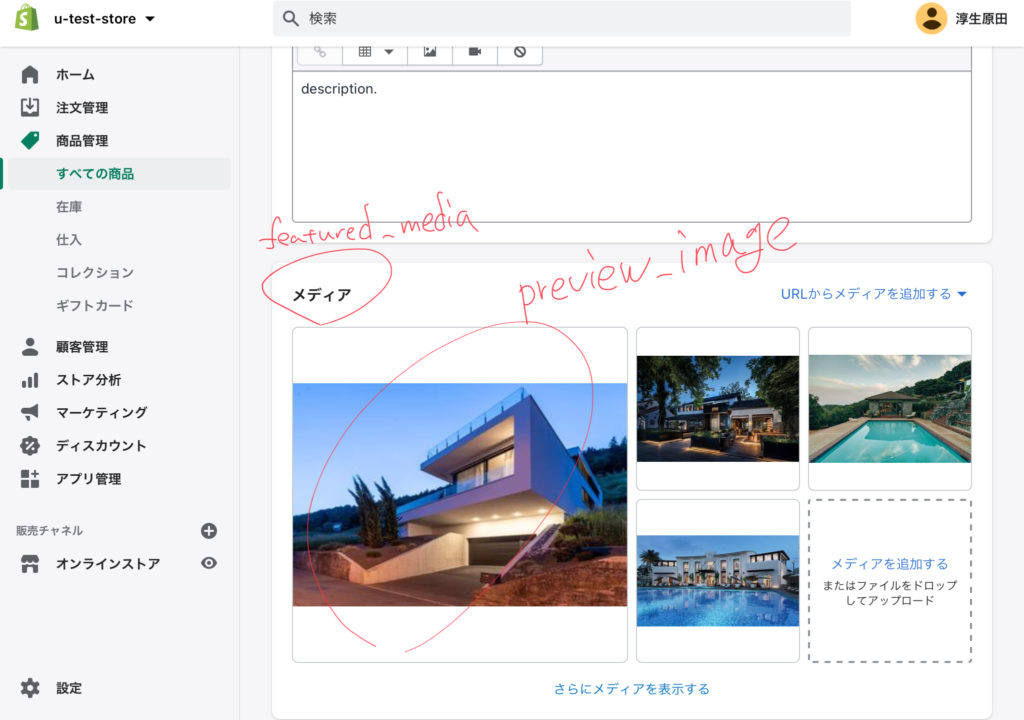
URL: products/name.pngproduct.featured_media
product.featured_mediaは、製品に添付されたメディアの最初の部分をレンダリングするために使用できます。
product.first_available_variant
product.first_available_variantは、購入可能な最初の製品の variant オブジェクトを返します。
variant を利用可能にするには、 variant.inventory_quantity がゼロよりも大きいか、 variant.inventory_policy が継続するように設定されていなければなりません。inventory_policy が設定されていない variant は利用可能とみなされます。
product.handle
product.handleは、商品のハンドルを返します。
product.has_only_default_variant
product.has_only_default_variantは、商品がデフォルトのバリアントのみを持っている場合に true を返します。(1種類しかない場合true)
これにより、商品フォームでバリアントピッカーを表示するかどうかを決めることができます。
カスタマイズされたバリアントを持たない商品は、"Title" オプションを "Default Title" に設定したデフォルトのバリアントをひとつ持ちます。
{% if product.has_only_default_variant %}
  <input name="id" value="{{ variant.id }}" type="hidden">
{% else %}
  <select name="id">
    {% for variant in product.variants %}
      <option value="{{ variant.id }}">{{ variant.title }}</option>
    {% endfor%}
  </select>
{% endif %}
<select name="id">
<option value="34679843235">Red</option>
<option value="34679843236">Blue</option>
<option value="34679843237">Green</option>
</select>product.id
product.idは、商品のidを返します。
product.images
product.imagesは、商品の画像の配列を返します。Shopifyのコンテンツ配信ネットワーク(CDN)上の商品画像にリンクするには、img_urlフィルターを使用します。
管理画面>商品>メディアに登録されている画像を順番に出力する。
{% for image in product.images %}
  <img src="{{ image.src | product_img_url: 'medium' }}">
{% endfor %}
<img src="//cdn.shopify.com/s/files/1/0087/0462/products/shirt14_medium.jpeg?v=1309278311" />
<img src="//cdn.shopify.com/s/files/1/0087/0462/products/nice_shirt_medium.jpeg?v=1331480777">
<img src="//cdn.shopify.com/s/files/1/0087/0462/products/aloha_shirt_medium.jpeg?v=1331481001">商品画像は、product.mediaオブジェクトを使用して返すこともできます。
product.media
product.mediaは、追加された日付でソートした、商品に関連するメディアの混合配列を返します。
メディアフィルタを使用して URL やモデルビューアタグを生成し、商品ページでメディアがレンダリングされるようにすることができます。
{{ product.media }}products/boat-shoes.jpgVideoDropExternalVideoDropproduct.media オブジェクトは、製品に関連付けられた各メディア項目を反復処理する for ループを作成するために使用されます。
{% for media in product.media %}
  {% include 'media' %}
{% endfor %}テーマに画像、動画、3Dモデルを追加する方法についてはこちらをご覧ください。
product.options
product.optionsは、商品のオプション名の配列を返します。
{% for option in product.options %}
  {{ option }}
{% endfor %}
Color Size Material製品のオプション数を決定する必要がある場合は、サイズを使用します。
{{ product.options.size }}3product.options_by_name
product.options_by_nameは、製品のオプションに名前で直接アクセスできるようにします。options_by_name のオブジェクトキーは大文字小文字を区別しません。
<label>
  Color
  <select>
    {% for color_option in product.options_by_name['Color'].values %}
      <option>{{ color_option }}</option>
    {% endfor %}
  </select>
</label>
<label>
  Color
  <select>
    <option>Red</option>
    <option>Green</option>
  </select>
</label>
product.options_with_values
product.options_with_valuesは、商品のオプションの配列を返します。
{% for product_option in product.options_with_values %}
  <label>
    {{ product_option.name }}
    <select>
      {% for value in product_option.values %}
        <option {% if product_option.selected_value == value %}selected{% endif %}>
          {{ value }}
        </option>
      {% endfor %}
    </select>
  </label>
{% endfor %}
<label>
  Color
  <select>
    <option selected>Red</option>
    <option>Green</option>
  </select>
</label>
product.price
product.priceは、すべての製品のバリアントの最低価格を返します。この属性は product.price_min と同じです。
product.price_max
product.price_maxは、すべての製品のバリアントの最高価格を返します。
product.price_min
product.price_minは、すべての製品のバリアントの最低価格を返します。
product.price_varies
product.price_variesは、製品のバリアントの価格が異なる場合に true を返します。すべての商品のバリエーションが同じ価格の場合は false を返します。
product.published_at
product.published_atは、ストアで商品が公開された時のタイムスタンプを返します。
product.requires_selling_plan
product.requires_selling_planは、製品のすべてのバリアントで variant.requires_selling_plan が true に設定されている場合に true を返します
product.selected_variant
product.selected_variantは、選択された variant の variant オブジェクトを返します。選択された variant は URL パラメータ variant に基づいています。
選択された variant がない場合、このプロパティは nil を返します。
<!-- URL = myshop.myshopify.com/products/shirt?variant=124746062 -->
{{ product.selected_variant.id }}
124746062
product.selected_or_first_available_variant
product.selected_or_first_available_variantは、選択されている variant の オブジェクトを返します。選択された variant は URL パラメータ variant に基づいています。
選択された variant がない場合は、最初に利用可能な variant が返されます。
→選択されているバリエーションのオブジェクトまたは、利用できるバリエーションの一番目のバリエーションオブジェクトを返します。(バリエーションとは、例えば、ある商品にあるS,M,Lといった種類)
variant が利用可能であるためには、 variant.inventory_quantity がゼロよりも大きいか、 variant.inventory_policy が継続するように設定されていなければなりません。inventory_management がない variant も利用可能とみなされます。
product.selected_of_first_available_selling_plan_allocation
product.selected_of_first_available_selling_plan_allocationは、以下のシーケンシャルロジックに基づいた selling_plan_allocation オブジェクトを返します。
- URL パラメータで有効な割り当てが選択されている場合、その割り当てが返されます。
- URL で指定された割り当てがない場合、在庫のあるバリアントの最初の割り当てが返されます。
- 在庫のある
variantがない場合は、最初のvariantの最初の割り当てが返されます。
製品に selling plans がない場合、このプロパティは nil を返します。
product.selected_selling_plan
product.selected_selling_planは、URL パラメータ selling_plan と販売計画の ID の値に基づいて selling_plan オブジェクトを返します。
例えば、URL パラメータに ?selling_plan=789 を指定すると、このプロパティは ID 789 の selling_plan オブジェクトを返します。
product.selected_selling_plan_allocation
product.selected_selling_plan_allocationは、販売計画とバリアントを識別する URL パラメータに基づいて selling_plan_allocation オブジェクトを返します。
たとえば、URL パラメータに variant=12345&selling_plan=8765 を指定した場合、このプロパティは、ID 12345 の variant オブジェクトと ID 8765 の selling plan のアロケーションを返します。
product.selling_plan_groups
product.selling_plan_groupsは、商品のバリエーションを含む selling_plan_group オブジェクトの配列です。
product.tags
product.tags は、商品のすべてのタグの配列を返します。タグはアルファベット順に返されます。
{% for tag in product.tags %}
  {{ tag }}
{% endfor %}
new
leather
sale
special
product.template_suffix
product.template_suffixは、product.プリフィックス と .liquid 拡張子を除いた、その製品に割り当てられたカスタムプロダクトテンプレートの名前を返します。
カスタムテンプレートが製品に割り当てられていない場合は、nilを返します。
<!-- on product.wholesale.liquid -->
{{ product.template_suffix }}
wholesaleproduct.title
product.titleは、商品のタイトルを返します。
product.url
product.urlは、商品の相対 URL を返します。
product.variants
product.variantsは、商品のバリアントの配列を返します。
product.vendor
product.vendorは、商品のベンダーを返します。
product_option オブジェクト
product_option オブジェクトは、製品オプション配列の各オプションで利用可能です。
製品オプション配列には、 product.options_with_values でアクセスできます。
product_option.name
製品オプションの名前を返します。
product_option.position
製品オプション配列内の製品オプションの位置を返します。
<ul>
  {% for product_option in product.options_with_values %}
    <li>{{ product_option.position }} - {{ product_option.name }}</li>
  {% endfor %}
</ul>
<ul>
<li>1 - Color</li>
<li>2 - Size</li>
</ul>product_option.selected_value
この製品オプションに対して現在選択されている値を返します。 もっと詳しく知る
<select>
  {% for value in product_option.values %}
    <option {% if product_option.selected_value == value %}selected{% endif %}>
      {{ value }}
    </option>
  {% endfor %}
</select>
<select>
<option selected>Red</option>
<option>Green</option>
</select>product_option.values
この製品オプションの可能な値の配列を返します。 もっと詳しく知る
<ul>
  {% for value in product_option.values %}
    <li>{{ value }}</li>
  {% endfor %}
</ul>
<ul>
<li>Red</li>
<li>Green</li>
</ul>recommendations オブジェクト
recommendationオブジェクトは、販売、商品説明、商品とコレクションの関係から得られるデータに基づいて、特定の商品に関連した商品レコメンデーションを提供します。
商品推薦は、新しい注文や商品データが利用可能になるにつれて、時間の経過とともにより正確になります。
商品推薦の仕組みの詳細については、「商品ページに商品推薦を表示する」を参照してください。
recommendationsオブジェクトは、<base_url>?section_id=<section_id>&product_id=<product_id>へのHTTPリクエストでレンダリングされたテーマセクションで使用された場合にのみ、製品を返します。
base_urlを決定するには、routes.product_recommendations_url属性を使用します。ハードコードされたURLではなく、routesオブジェクトを使用することで、製品のレコメンデーションが正しいロケールでロードされるようになります。
レコメンデーションオブジェクトの実装方法については、「製品レコメンデーション API セクションのレスポンスで製品レコメンデーションを表示する」を参照してください。
recommendations.performed
有効なパラメータを指定して recommendations エンドポイントを通じてレンダリングされるテーマセクションの内部で recommendations オブジェクトが参照されている場合に true を返します。
以下がrecommendations.performedのパラメーターです。
| Parameters | Description | Required |
|---|---|---|
| product_id | おすすめ商品を表示したい商品のID | yes |
| section_id | 推奨オブジェクトが使用されているセクションのID | yes |
| limit | 結果の数を最大10まで制限します | no |
recommendations.products_count
製品の推奨数を返します。recommendations.performedがfalseの場合は0を返します。
recommendations.products
製品のレコメンドを返します。これらのオブジェクトは製品です。 Recommendations.performedがfalseの場合、製品は返されません。
たとえば、このLiquidスニペットは、製品の推奨事項を表示するための条件を作成します。
{% if recommendations.performed %}
  {% if recommendations.products_count > 0 %}
    {% for product in recommendations.products %}
      {{ product.title | link_to: product.url }}
    {% endfor %}
  {% endif %}
{% else %}
  <div class="placeholder">Placeholder animation</div>
{% endif %}
囲んでいるセクションが同期的にレンダリングされると、次の出力が生成されます:

Placeholder animation

---------------------
When the enclosing section is rendered from the endpoint /recommendations/products?section_id=<section_id>&product_id=<product_id>
(また、エンドポイント/recommendations/products?section_id=<section_id>&product_id=<product_id>から囲み部分がレンダリングされると、以下のような出力が得られます):

Product title
Another product title
request オブジェクト
リクエストオブジェクトは、ストアへのアクセスに使用されたURLとアクセスされているページに関する情報を返します。
request.design_mode
テーマエディタからリクエストが行われているかどうか。 request.design_modeを使用して、テーマエディターでの望ましくない動作を無効にすることができます。
{% if request.design_mode %}
  <!-- This will only render in the theme editor -->
{% endif %}
これは、テーマエディタで表示されるストアフロントのプレビューを変更するために使用すべきではありません。ほとんどの場合、テーマエディタでマーチャントが見るプレビューは、顧客がライブストアで見るプレビューと一致するはずです。
この変数のユースケースは、テーマエディタのセッションデータがページトラッキングスクリプトに含まれないようにすることです。もう1つのユースケースは、サードパーティAPIを使用して、テーマエディタにはエラーを返して出力しますが、ライブストアには出力しません。
request.host
request.hostを使用して、顧客がアクセスしているドメインを確認できます。
request.design_mode
テーマエディタからリクエストが行われているかどうか。 request.design_modeを使用して、テーマエディターでの望ましくない動作を無効にすることができます。
{% if request.design_mode %}
  <!-- This will only render in the theme editor -->
{% endif %}
これは、テーマエディタで表示されるストアフロントのプレビューを変更するために使用すべきではありません。ほとんどの場合、テーマエディタでマーチャントが見るプレビューは、顧客がライブストアで見るプレビューと一致するはずです。
この変数のユースケースは、テーマエディタのセッションデータがページトラッキングスクリプトに含まれないようにすることです。もう1つのユースケースは、サードパーティAPIを使用して、テーマエディタにはエラーを返して出力しますが、ライブストアには出力しません。
request.host
request.hostを使用して、顧客がアクセスしているドメインを確認できます。
{{ request.host }}your-store.myshopify.com例えば、複数のドメインを持っている場合は、リクエストに応じて異なる挨拶を表示することができます。
{% if request.host == 'myshop.com' %}
  Welcome USA!
{% elsif request.host == 'myshop.ca' %}
 Welcome Canada!
{% else %}
  Welcome!
{% endif %}
request.locale
現在のリクエストのshop_localeを返します。
{{ request.locale.name }}Englishrequest.path
現在のページへのパスを返します。
request.pathは、既存のページへのURLのみを返します。 URLが存在しない場合は、JavaScriptを使用して完全なURLを取得する必要があります。
{{ request.path }}/collections/classics/products/chambray-shirtrequest.page_type
現在のページのタイプを返します。これらは異なるページタイプです。
- 404
- article
- blog
- cart
- collection
- list-collections
- customers/account
- customers/activate_account
- customers/addresses
- customers/login
- customers/order
- customers/register
- customers/reset_password
- gift_card
- index
- page
- password
- product
- Learn more
routes オブジェクト
routesオブジェクトを使用して、ストアフロント(トップページ)への動的なURLを生成することができます
テーマで複数の言語をサポートする際にもroutesオブジェクトを使用します
routes.root_url
ストアのベース(トップページ)URLを返します。
{{ routes.root_url }}/routes.account_url
アカウントページのURLを返します。
{{ routes.account_url }}/account
routes.account_login_url
アカウントのログインページのURLを返します。
{{ routes.account_login_url }}/account/login
routes.account_logout_url
アカウントのログアウトページのURLを返します。
{{ routes.account_logout_url }}/account/logoutroutes.account_register_url
アカウント登録ページのURLを返します。
{{ routes.account_register_url }}/account/register
routes.account_addresses_url
会員アカウントに関連付けられたアドレスを管理できるページのURLを返します。
{{ routes.account_addresses_url }}/account/addresses
routes.collections_url
コクションページのURLを返します。
{{ routes.collections_url }}/collections
routes.all_products_collection_url
ストア内の全商品を含むコレクションのURLを返します。
{{ routes.all_products_collection_url }}/collections/all
routes.search_url
検索するためのURLを返します。
{{ routes.search_url }}/searchroutes.cart_url
カートページのURLを返します。
商品のvariant.id、item.keyを用いて少なくとも1つのアイテムを指定する必要があります。
{{ routes.cart_url }}routes.cart_add_url
カートに商品を追加するためのURLを返します。
{{ routes.cart_add_url }}/cart/add
カートに一つや複数のバリアントを追加するには、POST/cart/add.jsエンドポイントを使用します。
カートに追加するには、variant.idまたはitem.keyを用いて少なくとも1つのアイテムを指定する必要があります。
quantityは追加したい量、idはその商品の variant ID を指定します。
複数のvariantをカートに追加するには、items配列にオブジェクトを追加します。
items: [
  {
   id: 36110175633573,
   quantity: 2
  }
]
シリアル化されたカートへの追加フォームを送信するには、以下のポスターデータを指定します。
シリアルかとは、オブジェクトをバイト列やテキストに変換することを言います。
jQuery.post('/cart/add.js', $('form[action="/cart/add"]').serialize());
また、数量やIDだけでなく、ラインアイテムのプロパティでカートに追加することも出来ます。
jQuery.post('/cart/add.js', {
  items: [
    {
      quantity: 1,
      id: 794864229,
      properties: {
        'First name': 'Caroline'
      }
    }
  ]
});
詳細については、、Ajax Cart API リファレンスを参照してください。
routes.cart_change_url
商品の購入数を変更できるURLを返します。
商品のvariant.idまたはline_item.keyを指定する必要があります。
/cart/change.jsは、カートのラインアイテムのquantity(数量)とproperties(商品の情報)を変更することが出来ます。
変更できるのはすでにカートに入っている商品のみで、一度に変更できるのは一つのラインアイテムだけです。
データを変更するには、変更するラインアイテムのidかline propertyが必要です。
idの値はvariant_idまたはkeyを指定します。
詳細については、、Ajax Cart API リファレンスを参照してください。
{{ routes.cart_change_url }}/cart/change
routes.cart_clear_url
カートをクリアできるURLを返します。
{{ routes.cart_clear_url }}/cart/clear
routes.product_recommendations_url
おすすめ商品情報のURLを返します。
{{ routes.product_recommendations_url }}/recommendations/productssearch オブジェクト
searchオブジェクトは、検索結果や一致した検索結果の数などの情報を返します。
search.performed
action="/search"を持つHTMLフォームが正常に送信された場合に、trueを返します。
これにより、検索された時にコンテンツを表示することができます。
{% if search.performed %}
    <!-- Show search results -->
{% endif %}
search.results
検索に一致する項目の配列を返します。
- article
- page
- product
search.resultsをループさせることで、個々の検索結果にアクセスすることが出来ます。
{% for item in search.results %}
  <h3>{{ item.title | link_to: item.url }}</h3>
{% endfor %}検索結果には、object_typeというタイトルの追加属性があり、各結果の型を返します。
以下の例では、object_typeによる制御フローを書いています。
{% for item in search.results %}
  <h3>{{ item.title | link_to: item.url }}</h3>
  {% if item.object_type == 'article' %}
    {% comment %}
      'item' is an article
      All article object properties can be accessed.
    {% endcomment %}

    {% if item.image %}
      <div class="result-image">
        <a href="{{ item.url }}" title="{{ item.title | escape }}">
          {{ item | img_url: 'small' | img_tag: item.title }}
        </a>
      </div>
    {% endif %}

  {% elsif item.object_type == 'page' %}
    {% comment %}
      'item' is a page.
      All page object properties can be accessed.
    {% endcomment %}

  {% else %}
    {% comment %}
      'item' is a product.
      All product object properties can be accessed.
    {% endcomment %}

    {% if item.featured_image %}
      <div class="result-image">
        <a href="{{ item.url }}" title="{{ item.title | escape }}">
          {{ item.featured_image | img_url: 'small' | img_tag: item.featured_image.alt }}
        </a>
      </div>
    {% endif %}
  {% endif %}

  <span>{{ item.content | strip_html | truncatewords: 40 | highlight: search.terms }}</span>
{% endfor %}
search.results_count
一致した検索結果の数を返します。
search.terms
検索欄に入力された文字列を返します。
以下の例のようにhighlightフィルタを使って、検索結果の中でsearch.termsと一致するインスタンスに異なる style を適用することも出来ます。
highlightフィルターは、検索範囲内の一致した文字列をHTMLの<strong>タグでラップし、クラスに highlight を与えます。
{{ item.content | highlight: search.terms }}<!-- If the search term was "Yellow" --> <strong class="highlight">Yellow shirts are the best!
search.types
検索が実行されたタイプを表す文字列の配列を返します。
配列に含まれる項目は、article、page、productのいずれかになります。
検索タイプは、検索ページのURLパラメータで確認することができます。
例えば、URLが、storefront.com/search?type=article,product&q=*の場合、search.typesの配列には、articleとproductが入ります。
script オブジェクト
scriptオブジェクトには、ストアで公開されているShopifyスクリプトに関する情報が含まれています。
グローバルスクリプトオブジェクトを使用してタイプ別のスクリプトを検索します。
Shopifyスクリプトとは、割引や配送オプション、決済方法の変更をするコードのことです。
以下のタイプのようなスクリプトを作成することが出来ます。
- Line item scripts - カート内のラインアイテムの価格を変更したり、割引を付与したりすることができます。カート内のアイテムが追加、削除、変更するたびに実行されます。
- Shipping scripts - 配送方法を変更したり、配送料金の割引を適用したりすることができます。顧客がチェックアウトの配送オプションページにアクセスするたびに実行されます。
- Payment scripts - 支払いゲートウェイの名前を変更、非表示にしたり、再注文したりすることができます。顧客がチェックアウト時に支払い方法のページにアクセスするたびに実行されます。PayPal ExpressやApple Payなど、チェックアウトの前に顧客に表示される支払いゲートウェイとは相互作用しません。
Shopifyスクリプトには、いくつかのテンプレートが用意されており、実際に作成する際は、テンプレートを選択して、ニーズに合わせて編集することができます。
以下のようなテンプレートがあります。
- percentage (%) off a product:割引 (%)
- amount ($) off a product:割引 ($)
- percentage (%) and amount ($) off a product:割引
- bulk discounts:まとめ割
- buy one get one free (BOGO):一つ買うと一つ無料(BOGO)
- modify shipping rate price:送料価格を変更する
- modify shipping rate name:変更送料名
- hide shipping rates:送料を隠す
- re-order shipping rates:再注文送料
- modify payment gateway name:決済ゲートウェイ名を変更する
- hide payment gateway:非表示の支払いゲートウェイ
- re-order payment gateways:再注文決済ゲートウェイ
Shopifyスクリプトの詳細については、Shopifyスクリプトとスクリプトエディタのヘルプコンテンツを参照してください。


script.id
スクリプトのIDを返します。
script.name
スクリプトの名前を返します。
{% if scripts.cart_calculate_line_items %}
  <p>Check out our sale: {{ scripts.cart_calculate_line_items.name }}</p>
{% endif %}
Check out our sale: Buy one chambray shirt and get a second for half pricesection オブジェクト
セクションオブジェクトを使用すると、セクションのプロパティと設定値にアクセスできます。
セクションは、特定の機能をもったモジュールであり、カスタマイズできるページ要素です。テーマのテンプレートに(ヘッダーやフッター同様に)静的に含まれるか、テーマエディターによってテーマのホームページに動的に追加されます。


セクションはスニペットに似ていますが、セクションの一番の特徴はテーマエディタ上でカスタマイズできることです。

section.blocks
セクションのブロックの配列を返します。
section.id
静的セクションの場合、「.liquid」なしでセクションのファイル名を返します。動的セクションの場合、動的に生成されたIDを返します。
section.settings
テーマエディタで設定したセクション設定のオブジェクトを返します。設定の一意のIDを参照して、設定値を取得します。
<h2>{{ section.settings.heading }}</h2>
<a href="{{ section.settings.featured_collection.url }}">This week's best selling items</a>
¥
<h2>Weekly promotion</h2> <a href="/collections/new-this-week">This week's best selling items</a>shipping_method オブジェクト
価格や合計などの金額の属性は、顧客の現地通貨で表示されます。結果を金額として表示するには、金額フィルタを使用します。
shipping_method.handle
配送方法のハンドルを返します。送料の価格はハンドルの端に追加されます。
{{ shipping_method.handle }}
shopify-international-shipping-25.00shipping_method.original_price
割引が適用される前の配送方法の元の価格を返します。money フィルターを使用して、金額形式で値を返します。
{{ shipping_method.original_price | money }}$20.00shipping_method.price
配送方法の価格を返します。
shipping_method.title
配送方法のタイトルを返します。
shop オブジェクト
The shop object can be used and accessed from any file in your theme. Learn more
shop.address
shop.addressに属性を追加して、ショップの住所に関する情報を返すことができます。
shop.address.city
ショップの住所にある都市を返します。
shop.address.country
ショップの住所にある国を返します。
shop.address.country_upper
大文字を使用してショップの住所にある国を返します。
JAPAN結果は、shop.address.countryで大文字のフィルターを使用した場合と同じです。
shop.address.province
ショップの住所の州または県を返します。
shop.address.province_code
ショップの住所にある州または県の省略形を返します。
shop.address.street
ショップの住所を返します。
shop.address.summary
ショップの住所の概要を返します。
shop.address.zip
ショップの住所の郵便番号を返します。
shop.checkout.guest_login
顧客アカウントがチェックアウトを完了するためにオプションであり、URLに?checkout_urlパラメーターがある場合、trueを返します。それ以外の場合は、falseを返します。
checkout_urlパラメーターは、訪問者がチェックアウト時にリンクからアカウントログインページにアクセスしたときに作成されます。
https://myshopify.com/account/login?checkout_url=https%3A%2F%2Fmyshopify.com%2F7117957%2Fcheckouts%2F87ff64e2e02b16%3Fkey%3D9b3ee8823%26step%3Dcontact_informationshop.collections_count
ショップ内のコレクションの数を返します。
shop.currency
ストアの通貨を返します(ISO 4217形式。例えば、USD。これはShopifyの管理画面(レポートを含む)で使用されている通貨です。
お店がマルチカレンシーを使用していない場合、ストア通貨は顧客のローカル通貨と同じになります。あなたの店がマルチカレンシーを使用している場合は、ストアの通貨は顧客の通貨と異なることができます。
カートの通貨を返すには、 cart.currency オブジェクトを参照してください。
チェックアウトの通貨を返すには、checkout.currency オブジェクトを参照してください。
ストアが使用できる通貨オブジェクトのリストを返すには、shop.enabled_currencies オブジェクトを参照してください。
shop.customer_accounts_enabled
チェックアウトを完了するために顧客アカウントが必要な場合はtrueを返します。それ以外の場合は、falseを返します。
shop.customer_accounts_optional
顧客アカウントがチェックアウトを完了するためにオプションである場合、trueを返します。それ以外の場合は、falseを返します。
shop.description
ストアの説明を返します。
shop.domain
ショップのプライマリドメインを返します。
shop.email
ショップのメールアドレスを返します。
shop.enabled_currencies
ストアが受け付ける通貨オブジェクトのリストを返します。
カートの通貨を返すには、 cart.currency オブジェクトを参照ください。
チェックアウトの通貨を返すには、checkout.currency オブジェクトを参照ください。
ストアの通貨を返すには、shop.currency オブジェクトを参照してください。
shop.enabled_payment_types
お店で受け入れられているクレジットカード、暗号通貨、その他の支払いタイプの配列を返します。支払いタイプのリストは、あなたの店の有効な支払いプロバイダで受け入れられているものに基づいています。
支払いタイプのロゴを表示するには、payment_type_svg_tag フィルタを使用してインライン SVG を表示します。または、payment_type_img_url フィルタを使用して SVG 画像へのリンクを表示することもできます。
shop.metafields
ショップのメタフィールドを返します。メタフィールドは、ShopifyAPIを使用してのみ設定できます。
shop.money_format
Shopifyが通貨を表示せずにお金をフォーマットするために使用する文字列を返します。
shop.money_with_currency_format
Shopifyが通貨を表示しながらお金をフォーマットするために使用する文字列を返します。
shop.name
ショップの名前を返します。
shop.password_message
ショップのパスワードページメッセージを返します。
shop.permanent_domain
ショップの.myshopify.comURLを返します。
shop.phone
ショップの電話番号を返します。
shop.policies
ショップのポリシーオブジェクトの配列を返します。これらのポリシーは、Shopify管理者のストアの法的設定で設定できます。
<ul>
{% for policy in shop.policies %}
  <li>{{ policy.title }}</li>
{% endfor %}
</ul>
アウトプットは以下になります。
<ul>
  <li>Privacy policy</li>
  <li>Refund policy</li>
  <li>Shipping policy</li>
  <li>Terms of service</li>
</ul>
個々のポリシーは、ショップオブジェクトで直接参照できます。各ポリシーには、独自のポリシーオブジェクトがあります。input.liquid
{{ shop.privacy_policy.title }}Privacy policy
shop.privacy_policy
ストアのプライバシーポリシーのポリシーオブジェクトを返します。
shop.published_locales
shop_localeオブジェクトの配列を返します。各オブジェクトは、ショップで公開されているショップロケールを表します。

{% for locale in shop.published_locales %}
  {{ locale.name }} ({{ locale.iso_code }})
{% endfor %}
使えるオブジェクト
iso_code日本→ jalocale.endonym_name日本→ 「日本語」(japanではなく、その言語による国名で表示される)
shop.refund_policy
ストアの払い戻しポリシーのポリシーオブジェクトを返します。
shop.shipping_policy
ストアの配送ポリシーのポリシーオブジェクトを返します。
shop.subscription_policy
ストアのサブスクリプションポリシーのポリシーオブジェクトを返します。
shop.terms_of_service
ストアの利用規約のポリシーオブジェクトを返します。
shop.products_count
ショップ内の商品の数を返します。
shop.secure_url
httpsプロトコルが付加されたショップの完全なURLを返します。input.liquid
{{ shop.secure_url }}
shop.taxes_included
商品の価格に税金が含まれている場合はtrueを返します。それ以外の場合は、falseを返します。 これは、ストアの税設定で設定できます。input.liquid
{% if shop.taxes_included %}
  Taxes included
{% else %}
  Excluding taxes
{% endif %}
shop.types
ショップ内のすべての一意の商品タイプの配列を返します。
{% for product_type in shop.types %}
  {{ product_type | link_to_type }}
{% endfor %}
shop.url
ショップの完全なURLを返します。input.html
{{ shop.url }}
shop.vendors
ショップ内のすべての一意のベンダーの配列を返します
{% for product_vendor in shop.vendors %}
  {{ product_vendor | link_to_vendor }}
{% endfor %}
shop_locale オブジェクト
shop_localは、shop.published_locales配列の要素です。 shop_localeオブジェクトには次の属性があります。
shop_locale.endonym_name
ストアロケールの、現地の名称を返します。
例えば、français canadienのように。
shop_locale.iso_code
ロケールコードを返します。
例えば、fr-CAのように。
shop_locale.name
ロケール名を返します。
例えば、Canadian Frenchのように。
shop_locale.primary
ロケールがショップのプライマリロケールである場合、trueを返します。それ以外の場合はfalseを返します。
shop_locale.root_url
ロケールのルート相対URLを返します。
store_availability object
store_availabilityオブジェクトは、現在の在庫レベルに関係なく、実際の店舗の場所に在庫されているバリアントを表示するために使用されます。場所にバリアントがない場合、その場所は返されません。
store_availability.available
バリアントに在庫がある場合はtrueを返します。
store_availability.location
バリアントがストックされているロケーションオブジェクトを返します。
store_availability.pick_up_enabled
ピックアップが有効になっている場所にバリアントが在庫されている場合はtrueを返します。
store_availability.pick_up_time
集荷の準備が整うまでにかかる時間を返します(例:通常24時間で準備完了)。この値は、ローカルピックアップオプションの設定時に管理者で設定されます。
tablerow object
tablerowオブジェクトは、tablerowタグ内で使用されます。親のforループの属性が含まれています。
tablerow.length
tablerowループの反復回数を返します。
tablerow.index
1から始まるtablerowループの現在のインデックスを返します。
tablerow.index0
0から始まるテーブル行ループの現在のインデックスを返します。
tablerow.rindex
tablerow.indexを逆の順序で返します。
tablerow.rindex0
tablerow.index0を逆の順序で返します。
tablerow.first
テーブル行ループの最初の反復である場合はtrueを返します。最初の反復でない場合はfalseを返します。
tablerow.last
テーブル行ループの最後の反復である場合はtrueを返します。最後の反復でない場合はfalseを返します。
tablerow.col
1から始まる現在の行のインデックスを返します。
tablerow.col0
0から始まる現在の行のインデックスを返します。
tablerow.col_first
現在の列が行の最初の列である場合はtrueを返し、そうでない場合はfalseを返します。
tablerow.col_last
現在の列が行の最後の列である場合はtrueを返し、そうでない場合はfalseを返します。
tax_line オブジェクト
tax_line.price
tax_line.priceは、税金の金額を返します。
この金額は、顧客の現地通貨で表示されます。money filtersのいずれかを使用して、設定した金額形式で返します。
{{ tax_line.price | money }}
¥2,500tax_line.rate
tax_line.rateは、税率を10進数で返します。
{{ tax_line.rate }}
0.14tax_line.rate_percentage
tax_line.rate_percentageは、税率をパーセンテージ形式で返します。
tax_line.title
tax_line.titleは、税金のタイトルを返します。
templete オブジェクト
templeteオブジェクトは、一握りの属性があります。
templateだけを参照すると、現在のページをレンダリングするために使用されるテンプレートの名前を返します。
<!--  page.contact.liquid template が使用される場合は -->
{{ template }}
page.contact
<body class="{{ template }}"><body class="product">template.directory
template.directoryは、テンプレートの親ディレクトリの名前を返します。
親ディレクトリがtemplates/フォルダであるテンプレートの場合はnilを返します。
<!-- If you're on the customers/login.liquid template -->
{{ template.directory }}customerstemplate.name
template.nameは、テンプレートのカスタムサフィックスが存在する場合はテンプレート名を、.liquid拡張子が存在する場合は.liquid拡張子を除いたテンプレート名を返します。
<!-- If you're on the product.alternate.liquid template -->
{{ template.name }}
producttemplate.suffix
template.suffixは、template.nameプリフィックス、または.liquid拡張子を除いたカスタムテンプレートの名前を返します。カスタムテンプレートを使用していない場合はnilを返します。Input
<!-- product.alternate.liquid template の場合 -->
{{ template.suffix }}
Output
alternate
theme オブジェクト
themeオブジェクトには、ストアの公開テーマに関する情報が含まれています。
themeオブジェクトの属性についてみてみます。
theme.id
theme.idは、テーマのIDを返します。これは、ユーザーをテーマエディタに直接リンクさせたい場合に便利です。
Visit the <a href="/admin/themes/{{ theme.id }}/settings">theme editor</a> to change your logo.Visit the <a href="/admin/themes/8196497/settings">theme editor</a> to change your logo.
theme.name
theme.nameは、テーマの名前を返します。
transaction オブジェクト
transaction.amount
トランザクションの金額を返します。この金額は、顧客の現地通貨でのものです。金額を金額形式で返すには、マネーフィルターのいずれかを使用します。
transaction.created_at
トランザクションが作成されたときのタイムスタンプを返します。日付フィルターを使用してタイムスタンプをフォーマットします。
transaction.gateway
トランザクションに使用された支払いプロバイダーの名前を返します。
{{ transaction.gateway }}
Cash on Delivery (COD)transaction.id
トランザクションの一意の数値識別子を返します。
transaction.kind
トランザクションの種類を返します。トランザクションの種類は以下です。
authorizationとは、顧客が支払うことを同意したお金を予約することですcaptureとは、承認の段階で予約されたお金の転送ですsaleとは、一つのステップで実行される承認とキャプチャの組み合わせですvoidとは保留中の承認またはキャプチャのキャンセルです。refundとは獲得したお金の一部または全額を顧客に返金します。
transaction.name
トランザクションの名前を返します
transaction.payment_details
payment_detailsオブジェクトには、トランザクションで使用sれる支払い方法に関連する追加のプロパティが含まれています。
credit_card_company
顧客のクレジットカードを発行した会社の名前を返します。
{{ transaction.payment_details.credit_card_company }}{{ transaction.payment_details.credit_card_company }}credit_card_number
顧客のクレジットカード番号を返します。
最後の4桁を除く全てが隠されます。
{{ transaction.payment_details.credit_card_number }}•••• •••• •••• 1234
gift_card
トランザクションで使用された場合、ギフトカードのドロップを返します
{{ transaction.payment_details.gift_card.last_four_characters }}1234transaction.receipt
支払い領収書に関する支払いプロバイダーからの情報を含むテキストを返します。これには、支払いがテストケースであったかどうかと、トランザクションに含まれている場合は認証コードが含まれます。
transaction.status
トランザクションのステータスを返します。
transaction.status_label
トランザクションのステータスの変換された出力を返します。
English: {{ transaction.status }}
French: {{ transaction.status_label }}
English: Success
French: Réussite
The unit_price_measurement object
チートシートなし

variant オブジェクト
variant.available
variant が購入可能な場合はtrue、そうでない場合はfalseを返します。
variant が購入可能であるためには、 variant.inventory_quantity がゼロよりも大きいか、 variant.inventory_policy が継続するように設定されていなければなりません。
variant.inventory_management が設定されていない variant も利用可能とみなされます。
variant.varcode
バリアントのバーコードを返します。
variant.compare_at_price
バリアントの比較を価格で返します。金額フィルターを使用して、金額形式で値を返します。
variant.featured_media
バリアントに添付されている最初のメディアアイテムを返します。
varitant.id
バリアントの一意のIDを返します。
variant.image
バリアントに関連付けられている画像オブジェクトを返します。
{{ variant.image.src }}/products/red-shirt.jpeg
variant.incoming
バリアントに受信在庫がある場合はtrueを返します。
variant.inventory_management
バリアントの在庫追跡サービスを返します。
variant.inventory_policy
管理画面のバリアントオプションで、「ユーザーにこのアイテムの購入を許可する」チェックボックスがチェックされている場合に、文字列continueを返します。
チェックが入っていない場合はdenyを返します。
variant.inventory_quantity
バリアントの在庫数量を返します。
variant.next_incoming_date
次の入荷在庫が到着する日付を返します。
variant.options
バリアントの製品オプション値の配列を返します。
{% for option in variant.options %}
  - {{ option }}
{% endfor %}
- Red - Small - Wool
variant.option1
バリアントの最初の製品オプションの値を返します。
variant.option2
バリアントの2番目の製品のオプションの値を返します。
variant.option3
バリアントの3番目のオプションの値を返します。
variant.requires_shipping
バリアントの出荷が要求するように設定されている場合はtrueを返します。
variant.requires_selling_plan
カートに追加されたときにバリアントがselling_planを要求するように設定されている場合に、trueを返します。
variant.selected
バリアントが現在選択されている場合はtrueを返します。選択されたバリアントは、URLパラメータバリアントに基づいています。
variant.selected_selling_plan_allocation
URLパラメータselling_planに基づいたselling_plan_allocationオブジェクトを返します。
例えば、URLパラメーターにvariant=12345&selling_plan=8765を指定すると、valiantが12345、selling_planが8765の値が返されます。
選択されたselling plan allocationの割当がない場合、このプロパティはnilを返します。
valiant.selling_plan_allocations
バリアントで使用可能なselling_plan_allocationオブジェクトの配列。
valiant.sku
バリアントのSKUを返します。
variant.store_availabilities
StoreAvailabilityオブジェクトのリストを返します。
variant.taxable
バリアントに税金が請求される場合はtrueを返し、そうでない場合はfalseを返します。
variant.title
すべてのバリアントの製品オプション値を、/で連結して返します。
<!-- If variant’s option1, option2, and option3 are "Red", "Small", "Wool", respectively -->
{{ variant.title }}
Red / Small / Woolvariant.unit_price
Unitは、ドイツまたはフランスにある店舗でのみご利用いただけます。
製品バリアントのUnitを返します。価格は、広告申し込み情報に適用される割引を反映しています。
variant.unit_price_measurement
製品バリアントのunit_price_measurementオブジェクトを返します。
variant.url
1つの製品バリアントのみに固有のURLを返します。バリアントIDは一意の識別子として使用されます。
{{ variant.url }}
http://my-store.myshopify.com/products/t-shirt?variant=12345678variant.weight
バリアントの重量をグラムで返します。 weight_with_unitフィルターを使用して、ストアの重量形式またはバリアントで構成された重量単位に変換します。
variant.weight_unit
バリアントで構成されたウェイトの単位を返します。 weight_in_unit属性およびweight_with_unitフィルターと組み合わせて使用するとうまく機能します。
variant.weight_in_unit
variant で設定した単位に換算した製品の重量を返します。weight_unit 属性や weight_with_unit フィルタと組み合わせるとうまく動作します。