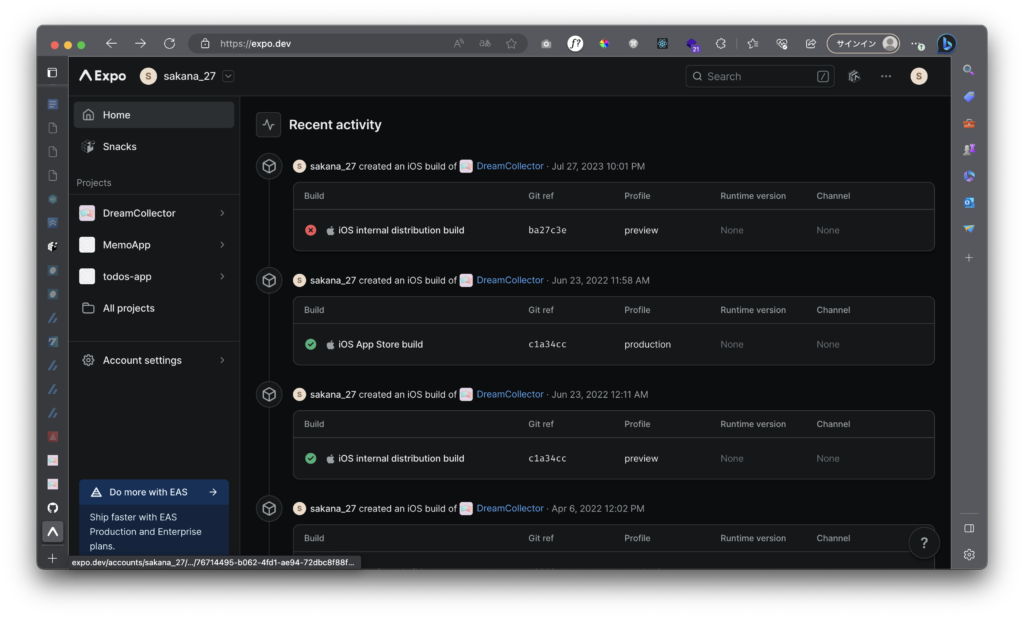
概要
EAS(外部サービス)を利用してビルドを行う都合上、EASのアップデートに合わせて、ReactNativeプロジェクトをアップデートする必要がある。
起こった事象
発生時のバージョン
package.json
"expo": "^44.0.0",
"react-native": "0.64.3",
Nodeバージョン
v14.18.1Yarn
~ % yarn --version
1.22.19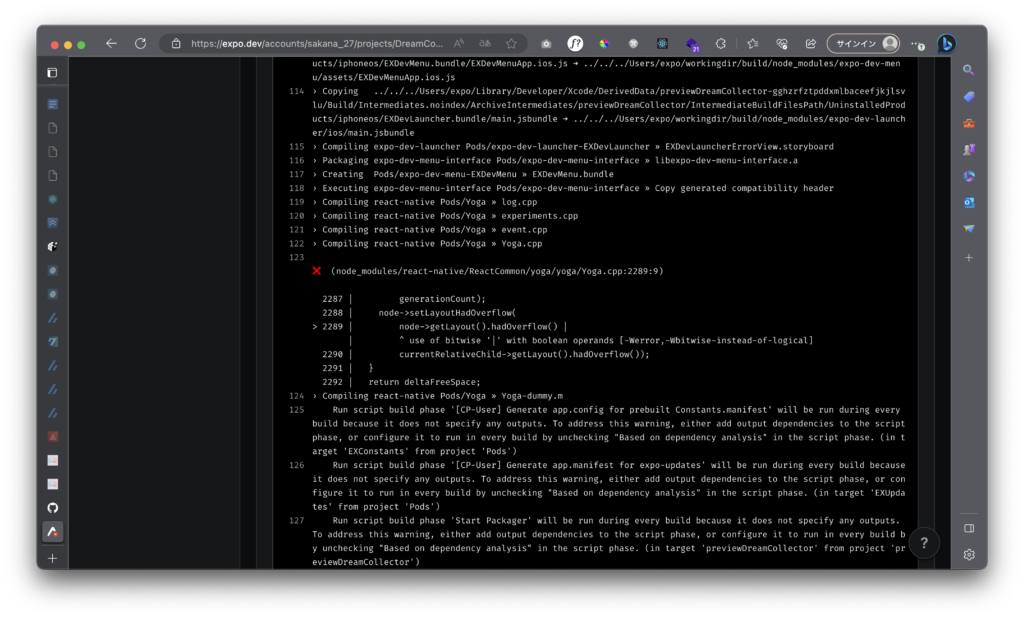
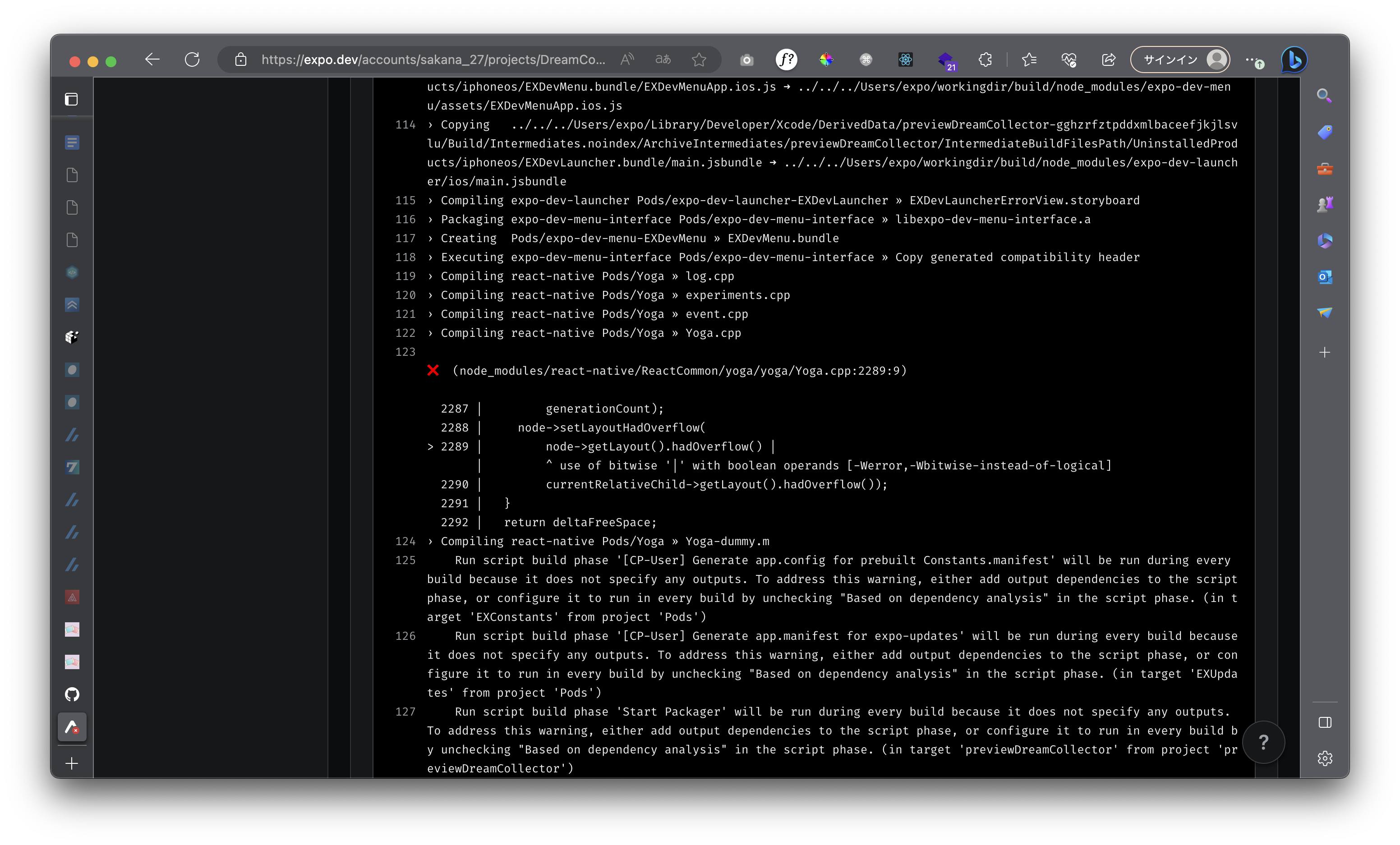
react-native 内部で使われている Yoga というパッケージのバージョンが古い(yoga <= v1.18.0)と、operator の使い方間違っているようです(以下が修正 commit)
シンプルに react-native のバージョンを上げるという方法もありますが、プロダクトの状況によってはパッチを当てて、すぐにリリースしたいケースもあるでしょう。
ここでは、
patch-packageという npm パッケージを使って、パッチを作成する方法を紹介します。
こちらではシンプルにreact-nativeのバージョンを上げていく。
アップデート手順
別ブランチを作り作業すること。(ミスの際戻れるように)
参考
Expo アップデートのメモ(Expo 44 → 45 React Native 0.64 → 0.68) | 35D BLOG
上記は、Bareワークフローで、うちのプロジェクトのマネージドワークフローとは違うが参考になる。
公式ドキュメント
Upgrade Expo SDK - Expo Documentation
プロジェクトのExpo SDKバージョンをインクリメンタルにアップグレードする方法について説明します。
Upgrade Expo SDK - Expo Documentation
SDKのバージョンは、1つずつインクリメンタルにアップグレードすることをお勧めします。そうすることで、アップグレード プロセス中に発生する障害や問題を特定しやすくなります。
Expo では、6 か月間の下位互換性を維持しています。SDKのバージョンが非推奨になると、Expo Goアプリは使用できなくなります。ただし、eas updateを使用してアップデートを公開し、eas buildを使用してビルドすることはできます。非推奨になったとしても、運用中のスタンドアロンアプリには影響しません。
具体的なアップデート手順は、上記各ブログポストに記載(expo upgrade等で検索)
例)Expo44 -> 45へのアップデートのブログ
管理ワークフロー
アプリをExpo SDK 44から45にアップグレードする方法は次のとおりです:
Expo CLIを最新バージョンに更新する: npm i -g expo-cli. expo-cli@5.4.3 以上が必要です。
EAS CLIを使用している場合は、最新バージョンにアップデートします: npm i -g eas-cli.
プロジェクトディレクトリで expo upgrade を実行します。
あなたのアプリに最も影響を与えそうな変更点については、上記の「廃止予定、名前の変更、削除」のセクションを参照してください。
その他の変更については、変更履歴を確認してください!
Expo Goを使用している場合: App Store / Google Playから、お使いのExpo Goアプリをアップデートしてください。既存のアプリを削除すれば、Expo CLIがシミュレーターで自動的にアプリを更新します。また、Expo Client:install:iosおよびExpo Client:install:androidを実行することもできます。また、expo.dev/toolsからiOSシミュレータのビルドやAPKをダウンロードすることもできます。
expo-dev-clientを使用する場合: アップグレード後、開発アプリの新しいビルドを作成します。App.jsまたはApp.tsxを見て、最高のデバッグ体験のために'expo-dev-client'をインポートしていることを確認してください。
プロジェクト内のcustom config pluginsを更新する必要があるかもしれません。プリビルド段階でエラーが発生した場合は、custom config pluginsを調査してください。設定プラグインが@expo/config-pluginsの4.1より低いバージョンに依存している場合、この問題が発生する可能性があります。場合によっては、サードパーティ・ライブラリのフォローアップが必要になるかもしれません。
以前にスタンドアロンアプリをビルドした場合は、SDKバージョンを更新するために新しいビルドを作成する必要があることを覚えておいてください。ストアに提出する新しいビルドの準備ができたら、eas build -p ios または eas build -p android を実行してください。
例)45 -> 46
アプリをExpo SDK 45から46にアップグレードする方法は次のとおりです:
Expo CLI の最新バージョンに更新する: npm i -g expo-cli. expo-cli@6.0.0 以上を推奨します。
EAS CLIを使用している場合は、最新バージョンにアップデートします: npm i -g eas-cli.
プロジェクトディレクトリで expo-cli upgradeを実行します。その後 expo-cli doctor を実行し、プロジェクトの依存関係に問題がないか確認してください。
あなたのアプリに影響を与える可能性の高い変更については、上記の「廃止予定、名前の変更、削除」のセクションを参照してください。
その他の変更については、変更履歴を確認してください!
Expo Goを使用している場合: App Store / Google Playから、お使いのExpo Goアプリをアップデートしてください。Expo CLIは、シミュレーターのアプリを自動的にアップデートします。Expo.dev/toolsからiOSシミュレータービルドまたはAPKをダウンロードすることもできます。
expo-dev-clientを使用する場合: アップグレード後、開発アプリの新しいビルドを作成します。
新しいCLIを使用する:npx expo startまたはyarn expo startでプロジェクトを実行してください。
以前にスタンドアロンアプリをビルドした場合は、SDKバージョンを更新するために新しいビルドを作成する必要があることを覚えておいてください。ストアに提出するための新しいビルドの準備ができたら、eas build -p ios --clear-cache や eas build -p android を実行してください。
ご質問ですか?SDK46へのアップグレードに焦点を当てたオフィスアワーを開催する予定です。詳細はDiscordでご確認ください。
例)46 -> 47
以下は、お使いのアプリをExpo SDK 46から47にアップグレードする方法です:
・Expo CLIを最新バージョンにアップデートする: npm i -g expo-cli. expo-cli@6.0.0 以上を推奨します。
EAS CLIの最新バージョンにアップデートします(EAS CLIを使用している場合): npm i -g eas-cli.
プロジェクトディレクトリで expo-cli upgrade を実行します。その後 expo-cli doctor を実行し、プロジェクトの依存関係に問題がないか確認します。
あなたのアプリに影響を与える可能性の高い変更については、上記の「廃止予定、名前の変更、削除」のセクションを参照してください。
他のすべての破壊的な変更については、変更履歴を確認してください!
SDK 47プロジェクトでは、ネイティブiOSプロジェクトをコンパイルするためにXcode 14が必要です。npx expo run:ios を使用する場合、eas.json に iOS イメージを設定する場合、または eas build --local を使用する場合は、Xcode 14.0 以上を使用していることを確認してください。イメージの指定がないプロジェクトは、EAS ビルドのデフォルトが Xcode 14.0 になります。
Expo Goを使用している場合: App Store / Google Playから、お使いの携帯電話のExpo Goアプリをアップデートしてください。Expo CLIは、シミュレータのアプリを自動的に更新します。また、expo.dev/toolsからiOSシミュレータビルドまたはAPKをダウンロードすることもできます。
expo-dev-clientを使用する場合: アップグレード後、開発アプリの新しいビルドを作成します。
新しいCLIを使用する:npx expo startまたはyarn expo startでプロジェクトを実行してください。
以前にスタンドアロンアプリをビルドした場合は、SDKバージョンを更新するために新しいビルドを作成する必要があることを覚えておいてください。ストアに提出するための新しいビルドの準備ができたら、eas build -p ios --clear-cache や eas build -p android を実行してください。
ご質問ですか?SDK47へのアップグレードに焦点を当てたオフィスアワーを開催する予定です。詳細はDiscordでご確認ください。
例)47 -> 48
以下は、お使いのアプリを Expo SDK 47 から Expo SDK 48 にアップグレードする方法です:
EAS CLIの最新バージョンにアップデートします(使用している場合):
.npm i -g eas-cli
新しいバージョンのExpoパッケージをインストールします:
npm install expo@^48.0.0 または yarn add expo@^48.0.0
すべての依存関係をSDK 48に合わせてアップグレードします:
npx expo install --fix
注意:プロジェクトの依存関係にインストールした場合は、削除する必要があります!SDK 46以降、CLIはパッケージの一部となり、古いパッケージがインストールされていると、.expo-cliexpo-clinpx expo install --fixを実行したときに「error: unknown option --fix'」などの問題が発生する可能性があります。
プロジェクトの依存関係に問題がないか確認してください:
npx expo-doctor
あなたのアプリに影響を与える可能性の高い変更については、上記の「廃止予定、名前の変更、削除」のセクションを参照してください。
その他の変更については、変更履歴を確認してください!
必要であれば、Xcodeをアップグレードしてください: ネイティブiOSプロジェクトをコンパイルするには、Xcode 14を使用してください。Xcodeでビルドする場合、eas.jsonでiOSを設定するか、Xcode 14.0以上を使用していることを確認してください。何も指定されていないプロジェクトは、EAS Build.npx expo run:iosimageeas build --localimage のデフォルトが Xcode 14.2 になります。
独自のネイティブプロジェクトを管理する場合(ベアワークフロー):
・ React Native Upgrade Helperから関連する変更を適用します。
・あるいは、将来のアップグレードを容易にするために、プリビルドの採用を検討することもできます。
・Androidプロジェクトがある場合、AGP(Android Gradle Plugin)を7.4.1にアップグレードしてください。
Expo Goを使用している場合: App Store / Google Playから、携帯電話のExpo Goアプリをアップデートしてください。Expo CLIは、シミュレータのアプリを自動的にアップデートします。また、expo.dev/toolsからiOSシミュレータビルドまたはAPKをダウンロードすることもできます。
expo-dev-clientで開発ビルドを使用する場合: アップグレード後に新しい開発ビルドを作成します。
例)48 -> 49
以下は、お使いのアプリを Expo SDK 48 から Expo SDK 49 にアップグレードする方法です:
EAS CLIの最新バージョンにアップデートします(使用している場合):
npm i -g eas-cli.
新しいバージョンのExpoパッケージをインストールします:
npm install expo@^49.0.0 または yarn add expo@^49.0.0
すべての依存関係をSDK 49に合わせてアップグレードします:
npx expo install --fix
注:プロジェクトの依存関係にexpo-cliがインストールされている場合は、それを削除する必要があります!SDK 46以降、CLIはexpoパッケージの一部となり、古いexpo-cliパッケージがインストールされていると、npx expo install --fixを実行したときに「error: unknown option --fix'」などの問題が発生する可能性があります。
package.jsonにresolution/overridesがある場合は、それらがまだ必要かを確認してください。SDK48でexpo-router用に追加した場合は、metroとmetro-resolverのオーバーライドを0.76.0に削除する必要があります。
package.jsonの依存関係に@babel/plugin-proposal-export-namespace-fromがある場合は、削除してかまいません。これは現在 babel-preset-expo に含まれています。
プロジェクトの依存関係に問題がないか確認してください:
npx expo-doctor@latest
あなたのアプリに影響する可能性の高い変更については、上記の「廃止予定、名前の変更、削除」のセクションを参照してください。
その他の変更については、変更履歴を確認してください!
必要であれば、Xcodeをアップグレードしてください: ネイティブiOSプロジェクトをコンパイルするにはXcode 14が必要です。EAS Build では、指定されたイメージのないプロジェクトは、デフォルトで Xcode 14.3.1 になります。
自分のネイティブプロジェクトを管理する場合(ベアワークフロー):
・ios ディレクトリがある場合は、npx pod-install を実行します。
・React Native Upgrade Helperから関連する変更を適用します。
・または、将来のアップグレードを容易にするために、プリビルドの採用を検討することもできます。
Android 用の Expo モジュールを保守している場合: Gradle 8 移行ガイドを参照してください。
Expo Goを使用している場合: 携帯電話の Expo Go アプリをアプリ ストアから更新します。Expo CLIは、シミュレータ内のアプリを自動的に更新します。iOSシミュレータビルドまたはAPKをexpo.dev/toolsからダウンロードすることもできます。
expo-dev-clientで開発ビルドを使用する場合: アップグレード後に新しい開発ビルドを作成してください。
ご質問ですか?SDK 49へのアップグレードに焦点を当てたオフィスアワーを開催する予定です。詳細はDiscordでご確認ください。 無料版のDeepL翻訳(www.DeepL.com/Translator)で翻訳しました。
Expo 45へのアップデート
手順1: Expo CLIを最新バージョンにアップデート
npm i -g expo-cli手順2:EAS CLIを最新バージョンにアップデート
npm i -g eas-cli手順3:expo upgrade を実行
expo upgrade 45expo-cli upgrade 46のようにできる?
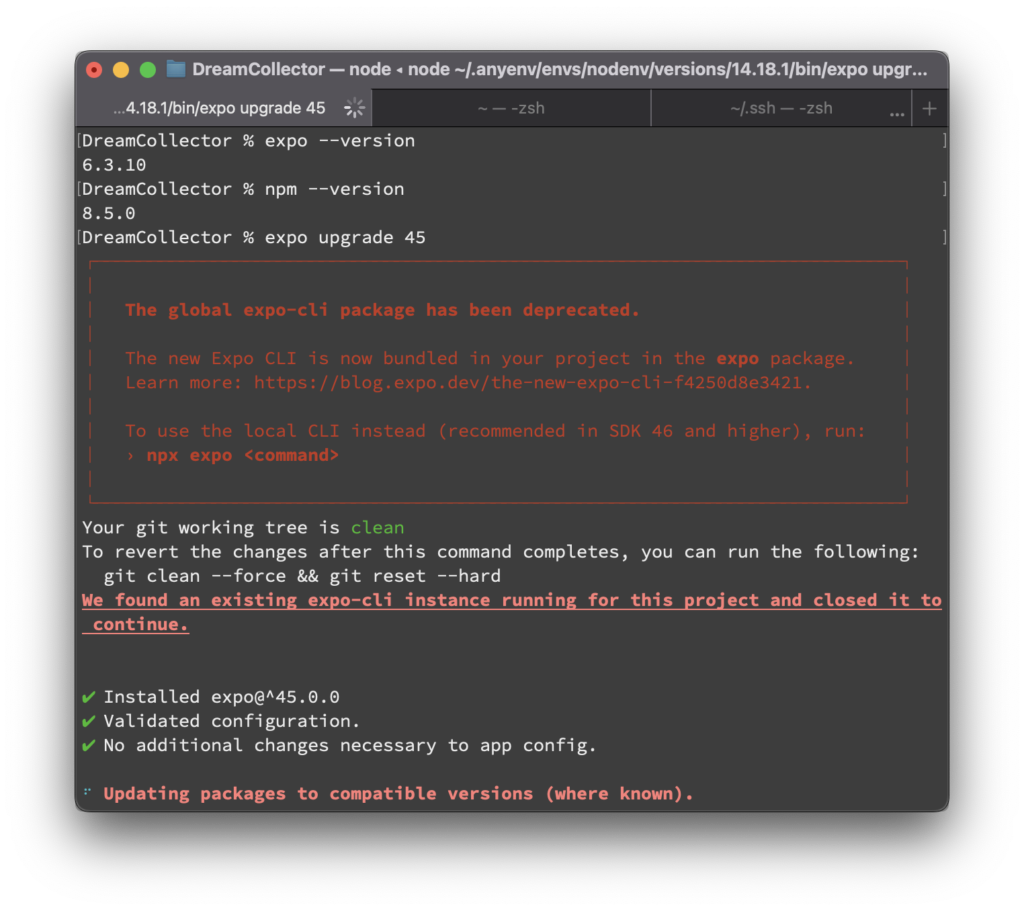
DreamCollector % expo upgrade 45
┌───────────────────────────────────────────────────────────────────────────┐
│                                                                           │
│   The global expo-cli package has been deprecated.                        │
│                                                                           │
│   The new Expo CLI is now bundled in your project in the expo package.    │
│   Learn more: https://blog.expo.dev/the-new-expo-cli-f4250d8e3421.        │
│                                                                           │
│   To use the local CLI instead (recommended in SDK 46 and higher), run:   │
│   › npx expo <command>                                                    │
│                                                                           │
└───────────────────────────────────────────────────────────────────────────┘
Your git working tree is clean
To revert the changes after this command completes, you can run the following:
  git clean --force && git reset --hard
We found an existing expo-cli instance running for this project and closed it to continue.


✔ Installed expo@^45.0.0
✔ Validated configuration.
✔ No additional changes necessary to app config.

✔ Updated known packages to compatible versions.
✔ Cleared packager cache.
Failed to query all project files. Skipping `.expo.*` extension check...
✔ Validated project

👏 Automated upgrade steps complete.
...but this doesn't mean everything is done yet!

✅ The following packages were updated:
expo-ads-admob, expo-constants, expo-dev-client, expo-image-manipulator, expo-image-picker, expo-linear-gradient, expo-linking, expo-modules-core, expo-notifications, expo-status-bar, expo-tracking-transparency, expo-updates, lottie-react-native, react, react-dom, react-native, react-native-gesture-handler, @react-native-masked-view/masked-view, react-native-pager-view, react-native-reanimated, react-native-safe-area-context, react-native-screens, react-native-svg, react-native-web, jest-expo, jest, typescript, @babel/core, @types/react, @types/react-dom, @types/react-native, expo

🚨 The following packages were not updated. You should check the READMEs for those repositories to determine what version is compatible with your new set of packages:
@react-navigation/material-top-tabs, @react-navigation/native, @react-navigation/native-stack, color, dayjs, firebase, native-base, react-native-calendars, react-native-keyboard-accessory, react-native-redash, react-native-tab-view, styled-components, styled-system, @storybook/addon-actions, @storybook/addon-knobs, @storybook/addon-links, @storybook/addon-ondevice-actions, @storybook/addon-ondevice-knobs, @storybook/react-native, @storybook/react-native-server, @testing-library/jest-native, @testing-library/react-native, @types/babel__core, @types/color, @types/eslint, @types/jest, @types/prettier, @types/styled-components, @types/styled-system, @typescript-eslint/eslint-plugin, @typescript-eslint/parser, babel-loader, babel-plugin-transform-inline-environment-variables, eslint, eslint-config-airbnb, eslint-config-prettier, eslint-plugin-import, eslint-plugin-jsx-a11y, eslint-plugin-prefer-arrow, eslint-plugin-react, eslint-plugin-react-hooks, lint-staged, prettier, simple-git-hooks, stylelint, stylelint-config-recess-order, stylelint-config-standard, stylelint-order

Please refer to the release notes for information on any further required steps to update and information about breaking changes:
https://blog.expo.dev/expo-sdk-45-f4e332954a68
DreamCollector %
🚨 以下のパッケージは更新されていません。これらのリポジトリのREADMEをチェックして、新しいパッケージ・セットと互換性のあるバージョンを確認してください:
react-navigation/material-top-tabs、@react-navigation/native、@react-navigation/native-stack、color、dayjs、firebase、native-base、react-native-calendars、react-native-keyboard-accessory、react-native-redash、react-native-tab-view、styled-components、styled-system、 storybook/addon-actions、@storybook/addon-knobs、@storybook/addon-links、@storybook/addon-ondevice-actions、@storybook/addon-ondevice-knobs、@storybook/react-native、@storybook/react-native-server、@testing-library/jest-native、@testing-library/react-native、@types/babel__core、 types/color、@types/eslint、@types/jest、@types/prettier、@types/styled-components、@types/styled-system、@typescript-eslint/eslint-plugin、@typescript-eslint/parser、babel-loader、babel-plugin-transform-inline-environment-variables、eslint、eslint-config-airbnb、 eslint-config-prettier, eslint-plugin-import, eslint-plugin-jsx-a11y, eslint-plugin-prefer-arrow, eslint-plugin-react, eslint-plugin-react-hooks, lint-staged, prettier, simple-git-hooks, stylelint, stylelint-config-recess-order, stylelint-config-standard, stylelint-order
ただし、自動更新の対象になっていないパッケージもある(
Expo のビルドで発生する Unable to find a specification for `UMCore` depended upon by `EX**` について - yn2011's blog (hatenablog.com)The following packages were not updated.)
これらについては、EAS Build を行ってエラーが出る度に 1つずつ対応していくか、node_modules 内をUMCoreで grep してエラーになりそうなパッケージを探していくかする必要がある。
Upgrading an Expo App (janaagaard.com)
上記昔のアップデート記事だが。
不明なパッケージのアップグレード
Upgrading an Expo App (janaagaard.com)
.expo upgradeでアップグレードされなかった未知のパッケージと依存関係のあるパッケージをアップグレードします。yarn upgrade
未知のパッケージのメジャーアップデート
yarn upgradeはパッケージを新しいメジャーバージョンにアップグレードしません。最新でないものがないか確認し、あればアップグレードを検討します。私のExpoプロジェクトでは、これは通常ESLint関連のパッケージです。手動でバージョンを更新してから、.package.jsonyarn installを実行します。
知っているパッケージのいくつかは非推奨と表示されるかもしれませんが、それらは更新しないでください。Expo はこれらのパッケージの特定のバージョンでテストされており、当然ながら最新リリースから少し遅れています。
不明なパッケージのメジャーアップデートを探してください。ステップ1で不明とされたパッケージが赤い線で表示されています。
【ReactNative開発】Yarn/npmでパッケージを最新化する | 煎茶 (simpletraveler.jp)
上記 yarn upgradeやyarn outdatedの使い方について
自分はyarn outdated + 対話的アップデートで都度更新していこうと思います
手順4:非推奨になる項目を確認し、修正・削除する必要のあるパッケージがないか確認する
公式ドキュメントの各ブログから、「Deprecations, renamings, and removals(廃止予定、名前の変更、削除)」の項目を確認し、対応が必要な箇所がないか確認
例)44->45
・expo-ads-admob、expo-analytics-amplitude、expo-ads-facebook、expo-facebook、expo-google-sign-in、expo-segmentは非推奨です。詳細はそれぞれのドキュメントを参照してください。
・expo-app-loading は非推奨です - 代わりに expo-splash-screen を直接使用してください: 代わりに expo-splash-screen を直接使用してください: SplashScreen.preventAutoHideAsync() と SplashScreen.hideAsync() です。この実装は expo-splash-screen の薄いラッパーに過ぎないので、使い続けたい場合はプロジェクトにコピーしてください。
・react-native-appearanceはSDK 43以降非推奨となり、現在はExpo Goから削除されています。React NativeのAppearance APIに移行することをお勧めします。
・Node 12のサポートは終了しました。
・SDK 42以下のiOS向けクラシックビルドは、Apple App Storeで受け付けられなくなりました(関連アナウンスを参照)。SDK 43以上にアップデートしてください。
プロジェクト内で npx expo を使用している場合(たとえば、グローバルに Expo CLI をインストールするのをスキップするために CI 上で)、誤って新しいベータ版ローカル CLI を起動しないように、npx expo-cli に変更することをお勧めします。
例)45ー>46
・SDK 45で非推奨とされたライブラリが削除されました。Expo-ads-admob、expo-analytics-amplitude、expo-ads-facebook、expo-facebook、expo-google-sign-in、expo-segmentです。移行方法の詳細については、各ライブラリのSDK 45ドキュメント(上記の各ライブラリ名からリンクされています)を参照してください。
・Expo CLIのWeb UIは、expo-cli@6.0.0、削除されました。新しいローカルCLIでも利用できません。Expo CLIのWeb UIの廃止」で説明しています。
・expo-error-recovery は非推奨となり、SDK 47 で削除されます。エラー回復モジュールは、クラシック ビルド システムの制約内で作業するためだけに使用されていましたが、EAS ビルドが存在する現在では必要なくなりました。詳細はこちら。
・react-native-web、react-dom、@expo/webpack-configは、Web上で実行するために新しいプロジェクトにインストールする必要があります。これらはテンプレートのインストールサイズを小さくするために削除され、web を起動するときにインストールする方法を説明します。
例)46 -> 47
・React Native Maps 0.31.1 → 1.3.2。これはメジャーバージョンアップであり、どの変更があなたのアプリに影響するかを判断するためにreact-native-maps/CHANGELOGを参照することをお勧めします。
・expo-firebase-* ライブラリは非推奨です。アプリで expo-firebase-analytics または expo-firebase-recaptcha を使用している場合は、React Native Firebase に移行することをお勧めします。詳細は「Expo FirebaseからReact Native Firebaseへの移行」ガイドを参照してください。
非推奨のapp.jsonフィールドを削除しました。以下の値が削除され、SDK 47+のapp.jsonでは無効になりました:useNextNotificationsApi、android.googleSignIn、ios.merchantId、ios.googleSignIn、ios.splash.xib、appKey。
・SDK 47はクラシックビルドをサポートしていません。SDK 46は、Expoビルド:[ios|android]をサポートする最終リリースでした。Expo プロジェクトは、EAS Build(クラウドまたは独自のインフラストラクチャ)、または Xcode/Android Studio(プリビルドを実行してネイティブプロジェクトを生成)を使用してビルドできます。
例)47 -> 48
app.json/app.config.jsからentryPointが削除されました。代わりにpackage.jsonで使用してください。
.expo-auth-session で useProxy が非推奨になりました。
expo-randomはexpo-crypto-expo-randomにマージされ、このパッケージは非推奨となりました。
@types/react-nativeはTypeScriptに必要なくなりました。 .@types/react-nativeはSDK 48 project.react-nativeからアンインストールする必要があります。
EAS Updateのリリースに伴い、expo publishとClassic Updatesは来年で終了となります。クラシックアップデートの公開は2024年までサポートされます。既存のアプリは引き続き動作し、終了前に公開されたアップデートを受け取ることができます。
例)48 -> 49
Android Expo モジュールを Gradle 8 用に更新する: Kotlin でネイティブモジュールをビルドするために Expo Modules API を使用したことがある方は、モジュールを Gradle 8 に対応させる方法について expo.fyi/expo-modules-gradle8-migration を参照してください。
sentry-expo メジャーバージョンバンプ: sentry-expo@7.0.0 の新しいメジャーリリースは、New Architecture をサポートする Sentry React Native SDK バージョン 5 を使用するようになりました。プロジェクトに影響する可能性のある変更の詳細については、移行ガイドを参照してください。
Expo CLI のデフォルトが、すべてのプロジェクトでポート 19000 ではなく 8081 になりました。ポート 19000 は歴史的な理由で使用されていただけで、もはや必要ないため、8081 に収束しました。
Expo Goとexpo-dev-clientでは、JSCのリモートデバッグを無効にしました。JSCのリモートデバッグは、Hermesでのデバッグと比べて特にうまく機能したことがなく、時間の経過とともに信頼性が低下してきました。詳細については、React Nativeへのこのプルリクエストを参照してください。
Constants.manifest は非推奨です。代わりに Constants.expoConfig を使用してください。Expo アプリのマニフェストは、アプリのアセット(JavaScript など)と設定データ(多くの場合、app.json のフィールド)を指定します。以前は、Constants.manifest がアプリの設定データにアクセスする方法でした。SDK 49では、Constants.expoConfigがこの目的のためにConstants.manifestに取って代わります。この変更の詳細については、expo.fyi/why-constants-expoconfig を参照してください。
AuthSessionプロキシが削除されました: この推奨に従って、useProxyオプションとAuthSession.startAsyncメソッドがexpo-auth-session@5から削除されました。auth プロキシからの移行にもう少し時間が必要な場合は expo-auth-session@4 を使い続けることができます。現在、カスタムスキームにリダイレクトされない認証プロバイダーを回避するために auth プロキシを使用している場合は、Expo Go から開発ビルドに切り替え、そのプロバイダーのネイティブ SDK を使用することをお勧めします。たとえば Facebook、Googleなど。
android:usesCleartextTrafficは、システムのデフォルトに基づくようになりました。デバッグビルドでは明示的にenabledに設定され、その他のバリアントでは未指定です。つまり、API 27以下ではデフォルトがtrueになり、API 28以上ではデフォルトがfalseになります。つまり、API 27以下ではデフォルトでtrueになり、API 28以上ではデフォルトでfalseになる。Androidの本番環境で、安全でないエンドポイントへのネットワークリクエストに依存している場合は、expo-build-propertiesで手動で有効にする必要がある。
Reanimated 3 では、従来の Reanimated API のサポートが終了しました。より高速で人間工学的な新しい API にまだアップデートしていないライブラリに依存している場合、アップグレード時にこれに関連するエラーが表示される可能性があります。詳細はこちら。
Expo GoからExpo-face-detectorのサポートが削除されました。この変更は、Expo Go iOSシミュレータ ビルドでApple Siliconをネイティブにサポートするために必要でした。Expo Go以外では、これまでどおりこのライブラリを使用できます。 無料版のDeepL翻訳(www.DeepL.com/Translator)で翻訳しました。
対応書を書く
44 -> 45 対応書
- expo-ads-admobを削除し、代替のパッケージを使用する
- ReactNativeGoogleMobileAdsを使用するように書き直しました。
- React Nativeで作ったスマホアプリにAdmob(広告)とRevenue Cat(課金)を使ってマネタイズする
expo install react-native-google-mobile-ads- app.json に先ほど取得したアプリ ID を設定
- expo-dev-clientの追加
yarn remove expo-ads-admob- [react native] expo buildからeas buildに移行方法まとめ – weblog (ts-engine.net)
- これをしないとbuildが通らなかったし、またエラーメッセージもそういう表示がないので、かなり苦戦した。
- また、app.jsonから必要な箇所も削除しておかないとbuildが通らない。
- 以下のgoogleMobileAdsAppIDの部分を消さないとbuildが通らない。
- [react native] expo buildからeas buildに移行方法まとめ – weblog (ts-engine.net)
- 以上
45 -> 46対応書
- expo-error-recovery は非推奨 とのことだが、yarn-lockに先のパッケージ使っているのあるので、エラーが生じないか確認
- 以上
46 -> 47対応書
- なし
47 -> 48対応書
- @types/react-native をアンインストール
yarn remove @types/react-native
- 以上
48 -> 49対応書
- なし
手順4_5: expo-dev-clientの設定を行う
$ expo install expo-dev-clientpackage.jsonを変更
"scripts": {
    "start": "expo start --dev-client",
    "build": "eas build --profile development --local",
buildを実行
DreamCollector % yarn build
yarn run v1.22.17
$ eas build --profile development --local
✔ Select platform › iOS
Loaded "env" configuration for the "development" profile: APP_ENV. Learn more: https://docs.expo.dev/build-reference/variables/
EAS project not configured.
✔ Existing EAS project found for @sakana_27/DreamCollector (id = a886c477-24f3-4f76-bab4-0985ae1d52b4). Configure this project? … yes

Warning: Your project uses dynamic app configuration, and the EAS project ID can't automatically be added to it.
https://docs.expo.dev/workflow/configuration/#dynamic-configuration-with-appconfigjs

To complete the setup process, set "extra.eas.projectId" in your app.config.js or app.json:

{
  "expo": {
    "extra": {
      "eas": {
        "projectId": "a886c477-24f3-4f76-bab4-0985ae1d52b4"
      }
    }
  }
}

✖ Linking local project to EAS project a886c477-24f3-4f76-bab4-0985ae1d52b4
Cannot automatically write to dynamic config at: app.config.js
    Error: build command failed.
error Command failed with exit code 1.
info Visit https://yarnpkg.com/en/docs/cli/run for documentation about this command.
DreamCollector %
app.jsonに以下を追加
{
  "expo": {
    "extra": {
      "eas": {
        "projectId": "a886c477-24f3-4f76-bab4-0985ae1d52b4"
      }
    },
再度buildを実行
DreamCollector % yarn build
yarn run v1.22.17
$ eas build --profile development --local
✔ Select platform › iOS
Loaded "env" configuration for the "development" profile: APP_ENV. Learn more: https://docs.expo.dev/build-reference/variables/
Fastlane is not available, make sure it's installed and in your PATH
spawn fastlane ENOENT
npx exited with non-zero code: 1
    Error: build command failed.
error Command failed with exit code 1.
info Visit https://yarnpkg.com/en/docs/cli/run for documentation about this command.
DreamCollector %
Fastlaneが見つからないために発生するエラー?
Fastlaneは、iOSおよびAndroidアプリのビルド、署名、デプロイメントなど、モバイルアプリの自動化タスクを効率的に管理するためのツールです。EASビルドプロセスでは、Fastlaneが使用されていることが一般的で、Fastlaneが正しく設定されていることが必要です。
Fastlaneのインストールがあるか確認
DreamCollector % fastlane --version
zsh: command not found: fastlane
Fastlaneのインストール
Fastlaneを使ってアプリのデプロイを自動化する - Fastlaneを使ってReact nativeで作ったアプリをを自動でデプロイしてみましょう。 (posstree.com)
# Using RubyGems
sudo gem install fastlane -NV

# Alternatively using Homebrew
brew cask install fastlane
RubyGemsを使ってインストールすることをおすすめします
以下を実行
$ sudo gem install fastlane -NV以下のエラーが発生
ERROR:  While executing gem ... (Gem::FilePermissionError)
    You don't have write permissions for the /usr/bin directory.
~ % fastlane --version
zsh: command not found: fastlane
eas build --local メモ (zenn.dev)
gemがうまく行かなかったので、上記記事のようにhomebrewを実行
$brew install fastlane下記エラーが出るが、fastlane --version 実行でバージョンが表示されたのでインストール自体は成功と思われる。
Error: Failure while executing; `/usr/bin/env cp -pR /private/tmp/d20230821-14393-2n3vs/rust/. /usr/local/Cellar/rust` exited with 1. Here's the output:
cp: /private/tmp/d20230821-14393-2n3vs/rust/./1.71.1/lib/librustc_driver-431befb9efb1f10a.dylib: No space left on device
cp: /private/tmp/d20230821-14393-2n3vs/rust/./1.71.1/COPYRIGHT: No space left on device
以下省略
build を再実行
yarn build
以下のエラーが発生
Error: npx -y expo-cli@6.0.5 prebuild --non-interactive --no-install --platform ios exited with non-zero code: 1
    at ChildProcess.completionListener (/Users/haradaatsuki/.npm/_npx/9dcad7ace51add55/node_modules/@expo/spawn-async/build/spawnAsync.js:42:23)
    at Object.onceWrapper (events.js:520:26)
    at ChildProcess.emit (events.js:400:28)
    at maybeClose (internal/child_process.js:1058:16)
    at Process.ChildProcess._handle.onexit (internal/child_process.js:293:5)
    ...
    at spawnAsync (/Users/haradaatsuki/.npm/_npx/9dcad7ace51add55/node_modules/@expo/spawn-async/build/spawnAsync.js:7:23)
    at spawn (/Users/haradaatsuki/.npm/_npx/9dcad7ace51add55/node_modules/@expo/turtle-spawn/dist/index.js:16:47)
    at BuildContext.runGlobalExpoCliCommandAsync [as runGlobalExpoCliCommand] (/Users/haradaatsuki/.npm/_npx/9dcad7ace51add55/node_modules/eas-cli-local-build-plugin/dist/expoCli.js:24:43)
    at runExpoCliCommand (/Users/haradaatsuki/.npm/_npx/9dcad7ace51add55/node_modules/@expo/build-tools/dist/utils/project.js:23:20)
    at prebuildAsync (/Users/haradaatsuki/.npm/_npx/9dcad7ace51add55/node_modules/@expo/build-tools/dist/common/prebuild.js:25:43)
    at processTicksAndRejections (internal/process/task_queues.js:95:5)
    at async /Users/haradaatsuki/.npm/_npx/9dcad7ace51add55/node_modules/@expo/build-tools/dist/builders/ios.js:59:13
    at async BuildContext.runBuildPhase (/Users/haradaatsuki/.npm/_npx/9dcad7ace51add55/node_modules/@expo/build-tools/dist/context.js:101:28)
    at async buildAsync (/Users/haradaatsuki/.npm/_npx/9dcad7ace51add55/node_modules/@expo/build-tools/dist/builders/ios.js:50:9)
    at async runBuilderWithHooksAsync (/Users/haradaatsuki/.npm/_npx/9dcad7ace51add55/node_modules/@expo/build-tools/dist/builders/common.js:12:13)

Build failed
Unknown error. See logs for more information.
npx exited with non-zero code: 1
    Error: build command failed.
npx -y expo-cli@6.0.5 prebuild コマンドで問題発生? 45でDeprecated(非推奨だから?)
サーバーでビルドしても、エラーが生じたので、eas-cli をダウングレードかアップグレードするのがいいかも?
expo45に対応するeas-cliのバージョンわからんのでとりあえず、expo45->47までアップデートしてみる。
Build failed
bash -c node /usr/local/eas-build-worker/node_modules/.bin/expo prebuild --non-interactive --no-install --platform ios exited with non-zero code: 1
手順5:App Store / Google Playから、お使いのExpo Goアプリをアップデート
既存のアプリを削除すれば、Expo CLIがシミュレーターで自動的にアプリを更新します。
Expo 46へのアップデート
expo-cli upgrade [sdk-version]
expo-cli upgrade [sdk-version] | Fig
手順1: Expo CLIを最新バージョンにアップデート
npm i -g expo-cli手順2:EAS CLIを最新バージョンにアップデート
npm i -g eas-cli手順3:expo-cli upgrade を実行
expo-cli upgrade 46以下のエラーが発生
Failed to install expo package with error: yarnpkg exited with non-zero code: 1Expo SDK を 44→47 に upgrade した際のエラー解消メモ (zenn.dev)
下記のエラーが出て失敗します。これは yarn 側のエラーなので、自身の環境の問題である可能性が高いです。
yarnpkg exited with non-zero code: 1
Stack Overflow にも上がっており、私の方ではこちらを一通り試しましたが解決せず。https://embed.zenn.studio/card#zenn-embedded__4c9670af47dee
最終的に各パッケージをアップデートして成功しました。
$ yarn upgrade
$ expo upgrade
さらに各パッケージを必要に応じて手動でアップデートしなければいけないようですが、そちらは別記事で。
yarn cache clean を実行後、upgradeし直したら成功した。
👏 Automated upgrade steps complete.
...but this doesn't mean everything is done yet!

✅ The following packages were updated:
expo-constants, expo-dev-client, expo-image-manipulator, expo-image-picker, expo-linear-gradient, expo-linking, expo-modules-core, expo-notifications, expo-status-bar, expo-tracking-transparency, expo-updates, lottie-react-native, react, react-dom, react-native, react-native-gesture-handler, @react-native-masked-view/masked-view, react-native-pager-view, react-native-reanimated, react-native-safe-area-context, react-native-screens, react-native-svg, react-native-web, jest-expo, jest, typescript, @babel/core, @types/react, @types/react-dom, @types/react-native, expo

🚨 The following packages were not updated. You should check the READMEs for those repositories to determine what version is compatible with your new set of packages:
@react-navigation/material-top-tabs, @react-navigation/native, @react-navigation/native-stack, color, dayjs, firebase, native-base, react-native-calendars, react-native-google-mobile-ads, react-native-keyboard-accessory, react-native-redash, react-native-tab-view, styled-components, styled-system, @storybook/addon-actions, @storybook/addon-knobs, @storybook/addon-links, @storybook/addon-ondevice-actions, @storybook/addon-ondevice-knobs, @storybook/react-native, @storybook/react-native-server, @testing-library/jest-native, @testing-library/react-native, @types/babel__core, @types/color, @types/eslint, @types/jest, @types/prettier, @types/styled-components, @types/styled-system, @typescript-eslint/eslint-plugin, @typescript-eslint/parser, babel-loader, babel-plugin-transform-inline-environment-variables, eslint, eslint-config-airbnb, eslint-config-prettier, eslint-plugin-import, eslint-plugin-jsx-a11y, eslint-plugin-prefer-arrow, eslint-plugin-react, eslint-plugin-react-hooks, lint-staged, prettier, simple-git-hooks, stylelint, stylelint-config-recess-order, stylelint-config-standard, stylelint-order
手順4:expo-cli doctor を実行
expo-cli doctor結果
Expected package @expo/config-plugins@^4.1.0
Found invalid:
  @expo/config-plugins@5.0.4
  @expo/config-plugins@4.0.17
  (for more info, run: npm why @expo/config-plugins)
Some dependencies are incompatible with the installed expo package version:
 - @react-native-masked-view/masked-view - expected version: 0.2.6 - actual version installed: 0.2.7
 - expo-constants - expected version: ~13.1.1 - actual version installed: 13.2.4
 - expo-dev-client - expected version: ~1.0.1 - actual version installed: 1.3.1
 - expo-image-manipulator - expected version: ~10.3.1 - actual version installed: 10.4.0
 - expo-image-picker - expected version: ~13.1.1 - actual version installed: 13.3.1
 - expo-linear-gradient - expected version: ~11.3.0 - actual version installed: 11.4.0
 - expo-linking - expected version: ~3.1.0 - actual version installed: 3.2.4
 - expo-modules-core - expected version: ~0.9.2 - actual version installed: 0.11.10
 - expo-notifications - expected version: ~0.15.4 - actual version installed: 0.16.1
 - expo-status-bar - expected version: ~1.3.0 - actual version installed: 1.4.4
 - expo-tracking-transparency - expected version: ~2.2.0 - actual version installed: 2.3.1
 - expo-updates - expected version: ~0.13.4 - actual version installed: 0.14.7
 - lottie-react-native - expected version: 5.0.1 - actual version installed: 5.1.3
 - react - expected version: 17.0.2 - actual version installed: 18.0.0
 - react-dom - expected version: 17.0.2 - actual version installed: 18.0.0
 - react-native - expected version: 0.68.2 - actual version installed: 0.69.6
 - react-native-gesture-handler - expected version: ~2.2.1 - actual version installed: 2.5.0
 - react-native-pager-view - expected version: 5.4.15 - actual version installed: 5.4.24
 - react-native-reanimated - expected version: ~2.8.0 - actual version installed: 2.9.1
 - react-native-safe-area-context - expected version: 4.2.4 - actual version installed: 4.3.1
 - react-native-screens - expected version: ~3.11.1 - actual version installed: 3.15.0
 - react-native-web - expected version: 0.17.7 - actual version installed: 0.18.12
Your project may not work correctly until you install the correct versions of the packages.
To install the correct versions of these packages, please run: expo doctor --fix-dependencies,
or install individual packages by running expo install [package-name ...]
Warning: Invalid version react-native@0.69.6 for expo sdkVersion 45.0.0. Use react-native@0.68.2
以下を実行
expo doctor --fix-dependenciesアップしたバージョンがほとんど元に戻った?
なぜか、package.jsonのexpoのあバージョンが45のママだったのでやり直し
expo-cli doctor を実行後、expo doctor --fix-dependenciesを実行
以下のエラー発生
'expo-cli doctor' is not supported for SDK 46 and higher. Use 'npx expo-doctor' instead.expo-cliが最新だから? ドキュメントでは上記で行けるはず
npx expo-doctorを実行
DreamCollector % npx expo-doctor
Need to install the following packages:
  expo-doctor
Ok to proceed? (y) y
✔ Check Expo config for common issues
✔ Check package.json for common issues
✖ Check dependencies for packages that should not be installed directly
✔ Check for common project setup issues
✔ Check npm/ yarn versions
✔ Check Expo config (app.json/ app.config.js) schema
✖ Check that packages match versions required by installed Expo SDK
✔ Check that native modules do not use incompatible support packages
✔ Check for legacy global CLI installed locally
✔ Check that native modules use compatible support package versions for installed Expo SDK

Detailed check results:

Some dependencies are incompatible with the installed expo version:
  react-native@0.69.6 - expected version: 0.69.9
Your project may not work correctly until you install the correct versions of the packages.
Install individual packages by running npx expo install react-native@0.69.9
Found outdated dependencies
Advice: Use 'npx expo install --check' to review and upgrade your dependencies.

The package "expo-modules-core" should not be installed directly in your project. It is a dependency of other Expo packages, which will install it automatically as needed.

One or more checks failed, indicating possible issues with the project.
46 -> 47
手順1,2は省略
手順3:expo-cli upgrade を実行
expo-cli upgrade 47👏 Automated upgrade steps complete.
...but this doesn't mean everything is done yet!
✅ The following packages were updated:
expo-constants, expo-dev-client, expo-image-manipulator, expo-image-picker, expo-linear-gradient, expo-linking, expo-modules-core, expo-notifications, expo-status-bar, expo-tracking-transparency, expo-updates, lottie-react-native, react, react-dom, react-native, react-native-gesture-handler, @react-native-masked-view/masked-view, react-native-pager-view, react-native-reanimated, react-native-safe-area-context, react-native-screens, react-native-svg, react-native-web, jest-expo, jest, typescript, @babel/core, @types/react, @types/react-dom, @types/react-native, expo
🚨 The following packages were not updated. You should check the READMEs for those repositories to determine what version is compatible with your new set of packages:
@react-navigation/material-top-tabs, @react-navigation/native, @react-navigation/native-stack, color, dayjs, firebase, native-base, react-native-calendars, react-native-google-mobile-ads, react-native-keyboard-accessory, react-native-redash, react-native-tab-view, styled-components, styled-system, @storybook/addon-actions, @storybook/addon-knobs, @storybook/addon-links, @storybook/addon-ondevice-actions, @storybook/addon-ondevice-knobs, @storybook/react-native, @storybook/react-native-server, @testing-library/jest-native, @testing-library/react-native, @types/babel__core, @types/color, @types/eslint, @types/jest, @types/prettier, @types/styled-components, @types/styled-system, @typescript-eslint/eslint-plugin, @typescript-eslint/parser, babel-loader, babel-plugin-transform-inline-environment-variables, eslint, eslint-config-airbnb, eslint-config-prettier, eslint-plugin-import, eslint-plugin-jsx-a11y, eslint-plugin-prefer-arrow, eslint-plugin-react, eslint-plugin-react-hooks, lint-staged, prettier, simple-git-hooks, stylelint, stylelint-config-recess-order, stylelint-config-standard, stylelint-order
Please refer to the release notes for information on any further required steps to update and information about breaking changes:
https://blog.expo.dev/expo-sdk-47-a0f6f5c038af
手順4:expo-cli doctor を実行
expo-cli doctornpx expo-doctorDreamCollector % npx expo-doctor
✔ Check Expo config for common issues
✔ Check package.json for common issues
✖ Check dependencies for packages that should not be installed directly
✔ Check for common project setup issues
✔ Check npm/ yarn versions
✔ Check Expo config (app.json/ app.config.js) schema
✖ Check that packages match versions required by installed Expo SDK
✔ Check that native modules do not use incompatible support packages
✔ Check for legacy global CLI installed locally
✔ Check that native modules use compatible support package versions for installed Expo SDK
Detailed check results:
Some dependencies are incompatible with the installed expo version:
react-native@0.70.5 - expected version: 0.70.8
Your project may not work correctly until you install the correct versions of the packages.
Install individual packages by running npx expo install react-native@0.70.8
Found outdated dependencies
Advice: Use 'npx expo install --check' to review and upgrade your dependencies.
The package "expo-modules-core" should not be installed directly in your project. It is a dependency of other Expo packages, which will install it automatically as needed.
One or more checks failed, indicating possible issues with the project.npx expo install --checkDreamCollector % npx expo install --check
Some dependencies are incompatible with the installed expo version:
react-native@0.70.5 - expected version: 0.70.8
Your project may not work correctly until you install the correct versions of the packages.
Install individual packages by running npx expo install react-native@0.70.8
✔ Fix dependencies? … yes
› Installing 1 SDK 47.0.0 compatible native module using Yarn
> yarn add react-native@0.70.8
yarn add v1.22.17
$ typesync || :
» TypeSync v0.8.0
- Syncing type definitions in package.json...
✖ getaddrinfo ENOTFOUND typespublisher.blob.core.windows.net
Stack:
Error: getaddrinfo ENOTFOUND typespublisher.blob.core.windows.net
at GetAddrInfoReqWrap.onlookup [as oncomplete] (dns.js:71:26)
[1/4] 🔍 Resolving packages...
warning Resolution field "react-devtools-core@4.14.0" is incompatible with requested version "react-devtools-core@4.24.0"
[2/4] 🚚 Fetching packages...
[3/4] 🔗 Linking dependencies...
[4/4] 🔨 Building fresh packages...
success Saved lockfile.
success Saved 6 new dependencies.
info Direct dependencies
└─ react-native@0.70.8
info All dependencies
├─ @react-native-community/cli-doctor@9.3.0
├─ @react-native-community/cli-hermes@9.3.4
├─ @react-native-community/cli-platform-android@9.3.1
├─ @react-native-community/cli-platform-ios@9.3.0
├─ @react-native-community/cli@9.3.2
└─ react-native@0.70.8
$ simple-git-hooks > /dev/null
✨ Done in 46.23s.
Xcode 14をインストール
49がXcode14.3.1対応?なのでそれインストール
yarn build を再度実行するもエラー
Error: pod install exited with non-zero code: 31
    at ChildProcess.completionListener (/Users/haradaatsuki/.npm/_npx/9dcad7ace51add55/node_modules/@expo/spawn-async/build/spawnAsync.js:42:23)
    at Object.onceWrapper (events.js:520:26)
    at ChildProcess.emit (events.js:400:28)
    at maybeClose (internal/child_process.js:1058:16)
    at Process.ChildProcess._handle.onexit (internal/child_process.js:293:5)
    ...
    at spawnAsync (/Users/haradaatsuki/.npm/_npx/9dcad7ace51add55/node_modules/@expo/spawn-async/build/spawnAsync.js:7:23)
    at spawn (/Users/haradaatsuki/.npm/_npx/9dcad7ace51add55/node_modules/@expo/turtle-spawn/dist/index.js:16:47)
    at installPods (/Users/haradaatsuki/.npm/_npx/9dcad7ace51add55/node_modules/@expo/build-tools/dist/ios/pod.js:11:38)
    at /Users/haradaatsuki/.npm/_npx/9dcad7ace51add55/node_modules/@expo/build-tools/dist/builders/ios.js:70:41
    at BuildContext.runBuildPhase (/Users/haradaatsuki/.npm/_npx/9dcad7ace51add55/node_modules/@expo/build-tools/dist/context.js:101:34)
    at buildAsync (/Users/haradaatsuki/.npm/_npx/9dcad7ace51add55/node_modules/@expo/build-tools/dist/builders/ios.js:69:19)
    at async runBuilderWithHooksAsync (/Users/haradaatsuki/.npm/_npx/9dcad7ace51add55/node_modules/@expo/build-tools/dist/builders/common.js:12:13)
    at async Object.iosBuilder (/Users/haradaatsuki/.npm/_npx/9dcad7ace51add55/node_modules/@expo/build-tools/dist/builders/ios.js:29:16)
    at async buildIosAsync (/Users/haradaatsuki/.npm/_npx/9dcad7ace51add55/node_modules/eas-cli-local-build-plugin/dist/ios.js:66:12)
    at async buildAsync (/Users/haradaatsuki/.npm/_npx/9dcad7ace51add55/node_modules/eas-cli-local-build-plugin/dist/build.js:54:29)

Build failed
Unknown error. See logs for more information.
npx exited with non-zero code: 1
    Error: build command failed.
error Command failed with exit code 1.
info Visit https://yarnpkg.com/en/docs/cli/run for documentation about this command.
pod install のエラー?っぽいので、pod をアップデートすればいけるか?
DreamCollector % pod --version
Ignoring ffi-1.12.2 because its extensions are not built. Try: gem pristine ffi --version 1.12.2
Ignoring iStats-1.6.1 because its extensions are not built. Try: gem pristine iStats --version 1.6.1
Ignoring racc-1.5.2 because its extensions are not built. Try: gem pristine racc --version 1.5.2
Ignoring shopify-cli-2.3.0 because its extensions are not built. Try: gem pristine shopify-cli --version 2.3.0
1.10.1
DreamCollector %
sudo gem install cocoapods を実行
ERROR:  Error installing cocoapods:
	ERROR: Failed to build gem native extension.

    current directory: /Library/Ruby/Gems/2.6.0/gems/ffi-1.12.2/ext/ffi_c
/System/Library/Frameworks/Ruby.framework/Versions/2.6/usr/bin/ruby -I /Library/Ruby/Site/2.6.0 -r ./siteconf20230822-5545-1stzh3o.rb extconf.rb
/System/Library/Frameworks/Ruby.framework/Versions/2.6/usr/lib/ruby/2.6.0/mkmf.rb:467:in `try_do': The compiler failed to generate an executable file. (RuntimeError)
You have to install development tools first.
	from /System/Library/Frameworks/Ruby.framework/Versions/2.6/usr/lib/ruby/2.6.0/mkmf.rb:546:in `block in try_link0'
	from /System/Library/Frameworks/Ruby.framework/Versions/2.6/usr/lib/ruby/2.6.0/tmpdir.rb:93:in `mktmpdir'
	from /System/Library/Frameworks/Ruby.framework/Versions/2.6/usr/lib/ruby/2.6.0/mkmf.rb:543:in `try_link0'
	from /System/Library/Frameworks/Ruby.framework/Versions/2.6/usr/lib/ruby/2.6.0/mkmf.rb:570:in `try_link'
	from /System/Library/Frameworks/Ruby.framework/Versions/2.6/usr/lib/ruby/2.6.0/mkmf.rb:672:in `try_ldflags'
	from /System/Library/Frameworks/Ruby.framework/Versions/2.6/usr/lib/ruby/2.6.0/mkmf.rb:1832:in `pkg_config'
	from extconf.rb:9:in `system_libffi_usable?'
	from extconf.rb:34:in `<main>'

To see why this extension failed to compile, please check the mkmf.log which can be found here:

  /Library/Ruby/Gems/2.6.0/extensions/universal-darwin-22/2.6.0/ffi-1.12.2/mkmf.log

extconf failed, exit code 1

Gem files will remain installed in /Library/Ruby/Gems/2.6.0/gems/ffi-1.12.2 for inspection.
Results logged to /Library/Ruby/Gems/2.6.0/extensions/universal-darwin-22/2.6.0/ffi-1.12.2/gem_make.out
$ brew update
$ brew upgradeさきにbrewのバージョンを確認しておくべきだった。
Error: Your Xcode (13.1) is too outdated.
Please update to Xcode 14.3 (or delete it).
Xcode can be updated from the App Store.たー
xcodebuild -version
Xcode 13.1
Build version 13A1030d14.3.1をダウンロードしたが、切り替わってはいないらしい
下記赤線のとこをどうにかして、バージョンを最新に変更する。
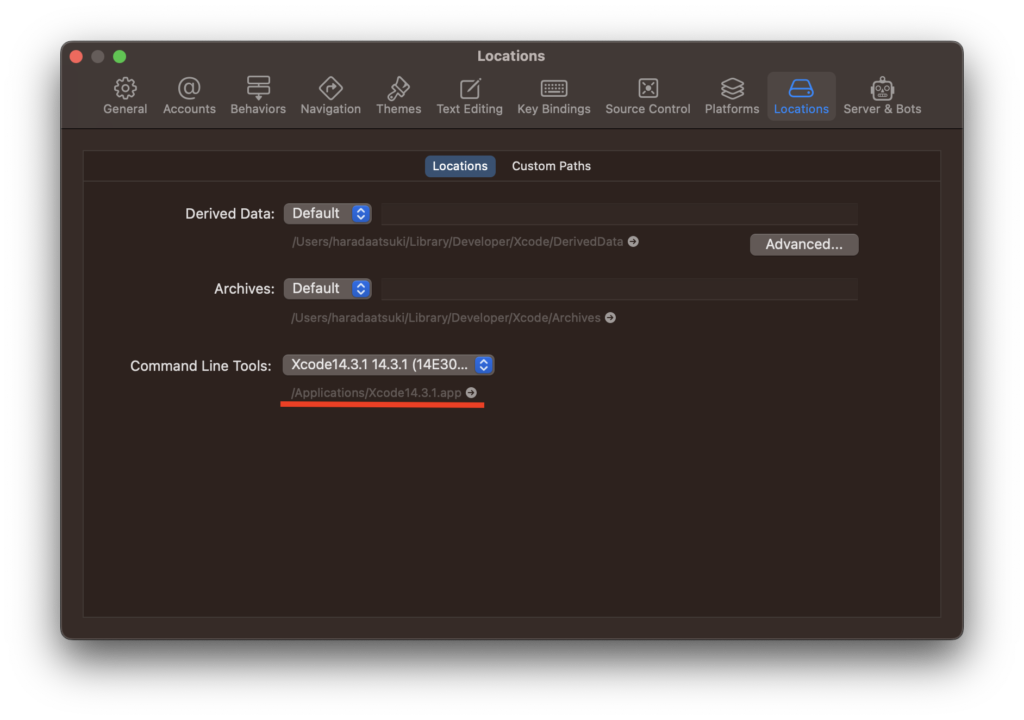
~ % xcodebuild -version
Xcode 14.3.1
Build version 14E300c
$ brew upgrade$ brew upgrade
省略
Error: Permission denied @ apply2files - /usr/local/lib/docker/cli-plugins一旦諦めてsudo gem install cocoapodsを再実行。
Successfullyinstalled cocoapods-core-1.12.1
ERROR:  While executing gem ... (Gem::FilePermissionError)
    You don't have write permissions for the /usr/bin directory.
~ % pod --version
Ignoring iStats-1.6.1 because its extensions are not built. Try: gem pristine iStats --version 1.6.1
Ignoring racc-1.5.2 because its extensions are not built. Try: gem pristine racc --version 1.5.2
Ignoring shopify-cli-2.3.0 because its extensions are not built. Try: gem pristine shopify-cli --version 2.3.0
1.10.1更新されていない。
上記を参考に実施。
sudo gem install -n /usr/local/bin cocoapodsIgnoring iStats-1.6.1 because its extensions are not built. Try: gem pristine iStats --version 1.6.1
Ignoring racc-1.5.2 because its extensions are not built. Try: gem pristine racc --version 1.5.2
Ignoring shopify-cli-2.3.0 because its extensions are not built. Try: gem pristine shopify-cli --version 2.3.0
Successfully installed cocoapods-1.12.1
Parsing documentation for cocoapods-1.12.1
Installing ri documentation for cocoapods-1.12.1
Done installing documentation for cocoapods after 2 seconds
1 gem installed
~ % pod --version
Ignoring iStats-1.6.1 because its extensions are not built. Try: gem pristine iStats --version 1.6.1
Ignoring racc-1.5.2 because its extensions are not built. Try: gem pristine racc --version 1.5.2
Ignoring shopify-cli-2.3.0 because its extensions are not built. Try: gem pristine shopify-cli --version 2.3.0
1.12.1
更新されたのを確認。
yarn build するも変わらずエラー
Error: pod install exited with non-zero code: 31
    at ChildProcess.completionListener (/Users/haradaatsuki/.npm/_npx/9dcad7ace51add55/node_modules/@expo/spawn-async/build/spawnAsync.js:42:23)
    at Object.onceWrapper (events.js:520:26)
    at ChildProcess.emit (events.js:400:28)
    at maybeClose (internal/child_process.js:1058:16)
    at Process.ChildProcess._handle.onexit (internal/child_process.js:293:5)
    ...
    at spawnAsync (/Users/haradaatsuki/.npm/_npx/9dcad7ace51add55/node_modules/@expo/spawn-async/build/spawnAsync.js:7:23)
    at spawn (/Users/haradaatsuki/.npm/_npx/9dcad7ace51add55/node_modules/@expo/turtle-spawn/dist/index.js:16:47)
    at installPods (/Users/haradaatsuki/.npm/_npx/9dcad7ace51add55/node_modules/@expo/build-tools/dist/ios/pod.js:11:38)
    at /Users/haradaatsuki/.npm/_npx/9dcad7ace51add55/node_modules/@expo/build-tools/dist/builders/ios.js:70:41
    at BuildContext.runBuildPhase (/Users/haradaatsuki/.npm/_npx/9dcad7ace51add55/node_modules/@expo/build-tools/dist/context.js:101:34)
    at buildAsync (/Users/haradaatsuki/.npm/_npx/9dcad7ace51add55/node_modules/@expo/build-tools/dist/builders/ios.js:69:19)
    at async runBuilderWithHooksAsync (/Users/haradaatsuki/.npm/_npx/9dcad7ace51add55/node_modules/@expo/build-tools/dist/builders/common.js:12:13)
    at async Object.iosBuilder (/Users/haradaatsuki/.npm/_npx/9dcad7ace51add55/node_modules/@expo/build-tools/dist/builders/ios.js:29:16)
    at async buildIosAsync (/Users/haradaatsuki/.npm/_npx/9dcad7ace51add55/node_modules/eas-cli-local-build-plugin/dist/ios.js:66:12)
    at async buildAsync (/Users/haradaatsuki/.npm/_npx/9dcad7ace51add55/node_modules/eas-cli-local-build-plugin/dist/build.js:54:29)

Build failed
Unknown error. See logs for more information.
npx exited with non-zero code: 1
    Error: build command failed.
error Command failed with exit code 1.
info Visit https://yarnpkg.com/en/docs/cli/run for documentation about this command.
expo-cliが最新だからか?
expoのバージョンを9まで上げて試してみる、
48 -> 49
$ yarn add expo@^48.0.0$ npx expo install --fixDreamCollector % npx expo-doctor
✔ Check Expo config for common issues
✔ Check package.json for common issues
✖ Check dependencies for packages that should not be installed directly
✔ Check for common project setup issues
✔ Check npm/ yarn versions
✔ Check Expo config (app.json/ app.config.js) schema
✔ Check that packages match versions required by installed Expo SDK
✔ Check that native modules do not use incompatible support packages
✔ Check for legacy global CLI installed locally
✖ Check that native modules use compatible support package versions for installed Expo SDK
Detailed check results:
Expected package @expo/config-plugins@~6.0.0
Found invalid:
@expo/config-plugins@5.0.4
(for more info, run: npm why @expo/config-plugins)
Advice: Upgrade dependencies that are using the invalid package versions.
The package "expo-modules-core" should not be installed directly in your project. It is a dependency of other Expo packages, which will install it automatically as needed.
The package "@types/react-native" should not be installed directly in your project, as types are included with the "react-native" package.
Expected package @expo/config-plugins@~6.0.0 に関して
Eas build failed expo 48 · Issue #21423 · expo/expo · GitHub
"overrides": {
"@expo/config-plugins": "~6.0.0",
"@expo/prebuild-config": "~6.0.0"
}
Adding this to the package.json has been able to fix the issue for me.
// これをpackage.jsonに追加すると、問題を修正できました。
いったん49までアップデートしてから確認。
クラウドのビルドでは問題なくビルドできることを確認。
48 -> 49
npm i -g eas-cliyarn add expo@^49.0.0上記でエラー
DreamCollector % yarn add expo@^49.0.0
yarn add v1.22.17
$ typesync || :
»  TypeSync v0.8.0
✖  getaddrinfo ENOTFOUND typespublisher.blob.core.windows.net
Stack:
Error: getaddrinfo ENOTFOUND typespublisher.blob.core.windows.net
    at GetAddrInfoReqWrap.onlookup [as oncomplete] (dns.js:71:26)
[1/4] 🔍  Resolving packages...
warning Resolution field "react-devtools-core@4.14.0" is incompatible with requested version "react-devtools-core@^4.26.1"
[2/4] 🚚  Fetching packages...
error babel-plugin-module-resolver@5.0.0: The engine "node" is incompatible with this module. Expected version ">= 16". Got "14.18.1"
error Found incompatible module.
info Visit https://yarnpkg.com/en/docs/cli/add for documentation about this command.
The engine "node" is incompatible with this module. Expected version ">= 16". Got "14.18.1" とあるので、nodeのバージョンを14.18.1から16以上にアップデートする必要がある。
同サイトのスタートガイドに従ってやる。
省略
$ nodenv install <<LTS(最新推奨バージョン)>>
$ nodenv global <<同上>>
$ node --version
nodeバージョン
DreamCollector % node --version
v18.17.1
再び、yarn add expo@^49.0.0を実行
npx expo install --fixnpx expo-doctor@latest以下は相変わらず出る
Expected package @expo/config-plugins@~7.2.2
Found invalid:
  @expo/config-plugins@5.0.4
  (for more info, run: npm why @expo/config-plugins)
Advice: Upgrade dependencies that are using the invalid package versions.

The package "expo-modules-core" should not be installed directly in your project. It is a dependency of other Expo packages, which will install it automatically as needed.

One or more checks failed, indicating possible issues with the project.
yarn buildしたら以下のエラーが
DreamCollector % yarn build
yarn run v1.22.19
$ eas build --profile development --local
nodenv: eas: command not found

The `eas' command exists in these Node versions:
  14.18.1

error Command failed with exit code 127.
info Visit https://yarnpkg.com/en/docs/cli/run for documentation about this command.
最新のnodeに引き継がれると思ったが、、、とりあえずいったんnpm i -g eas-cliを実行
npm i -g eas-cliyarn buildを再実行するもやはり似たエラー
[INSTALL_PODS] [!] `<PBXResourcesBuildPhase UUID=`13B07F8E1A680F5B00A75B9A`>` attempted to initialize an object with an unknown UUID. `7CA07D9C6E864C0AA4043FD2` for attribute: `files`. This can be the result of a merge and the unknown UUID is being discarded.
[INSTALL_PODS]
Error: pod install exited with non-zero code: 31
    at ChildProcess.completionListener (/Users/haradaatsuki/.npm/_npx/9dcad7ace51add55/node_modules/@expo/spawn-async/build/spawnAsync.js:42:23)
    at Object.onceWrapper (node:events:629:26)
    at ChildProcess.emit (node:events:514:28)
    at maybeClose (node:internal/child_process:1091:16)
    at Socket.<anonymous> (node:internal/child_process:449:11)
    at Socket.emit (node:events:514:28)
    at Pipe.<anonymous> (node:net:323:12)
    ...
    at spawnAsync (/Users/haradaatsuki/.npm/_npx/9dcad7ace51add55/node_modules/@expo/spawn-async/build/spawnAsync.js:7:23)
    at spawn (/Users/haradaatsuki/.npm/_npx/9dcad7ace51add55/node_modules/@expo/turtle-spawn/dist/index.js:16:47)
    at installPods (/Users/haradaatsuki/.npm/_npx/9dcad7ace51add55/node_modules/@expo/build-tools/dist/ios/pod.js:11:38)
    at /Users/haradaatsuki/.npm/_npx/9dcad7ace51add55/node_modules/@expo/build-tools/dist/builders/ios.js:70:41
    at BuildContext.runBuildPhase (/Users/haradaatsuki/.npm/_npx/9dcad7ace51add55/node_modules/@expo/build-tools/dist/context.js:101:34)
    at buildAsync (/Users/haradaatsuki/.npm/_npx/9dcad7ace51add55/node_modules/@expo/build-tools/dist/builders/ios.js:69:19)
    at async runBuilderWithHooksAsync (/Users/haradaatsuki/.npm/_npx/9dcad7ace51add55/node_modules/@expo/build-tools/dist/builders/common.js:12:13)
    at async Object.iosBuilder (/Users/haradaatsuki/.npm/_npx/9dcad7ace51add55/node_modules/@expo/build-tools/dist/builders/ios.js:29:16)
    at async buildIosAsync (/Users/haradaatsuki/.npm/_npx/9dcad7ace51add55/node_modules/eas-cli-local-build-plugin/dist/ios.js:66:12)
    at async buildAsync (/Users/haradaatsuki/.npm/_npx/9dcad7ace51add55/node_modules/eas-cli-local-build-plugin/dist/build.js:54:29)

Build failed
Unknown error. See logs for more information.
npx exited with non-zero code: 1
    Error: build command failed.
error Command failed with exit code 1.
info Visit https://yarnpkg.com/en/docs/cli/run for documentation about this command.
2023/10/20
とりあえず、yarn buil時のログの警告とか直してみる?
[INSTALL_DEPENDENCIES] warning Resolution field "react-devtools-core@4.14.0" is incompatible with requested version "react-devtools-core@^4.27.2"
[INSTALL_DEPENDENCIES] [2/4] Fetching packages...
[INSTALL_DEPENDENCIES] [3/4] Linking dependencies...
[INSTALL_DEPENDENCIES] warning " > lottie-react-native@5.1.6" has unmet peer dependency "lottie-ios@^3.4.0".
[INSTALL_DEPENDENCIES] warning " > native-base@3.4.28" has unmet peer dependency "@types/react-native@*".
[INSTALL_DEPENDENCIES] warning "native-base > @react-stately/checkbox@3.0.3" has incorrect peer dependency "react@^16.8.0 || ^17.0.0-rc.1".
[INSTALL_DEPENDENCIES] warning "native-base > @react-stately/collections@3.3.0" has incorrect peer dependency "react@^16.8.0 || ^17.0.0-rc.1".
[INSTALL_DEPENDENCIES] warning "native-base > @react-stately/combobox@3.0.0-alpha.1" has incorrect peer dependency "react@^16.8.0 || ^17.0.0-rc.1".
[INSTALL_DEPENDENCIES] warning "native-base > @react-stately/radio@3.2.1" has incorrect peer dependency "react@^16.8.0 || ^17.0.0-rc.1".
[INSTALL_DEPENDENCIES] warning "native-base > @react-stately/slider@3.0.1" has incorrect peer dependency "react@^16.8.0 || ^17.0.0-rc.1".
[INSTALL_DEPENDENCIES] warning "native-base > @react-stately/tabs@3.0.0-alpha.1" has incorrect peer dependency "react@^16.8.0 || ^17.0.0-rc.1".
[INSTALL_DEPENDENCIES] warning "native-base > @react-stately/toggle@3.2.1" has incorrect peer dependency "react@^16.8.0 || ^17.0.0-rc.1".
[INSTALL_DEPENDENCIES] warning "native-base > @react-native-aria/tabs > @react-aria/tabs@3.0.0-alpha.2" has incorrect peer dependency "react@^16.8.0 || ^17.0.0-rc.1".
[INSTALL_DEPENDENCIES] warning "native-base > @react-native-aria/tabs > @react-types/tabs@3.0.0-alpha.2" has incorrect peer dependency "react@^16.8.0 || ^17.0.0-rc.1".
[INSTALL_DEPENDENCIES] warning "native-base > @react-stately/combobox > @react-types/combobox@3.0.0-alpha.1" has incorrect peer dependency "react@^16.8.0 || ^17.0.0-rc.1".
[INSTALL_DEPENDENCIES] warning "native-base > @react-native-aria/tabs > @react-aria/tabs > @react-stately/tabs@3.0.0-alpha.0" has incorrect peer dependency "react@^16.8.0 || ^17.0.0-rc.1".
[INSTALL_DEPENDENCIES] warning "react-native > @react-native/codegen@0.72.6" has unmet peer dependency "@babel/preset-env@^7.1.6".
[INSTALL_DEPENDENCIES] warning "react-native > @react-native/codegen > jscodeshift@0.14.0" has unmet peer dependency "@babel/preset-env@^7.1.6".
[INSTALL_DEPENDENCIES] warning " > react-native-keyboard-accessory@0.1.16" has unmet peer dependency "prop-types@>= 15".
[INSTALL_DEPENDENCIES] warning " > react-native-reanimated@3.3.0" has unmet peer dependency "@babel/plugin-proposal-nullish-coalescing-operator@^7.0.0-0".
[INSTALL_DEPENDENCIES] warning " > react-native-reanimated@3.3.0" has unmet peer dependency "@babel/plugin-proposal-optional-chaining@^7.0.0-0".
[INSTALL_DEPENDENCIES] warning " > react-native-reanimated@3.3.0" has unmet peer dependency "@babel/plugin-transform-arrow-functions@^7.0.0-0".
[INSTALL_DEPENDENCIES] warning " > react-native-reanimated@3.3.0" has unmet peer dependency "@babel/plugin-transform-shorthand-properties@^7.0.0-0".
[INSTALL_DEPENDENCIES] warning " > react-native-reanimated@3.3.0" has unmet peer dependency "@babel/plugin-transform-template-literals@^7.0.0-0".
[INSTALL_DEPENDENCIES] warning " > styled-components@5.3.11" has unmet peer dependency "react-is@>= 16.8.0".
[INSTALL_DEPENDENCIES] warning "@storybook/addon-actions > @storybook/api@5.3.21" has unmet peer dependency "regenerator-runtime@*".
[INSTALL_DEPENDENCIES] warning "@storybook/addon-actions > @storybook/api > @reach/router@1.3.4" has incorrect peer dependency "react-dom@15.x || 16.x || 16.4.0-alpha.0911da3".
[INSTALL_DEPENDENCIES] warning "@storybook/addon-knobs > react-select@3.2.0" has incorrect peer dependency "react@^16.8.0 || ^17.0.0".
[INSTALL_DEPENDENCIES] warning "@storybook/addon-knobs > react-select@3.2.0" has incorrect peer dependency "react-dom@^16.8.0 || ^17.0.0".
[INSTALL_DEPENDENCIES] warning "@storybook/addon-knobs > react-select > react-input-autosize@3.0.0" has incorrect peer dependency "react@^16.3.0 || ^17.0.0".
[INSTALL_DEPENDENCIES] warning "@storybook/addon-ondevice-knobs > @emotion/native > @emotion/primitives-core@10.0.27" has unmet peer dependency "@emotion/core@^10.0.27".
[INSTALL_DEPENDENCIES] warning " > @testing-library/jest-native@4.0.13" has unmet peer dependency "react-test-renderer@>=16.0.0".
[INSTALL_DEPENDENCIES] warning " > @testing-library/react-native@9.2.0" has unmet peer dependency "react-test-renderer@>=16.0.0".
[INSTALL_DEPENDENCIES] warning "@types/storybook__react-native > @storybook/react-native@6.5.6" has unmet peer dependency "@react-native-async-storage/async-storage@>=1".
[INSTALL_DEPENDENCIES] warning "@types/storybook__react-native > @storybook/react-native > @storybook/core-client@6.5.16" has unmet peer dependency "webpack@*".
[INSTALL_DEPENDENCIES] warning " > babel-loader@8.3.0" has unmet peer dependency "webpack@>=2".
[INSTALL_DEPENDENCIES] warning " > eslint-config-airbnb@18.2.1" has incorrect peer dependency "eslint@^5.16.0 || ^6.8.0 || ^7.2.0".
[INSTALL_DEPENDENCIES] warning "eslint-config-airbnb > eslint-config-airbnb-base@14.2.1" has incorrect peer dependency "eslint@^5.16.0 || ^6.8.0 || ^7.2.0".
[INSTALL_DEPENDENCIES] warning "stylelint-config-recess-order > stylelint-order@4.1.0" has incorrect peer dependency "stylelint@^10.0.1 || ^11.0.0 || ^12.0.0 || ^13.0.0".
"react-devtools-core": "^4.27.2"にして、yarn install ←問題起こるかも?
他はyarn upgradeまずやってみる
効果なし
pod repo update で解決
yarn build時のエラーの上の方を見ると
[INSTALL_PODS] [!] CocoaPods could not find compatible versions for pod "Google-Mobile-Ads-SDK":
[INSTALL_PODS]   In Podfile:
[INSTALL_PODS]     RNGoogleMobileAds (from `../node_modules/react-native-google-mobile-ads`) was resolved to 12.3.0, which depends on
[INSTALL_PODS]       Google-Mobile-Ads-SDK (= 10.12.0)
[INSTALL_PODS] None of your spec sources contain a spec satisfying the dependency: `Google-Mobile-Ads-SDK (= 10.12.0)`.
[INSTALL_PODS] You have either:
[INSTALL_PODS]  * out-of-date source repos which you can update with `pod repo update` or with `pod install --repo-update`.
[INSTALL_PODS]  * mistyped the name or version.
[INSTALL_PODS]  * not added the source repo that hosts the Podspec to your Podfile.
CocoaPods にて、Google-Mobile-Ads-SDKのバージョンに関する不整合が起きているっぽい。
`Google-Mobile-Ads-SDK (= 10.12.0)`とのことだが、プロジェクトのは12.0.0で問題が起きてしまった。
* out-of-date source repos which you can update with `pod repo update` or with `pod install --repo-update`.とあるので、pod repo updateを実施(CocoaPodsのリポジトリを最新の状態に更新されていなかった。)
pod installとかするときは、必ずpod repo updateをしてから行う必要がある。
上記実行後、yarn buildが成功
